

Comparing subscription apps shopify merchants can use means checking more than the monthly fee: you also need the right billing options, customer controls and renewal workflow. This guide compares six options, shows pricing as listed on the Shopify App Store, and explains what to do about refunds and cancellations.
Start with the Shopify App Store subscriptions category, then narrow your shortlist using the comparison below. All prices are as listed on the Shopify App Store at the time of writing, billed in USD, always confirm on the listing before you buy. Your best fit depends on what you sell, subscriber volume and the features you actually need.
What to Look For in Subscription Apps Shopify Merchants Choose
Before comparing subscription apps shopify merchants should map the customer journey: choosing a plan, receiving deliveries, changing products and eventually leaving. Coffee replenishment, curated boxes and memberships do not necessarily need the same setup.
- Subscription types: Check replenishment, boxes, memberships and prepaid options against your offer.
- Pricing model: Compare flat fees, transaction charges and subscriber or revenue caps.
- Customer portal: Verify whether customers can skip, pause or swap, and on which plan.
- Retention: Check cancellation controls, failed payment recovery and reminder options.
- Implementation: Confirm migration help, support availability and required integrations.

For a shopify subscription app, total ownership cost includes more than its installation price. Review your platform expenses alongside Shopify plan pricing and hidden costs, then calculate what the app would cost at your next growth milestone.
When shortlisting subscription apps shopify merchants should also separate essential features from optional ones. A simple replenishment offer may not need bundles immediately, while a build-your-own box depends on them.
Write down a few practical questions before you open any listing. How many subscribers do you expect after six months? Which plan includes the cancellation tools you want? Does the app’s pricing change when recurring orders grow faster than planned? Answers to these questions make every comparison below easier to read.
Subscription Apps Shopify Comparison at a Glance
Use this subscription apps shopify comparison to identify suitable starting plans before checking individual feature gates.
| App | Free option | Paid plans (monthly) | Transaction fee | Trial | App Store rating |
|---|---|---|---|---|---|
| Shopify Subscriptions | Free | None listed | No paid transaction fee listed | Not applicable | 3.7/5 |
| Seal Subscriptions | 50 subscriptions; unlimited revenue | $5.95; $9.95; $24.95; bigger plans available | 0% on all listed plans | 30 days on paid plans | 4.9/5 |
| Appstle Subscriptions | Up to $500/month in subscriptions | Starter $10; Business $30; Business Premium $100 | 0% on paid plans | 14 days on paid plans | 5.0/5 |
| Loop Subscriptions | 50 active subscriptions | Starter $99; Pro $399 | Starter: 1% + $0.15 per loyalty order; Pro: 0.75% + $0.10 per loyalty order | 14 days on paid plans | 4.9/5 |
| Recharge Subscriptions | No | Starter $149; Scale $499 | Starter: 1.50% + $0.20 per transaction; Scale: 1.25% + $0.20 per transaction | 60 days | 4.8/5 |
| Subi Subscriptions | Free to install; free for development stores | Starter $29; Subi $79; Subi Plus $199 | Starter: 1.6%; Subi: 0.8%; Subi Plus: 0.4% | 7 days on paid plans | 4.9/5 |
Limits, fees and plan inclusions change. Confirm the current listing, including how each percentage and fixed charge applies, before committing.
Shopify Subscriptions (Native App by Shopify)
Shopify Subscriptions suits merchants testing straightforward replenishment without a monthly app fee. You set up subscriptions directly from Shopify admin, with weekly, monthly or yearly automatic billing and discounts. It supports digital and physical products, subscriptions on POS, and fixed, subscribe-and-save or custom pricing.
Customers can cancel, skip or pause. Customizable emails cover order confirmations or payment reminders, while reporting helps you review subscription performance. Existing subscription contracts can also be transferred in. For merchants comparing subscription apps shopify offers through its native option, these are useful basics to test before adding more complex workflows.
The app is free and has a 3.7/5 rating. Its limitation is flexibility: some merchant reviews mention being unable to move or schedule a charge date or configure products inside an existing subscription. Test those exact scenarios if customers regularly change delivery dates or box contents.
Seal Subscriptions
Seal suits merchants who want subscription-count-based plans rather than revenue-based caps. Its free plan includes 50 subscriptions, unlimited revenue, product swaps, tiered subscription discounts, API and webhooks access, and multi-language support. It also supports boxes, prepaid subscriptions, free trials and memberships.
The $5.95 plan raises the limit to 100 subscriptions and adds passwordless portal access and renewal reminders. At $9.95, you get 250 subscriptions and a custom cancellation flow. The $24.95 plan supports 500 subscriptions and adds retention and cancellation insight, fixed schedules and a subscribe now button. Bigger plans are available.
Among subscription apps shopify merchants may shortlist for predictable fees, Seal lists 0% transaction fees across these plans. Paid plans have a 30-day trial, and its rating is 4.9/5. The main limitation to budget around is subscriber capacity: growing past a plan’s allowance requires another tier, even when your revenue remains modest.
Appstle Subscriptions
Appstle suits merchants who want revenue-based tiers and a route into boxes and bundles. Its free plan covers up to $500 in monthly subscriptions, with pay-as-you-go and prepaid options, payment retry, built-in emails, analytics, churn control and a Shopify native customer portal.
Starter costs $10 monthly for up to $5,000 in subscription revenue. Business costs $30 for up to $15,000 and adds build-a-box, bundling, retention tools, cancellation control and bulk operations. Business Premium costs $100 for up to $100,000, adding product swaps, automatic price and address sync, checkout links and order unification.
Paid plans list 0% transaction fees, a 14-day trial and 20% savings with yearly billing. Appstle has a 5.0/5 rating and lists 24/7 human support and hands-on migration. The limitation is plan gating: check both your revenue ceiling and the tier required for each feature before choosing this shopify subscription app.
Loop Subscriptions
Loop suits merchants evaluating retention, bundles and loyalty together. Its free plan supports 50 active subscriptions, a mobile-friendly customer portal, customer alerts, and subscription growth and revenue analytics. That gives a small store a starting point without immediately committing to a paid tier.
Starter costs $99 monthly, plus 1% and $0.15 per loyalty order. It includes native loyalty and referrals, build-your-own and preset bundles, advanced payment recovery, smart cancellation flows, winbacks and a branded portal with upsells. Pro costs $399, plus 0.75% and $0.10 per loyalty order.
Pro adds a dedicated customer success manager, Slack support, subscriber journeys, A/B testing, Shopify Markets and multilingual support, APIs and webhooks. Paid plans offer a 14-day trial, and Loop has a 4.9/5 rating. Its limitation for budget planning is that paid costs combine monthly and usage-based charges; the listing also names English only, so confirm language requirements.
Recharge Subscriptions
Recharge suits merchants evaluating a paid platform with retention and selling tools from its entry tier. Starter includes a subscription-first product page widget, no-code customer portal, upsell and cross-sell tools, smart cancellation prevention, failed payment recovery, analytics and benchmarks.
Starter costs $149 monthly plus 1.50% and $0.20 per transaction. Scale costs $499 plus 1.25% and $0.20 per transaction, adding hands-on implementation, customizable bundles, tiered discounts, subscriber journey A/B testing, concierge SMS, a JavaScript SDK and Storefront API. The listing offers a 60-day trial and shows a 4.8/5 rating.
The limitation is the paid starting point: there is no free plan, and variable fees remain on both listed tiers. External charges may also be billed by Recharge separately from the Shopify invoice. Include those billing arrangements in your review, especially if your finance team expects every app expense to appear in one place.
Subi Subscriptions
Subi, formerly Subify, suits merchants comparing memberships, boxes and custom billing dates. Its free-to-install option is free for development stores and lists memberships, recurring payments, a customer portal, subscription bundles and boxes, analytics, and custom billing dates.
Starter costs $29 monthly plus 1.6% per subscription transaction. It includes unlimited subscriptions and revenue, prepaid subscriptions, failed payment retry, API and webhooks, and live chat and email support. The $79 Subi plan charges 0.8% and adds cancellation management, loyalty rewards, bulk edits and a quick checkout link.
Subi Plus costs $199 plus 0.4%, adding advanced analytics and a dedicated customer success manager. Paid plans list a seven-day trial and 30-day money-back guarantee; hands-on migration is available. Its rating is 4.9/5. The limitation to understand is that “free to install” is not a free production-store plan, and percentage fees continue on paid tiers.
Which Subscription Apps Shopify Merchants Should Shortlist
Choose by your current operating needs, then check the next tier before installing. When comparing subscription apps shopify merchants should model subscriber count, subscription revenue and required features together.
- Just testing or a small catalog: Start by reviewing Shopify Subscriptions, Seal’s free plan, Appstle’s free revenue allowance or Loop’s free subscriber allowance.
- Growing on a budget: Compare Seal’s subscription limits with Appstle’s revenue caps and paid-plan 0% transaction fees.
- Boxes and bundles: Review Seal’s box support, Appstle Business, Loop Starter, Subi’s listed box options or Recharge Scale.
- High-volume brands wanting retention tooling: Compare Loop’s paid tiers, Recharge’s cancellation prevention and Appstle’s Business features against your actual requirements.
No shopify subscription app wins every scenario. For subscription apps shopify comparisons, use a shortlist of two or three, then test customer changes, payment failures and support questions before migrating.
Subscription Apps Shopify Pricing: Fees, Limits and Plan Gates
When comparing subscription apps shopify merchants should separate three cost drivers: the monthly fee, percentage charges plus any fixed transaction fees, and subscriber or revenue caps. A lower starting price does not automatically produce the lowest ongoing bill.
For a worked subscription app pricing comparison, Appstle Business is $30 monthly with 0% transaction fees, subject to its $15,000 monthly subscription-revenue cap. Subi Starter is $29 plus 1.6% per subscription transaction, with unlimited subscriptions and revenue. The base-fee difference is $1; Subi’s percentage component grows as subscription revenue increases.
These are not identical feature packages. Use your own revenue and transaction counts, and include fixed charges where listed. For subscription apps shopify merchants are considering, also check what triggers an upgrade: cancellation controls sit on higher tiers in several apps. Subscription app pricing only becomes useful when matched to the plan you actually need.
How to Switch Between Subscription Apps Shopify Stores Rely On
Switching is a project, not a button. Several listings mention migration help, including Appstle and Subi, and Shopify Subscriptions lists support for transferring existing contracts in. Ask whichever team you choose exactly what moves across before you cancel the old plan.

A careful migration usually follows a simple order of work:
- Export or list your active subscribers, their products, billing dates and payment status.
- Decide which features you must keep, such as skip, pause, swap or cancellation flows.
- Test a small group of subscriptions in the new app before moving everyone.
- Tell subscribers what will change, including emails and portal links.
- Keep the old plan active until you have checked the first renewals in the new system.
Avoid moving during a busy sales period. Even with helpful support, a failed renewal or a duplicate charge creates refund work that your team has to untangle order by order.
Refunds and Cancellations With Subscription Apps Shopify Stores Use
Keep two actions separate when using subscription apps shopify stores install: cancelling stops future renewals inside the subscription app; refunding returns money for a specific renewal order in Shopify admin. Each renewal usually creates its own Shopify order.
If a customer asks to cancel a subscription and receive money back, record both requests. Use this guide to refund recurring orders step by step, and write down exactly which orders and amounts the refund covers.
Refunding one renewal does not refund the others or cancel the subscription contract. State clearly whether “cancel” means future renewals only, and separately confirm any refund decision.
For the order-level process, consult Shopify’s guide to refunding and cancelling orders. Check your subscription app’s own documentation too: this comparison does not verify third-party refund features.
Cancellation and retention tools by plan
| App | Listed tools and starting plan |
|---|---|
| Shopify Subscriptions | Customers can cancel, skip or pause; free. |
| Seal | Custom subscription cancellation flow from $9.95/month. |
| Appstle | Retention tools and cancellation control from Business, $30/month. |
| Loop | Smart cancellation flows and winbacks from Starter, $99/month. |
| Recharge | Smart cancellation prevention in Starter, $149/month. |
| Subi | Cancellation management tools from $79/month. |
Before customers cancel a subscription, explain what happens to an already-created order. Clear wording matters as much as the controls available in subscription apps shopify merchants choose.
Handle Returns on Renewal Orders With Yanet Returns & Exchanges
Yanet Returns & Exchanges is not a subscription app. It does not cancel subscription contracts or manage recurring billing. It manages order-based return, exchange and refund requests through a storefront Return Portal and merchant dashboard, so it can sit alongside any of the six apps above.
For subscription apps shopify merchants use to generate renewal orders, the separate returns workflow addresses what happens after delivery. Yanet supports rules based on order or fulfillment dates, product tags, collections, timeframes and non-returnable items, plus return reasons and email notifications at each step.
The Yanet Returns & Exchanges app breakdown explains its plans and workflow. Free includes six requests monthly; Professional costs $9.99 monthly with 80 included requests, then $0.20 each; Ultimate costs $29.99 monthly with unlimited requests and automated approval. Paid plans have a 14-day trial.
Refund methods include store credit and discount code on Free, with gift code on Professional and Ultimate. Enable only the methods you want customers to see.
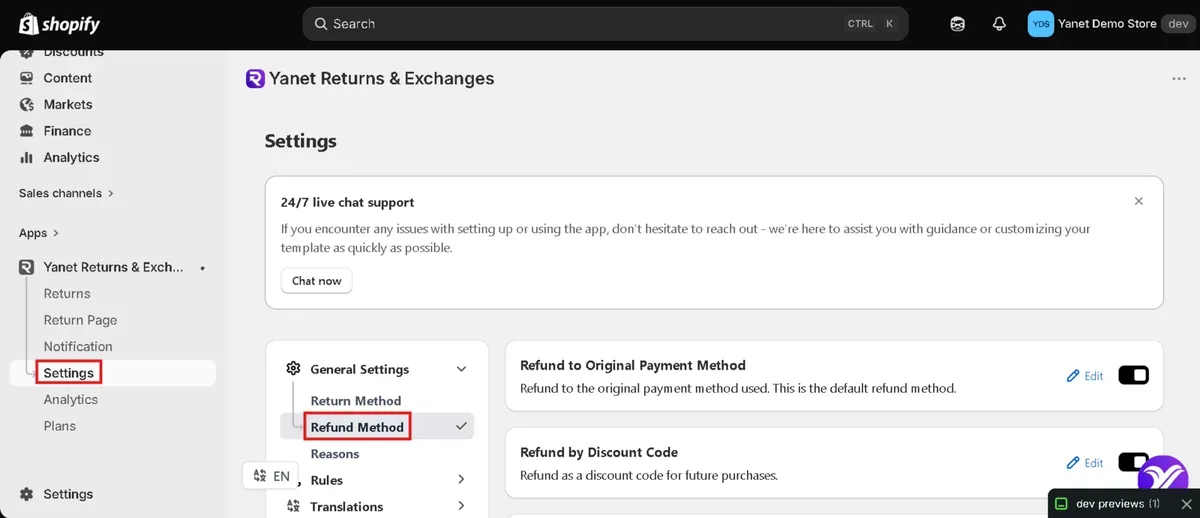
Explain store credit for returns and exchanges clearly in your policy. Free supports exchanges to the same product or variant; Professional supports exchanges to a different product or variant.
Use this processing sequence for eligible recurring orders:
- The customer submits a request through the Return Portal.
- The merchant reviews the request.
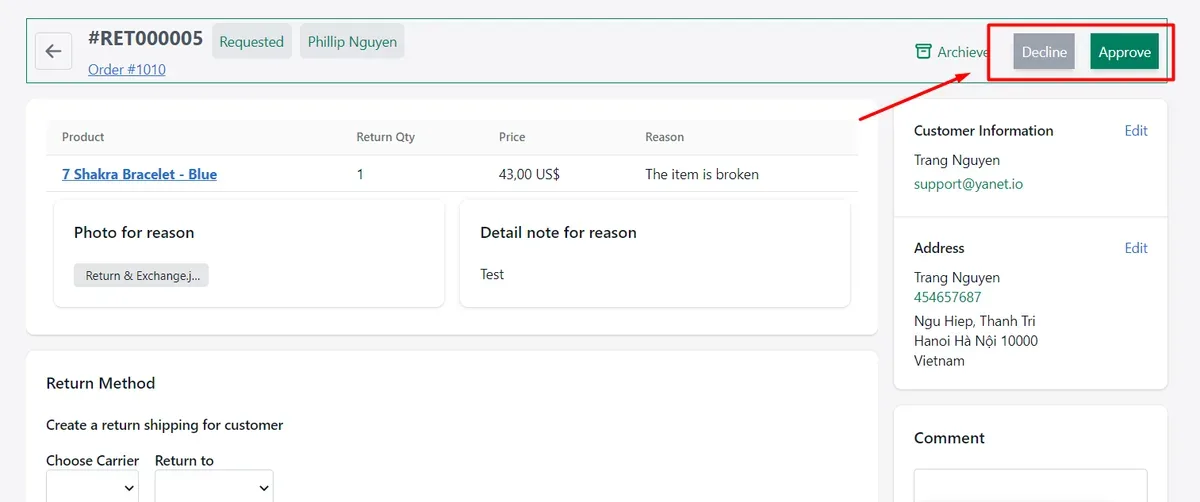
- Select Approve or Decline.
- Mark as Received.
- Mark as Checked, choosing restock and warehouse.
- Refund.
The Approve or Decline decision happens on the request detail page. Review the request against your rules before moving it through the remaining stages.
Yanet also supports 16 languages and return labels through FedEx, Shippo and EasyPost. Keep contract changes in the subscription app and order requests in the returns workflow.
Conclusion
The right subscription apps shopify merchants choose depend on subscriber volume, budget and required features. Check fees, caps and plan gates, and remember that customers who cancel a subscription have not automatically received an order refund.
Pair recurring billing with a clear returns process. Try Yanet Returns & Exchanges to manage order-based return, exchange and refund requests separately from subscription contracts. A Free plan is available.
FAQ
What are the best subscription apps for Shopify?
The right choice depends on subscriber volume, revenue, budget and required features. The six options compared here are Shopify Subscriptions, Seal Subscriptions, Appstle Subscriptions, Loop Subscriptions, Recharge Subscriptions and Subi Subscriptions. There is no single winner: compare the plan that supports your actual workflow, not just each app’s starting price.
Is there a free subscription app for Shopify?
Shopify Subscriptions is free. Seal, Appstle and Loop offer free plans with subscription-count or revenue limits. Subi is free to install and free for development stores, which is different from a free plan for a live production store. Confirm current limits and paid-plan requirements on each listing before choosing.
Does cancelling a subscription refund the customer?
No. Cancellation stops future renewals, while refunds apply to specific orders. Refunding one renewal order does not refund other renewals or cancel the subscription contract. If the customer requests both actions, handle them separately and confirm the scope in writing. Check the subscription app’s documentation for its own procedures.
Does Yanet Returns & Exchanges cancel Shopify subscriptions?
No. Yanet Returns & Exchanges handles order-based return, exchange and refund requests through its customer Return Portal and merchant dashboard. It does not cancel subscription contracts or manage recurring billing. Use your subscription app for contract changes, and use Yanet to process eligible requests relating to individual renewal orders.