

wix vs shopify is a choice between building a website that sells and building a business around selling online. Wix can suit small, simple, design-led or content-led sites with a few products. Shopify is the stronger fit for most ecommerce-first stores, particularly when orders and operational demands are likely to grow.
This comparison is for first-time sellers choosing a platform and existing merchants considering a switch. We’ll compare costs, selling tools, design, apps, scalability and returns. For additional context on Shopify’s approach, see our Shopify website builder review.
The practical wix vs shopify question is not which platform has the longest feature list. It is which one handles your everyday work with the least friction, at a total cost you can sustain.
Wix vs Shopify at a Glance
Start your wix versus shopify comparison with your business model. A portfolio with occasional product sales has different needs from a store managing regular orders, exchanges and multiple sales channels. Use this overview to identify what deserves closer testing.
| Area | Wix | Shopify |
|---|---|---|
| Built for | General-purpose website building, with ecommerce features added. | Hosted, commerce-first store building and operations. |
| Selling tools | Check the selling features included in the current ecommerce plans. | Built-in checkout, payments and commerce management, with plan-dependent capabilities. |
| Design control | Drag-and-drop flexibility for page layouts. | Theme-based design through the online store editor. |
| Apps | Its own app market; verify your required connections. | Shopify App Store for additional store and operational functions. |
| Scalability | Assess suitability as operational complexity increases. | A commerce-focused growth path, including Shopify Plus. |
| Best fit | Simple stores where website content and visual layout lead. | Ecommerce-first businesses planning to grow. |

A useful wix vs shopify test is to map one complete order: discovery, purchase, fulfillment and possible return. Any step that depends on copying information between tools deserves attention before you commit.
Wix vs Shopify Pricing: What You Really Pay
The wix vs shopify pricing comparison should include your entire operating setup, not just the subscription. Wix ecommerce typically requires a paid plan that includes selling. For both platforms, verify current plan inclusions and calculate the cost of the tools you actually need.
- Subscription: The platform plan and any billing commitment.
- Payment processing: Charges for accepting customer payments.
- Third-party gateway fees: On Shopify, additional transaction fees may apply when using a third-party gateway instead of Shopify Payments.
- Apps: Recurring or usage-based charges for additional functions.
- Theme: Any purchase or customization costs.
- Domain: Registration and renewal costs for your store address.
Use Shopify’s official pricing page to verify current figures and compare plans. Check Wix’s official pricing information separately, including whether the plan you are considering supports the selling tools and payment options your business requires.
Create a worksheet with launch costs, recurring costs and costs that change with sales. Model a quiet month and a busy month. Include essential apps from the beginning rather than treating them as an unexpected expense later.
Our Shopify pricing breakdown explains the cost categories worth reviewing. Keep platform subscription charges separate from payment processing and operational software so you can see what is driving the total.
Shopify usually offers a free trial, but confirm its current length and conditions on the official page. Check Wix’s current testing options too. A hands-on wix vs shopify comparison is more useful than choosing from headline subscription costs alone.
When you compare the two, avoid judging a plan by its entry price. A lower subscription can be offset by apps you need to add, while a higher one may already include capabilities your team would otherwise pay for separately. In any wix vs shopify budget, the useful number is the total you pay for the setup you will really run.
Selling Features Compared
For wix vs shopify selling features, test your actual catalog and checkout workflow. A platform can look suitable in a demonstration but become awkward when you add product options, fulfillment requirements or payment methods.
Products and inventory
Prepare representative products: one straightforward item, one with options and one with special handling requirements. Check how each platform lets you enter product information, organize the catalog and maintain stock. Verify plan-dependent capabilities rather than assuming both platforms handle every inventory scenario identically.
Also test routine changes. How easily can you update descriptions, correct availability and find the item associated with an order? In wix vs shopify, repetitive administrative work matters more than a feature you may never use.
Checkout and payments
Shopify includes built-in checkout and Shopify Payments. Check Shopify Payments availability and requirements for your business location, and review alternatives if necessary. For Wix, verify the payment providers and checkout options currently available for your location and selected plan.
During your wix vs shopify test, follow checkout on a phone and computer. Review payment choices, order details and confirmation messaging. Calculate payment-related costs using your expected provider rather than assuming the platform subscription covers payment acceptance.
Shipping, fulfillment and dropshipping
List your shipping destinations, packaging needs and fulfillment partners before comparing tools. In wix vs shopify, check the exact carrier, supplier or fulfillment connection you need, including any app dependency and separate charge. Avoid treating “supports dropshipping” as proof that a particular supplier workflow will work.
If that is your model, our guide to start a Shopify dropshipping store provides a focused starting point. Test how orders reach the supplier and how you will handle customer questions, cancellations and returns.
Selling on multiple channels
Shopify supports multi-channel selling, but confirm the requirements for each intended channel. For either platform, verify how product information, stock and orders move between systems. Launching on another channel should not leave your team manually reconciling conflicting records every day.
Design, Themes and Ease of Use
The design side of wix vs shopify comes down to flexibility versus a commerce-centered structure. Wix is a general-purpose drag-and-drop builder, which can appeal when page composition drives the project. Shopify uses themes and an online store editor organized around building a store.
Neither approach eliminates setup work. Test a homepage, product page and information page yourself. Check mobile layouts, menu changes and how easily you can keep pages visually consistent without repeatedly adjusting individual elements.
Explore free Shopify themes before budgeting for a paid design. Shopify’s Theme Store gives you a place to evaluate themes, but assess your content and layout requirements before committing to one.
For wix vs shopify customization, separate editor changes from development work. Deeper Shopify changes may require Liquid knowledge or developer help. Content-heavy sites can also feel more constrained than they would in a dedicated content management system.
Give yourself a small practical assignment: change a banner, update a product layout and publish a policy page. The easier platform is the one you can maintain confidently, not necessarily the one that looks simplest in a sales demonstration.
Apps and Integrations
Apps are an important part of wix vs shopify because they influence both capability and ongoing cost. Wix has its own app market. Shopify has the Shopify App Store, where merchants can evaluate tools for operational needs such as returns, labels, reviews and subscriptions.
Start with a requirements list rather than installing apps immediately. For each tool, record the problem it solves, its billing model, required permissions and who on your team will maintain it. Confirm that the specific function you need is included.
Check for overlap. Two apps may both provide part of the same workflow, leaving you paying twice or maintaining competing settings. Test whether order information and customer-facing messages remain consistent after adding a tool.
In wix vs shopify, ecosystem depth matters most when it removes real manual work. A smaller, dependable app setup is preferable to a long list of installations that nobody owns or reviews.
Scalability: Wix versus Shopify as Your Store Grows
Growth changes the wix vs shopify decision because operational complexity often rises alongside sales. You may need more people handling orders, clearer reporting, additional markets or more structured customer service. Check the current plan comparison for staff access and the capabilities relevant to those needs.
Shopify is built around commerce and offers Shopify Plus for high-volume or enterprise requirements. That provides a growth path, but it does not mean every growing merchant needs the highest tier. Choose based on demonstrated requirements rather than an ambitious sales forecast.

For international selling, write down the countries, payment needs, languages and fulfillment arrangements you expect to support. Verify how each platform and any required apps handle that combination. Availability and suitability can vary by market and plan.
A useful wix vs shopify warning sign is repeated work outside your store: spreadsheets tracking exceptions, copied order details or unclear team responsibilities. Investigate whether a better process, app or platform change would address the underlying problem.
If switching, audit products, customer records, orders, content and URLs before moving anything. Confirm what your chosen migration method transfers, what needs rebuilding and how you will check redirects. Keep a backup and test representative records before scheduling the launch.
SEO and Content Marketing
SEO should be part of wix vs shopify, but it should not be reduced to a claim that one platform automatically ranks better. Both support basic SEO fields. Your product information, useful content, site organization and migration decisions still need careful work.
Shopify supports a custom domain, pages and a blog, alongside SEO fields. These provide a foundation for product education, buying guides and store information. Test whether the publishing workflow suits the people who will actually create and update your content.
For a content-heavy publisher that sells only occasionally, Wix may deserve closer consideration. Shopify can feel more constrained than a dedicated CMS. Draft a realistic article and build its surrounding navigation before deciding whether the available structure suits your editorial needs.
Don’t Forget Returns: A Post-Purchase Gap to Plan For
Returns belong in a wix vs shopify comparison because the work continues after checkout. Customers need to understand eligibility, submit requests and know what happens next. Without a clear process, your team may spend time collecting order details and repeating policy explanations.
Shopify’s admin lets you refund orders, but it does not itself provide customers with a self-service way to request a return or set per-product return rules. A self-service Shopify return portal can address that workflow gap.
Yanet Returns & Exchanges is built for Shopify, not Wix. It provides a branded, customizable self-service return portal, rule-based return and exchange policies, request reasons and email notifications at each step. It supports 16 languages and works with Shopify Admin and customer accounts.
Set up a branded return portal
Open the app and go to Setting > Setup the Portal. Enable the portal so you can configure the customer-facing return request page.
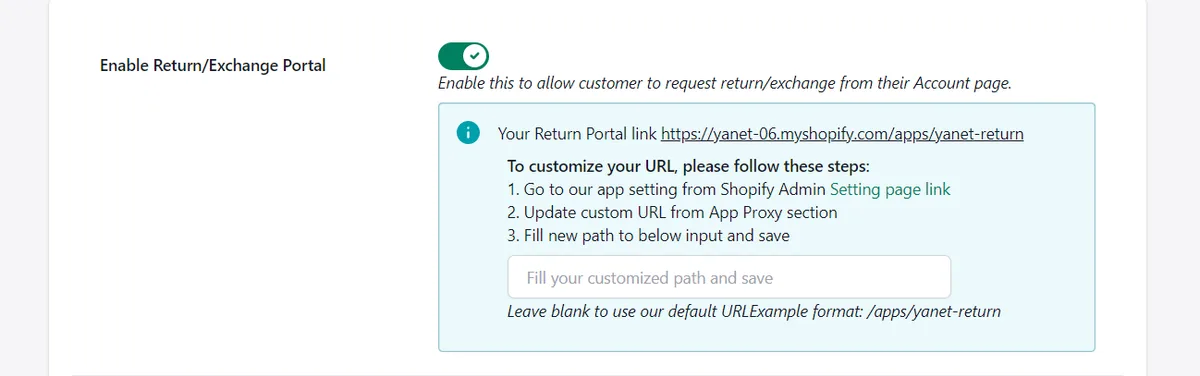
Upload one or more banners, using a single image or an auto banner slider. Change the font and button color to suit your store, and show a Return & Exchange policy link so customers can review your terms.

Next, configure your rules and return or exchange reasons. Check that the policy wording matches those settings. Review email notifications and your intended refund options before making the process part of your regular customer support workflow.
Yanet Returns & Exchanges offers a Free plan with six requests per month, plus Professional and Ultimate plans. Free includes the customizable portal, rules and reasons, same-product or variant exchanges, and refunds through discount codes and store credit.
Professional includes additional exchange options and packing slips; Ultimate adds automated approval. Other refund options include the original payment method and gift cards, with some options on paid plans. The app also works with EasyPost, FedEx and Shippo carriers.
This part of wix vs shopify is about planning a complete operating process. Whichever platform you choose, define who reviews requests, how customers receive updates and which outcomes your policy allows.
Wix vs Shopify for Different Types of Sellers
Real stores rarely match a generic comparison, so it helps to picture your own situation. These three examples show how the wix vs shopify decision can change with the way you sell.
A small seller with a handful of products
If you sell a few items alongside a portfolio, service pages or a personal brand, Wix may be enough. Your priority is likely a good-looking site that is easy to update. Confirm that the plan you need includes the selling tools and payment options you require.
A growing brand with a team
If orders, staff and customer questions are increasing, Shopify’s commerce focus becomes more relevant. You will want a dependable way to manage products, orders, apps and post-purchase requests. In this wix versus shopify scenario, the growth path matters as much as the launch price.
A dropshipper or content-led seller
A dropshipper should test supplier connections and order handling on both platforms before committing. A content-led seller should test the publishing workflow. In both cases, wix vs shopify is best decided by running your real tasks, not by reading feature lists.
Wix vs Shopify: Which Should You Choose?
Use your requirements to settle wix versus shopify, rather than choosing based on a template or introductory offer. Both deserve a practical test, but the better fit depends on whether the website or the selling operation is your main priority.
Choose Wix if…
- Your site is mainly about content, services or visual presentation.
- You have a straightforward catalog and relatively simple operating needs.
- Drag-and-drop layout control matters more than a commerce-first workflow.
- You have verified that its current selling plans and apps cover your requirements.
Choose Shopify if…
- Selling products is the core purpose of your website.
- You expect fulfillment, returns and other operational needs to grow.
- You want a commerce-focused platform and access to Shopify’s app ecosystem.
- You accept theme-based design and possible developer help for deeper customization.
A Shopify free trial can help you test the essentials before committing. Confirm the current trial terms, then build a representative product page and walk through your intended order-management process.
A five-question decision checklist
- Is selling the primary job of this website?
- Can the platform handle my actual catalog and payment requirements?
- What is the total recurring cost, including essential apps?
- Can my team manage orders, fulfillment and returns without repeated copying?
- What would need to change if the business became more complex?
The final wix vs shopify choice should follow those answers. If either platform requires an awkward workaround for a daily task, resolve that concern before paying for design work or starting a migration.
Conclusion
wix vs shopify is ultimately a decision about your store’s priorities. Wix is a fair option for a simple, design-led website with selling attached. Shopify is usually the stronger choice when ecommerce operations and future growth lead the project.
Compare total costs, test essential workflows and plan post-purchase support before launching. If Shopify fits your business, try Yanet Returns & Exchanges to give customers a branded self-service return portal and make return requests easier to manage.
FAQ
Is Shopify better than Wix for selling online?
Shopify is generally the stronger fit when selling products is your main business activity and operational requirements are likely to grow. Wix can be suitable for a simpler website where content or design comes first. Compare your catalog, payments, fulfillment and returns requirements rather than assuming either platform is best for every seller.
Is Wix cheaper than Shopify?
It depends on the plan, payment provider and additional tools your store needs. Compare subscriptions, payment processing, any applicable third-party gateway transaction fees, apps, themes and domain costs. Verify current figures on the official pricing pages, and calculate the total for your intended setup rather than comparing only the advertised subscription.
Can I move my store from Wix to Shopify?
You can plan a move, but confirm what your chosen migration method can transfer before starting. Audit products, customers, orders, images, content and URLs, then identify anything that needs rebuilding. Back up your information, test sample records and review redirects, payment settings and customer-facing pages before switching the live store.
Which is better for dropshipping, Wix or Shopify?
Shopify is often the stronger starting point for a commerce-first dropshipping business, but the specific supplier connection matters more than a broad platform label. Check supplier compatibility, app costs, order handling and return arrangements on either platform. Test the complete workflow before committing, especially how order details reach suppliers and how exceptions are resolved.