

The shopify website builder is worth considering if your website’s main job is selling products, but it is not automatically the best choice for every business. The decision depends on your catalog, budget, content needs, and how much control you want over the store.
This review is for first-time merchants choosing a platform and growing businesses reconsidering their setup. We will cover how Shopify works, its strengths and limitations, the costs beyond the subscription, and what to prepare after launch. The goal is to help you choose based on everyday operations, not just how a homepage looks.
What Is the Shopify Website Builder?
The shopify website builder is part of a hosted ecommerce platform. You do not manage servers or install software updates yourself. Instead, you choose a theme, edit your storefront, add products, and configure checkout and payments within the platform.

People searching for “shopify site builder” or “shopify web builder” usually mean this same combination of storefront editing and commerce tools. It is not a separate product that you need to buy alongside Shopify.
The important distinction is its purpose: Shopify is built for selling. Pages and blog content can support your business, but the platform’s central workflow revolves around products, checkout, and orders. If your primary goal is publishing articles or displaying a portfolio, evaluate whether you need that commerce focus before committing.
How the Shopify Website Builder Works
Themes and the online store editor
You start with a theme from the Shopify Theme Store, then use the online store editor to arrange sections and blocks. Common edits do not require code. Your theme provides the starting structure, so choose one that suits how customers need to browse your products.
If you are shortlisting a starting point, compare free Shopify themes by store type, speed and customization before you commit to a design.
Before investing in detailed styling, build a representative product page and a homepage. In the shopify website builder, test whether the theme communicates your product details clearly on mobile as well as desktop. A suitable structure matters more than matching a demo’s photography.
Products, checkout and payments built in
Next, add your products and configure checkout and payment settings. These are part of the platform rather than separate website components you must assemble yourself. That connection is useful when the same small team handles both the storefront and daily orders.
Work through a customer’s buying journey before launch. Check whether product information answers obvious questions, whether your payment setup suits the business, and whether your store policies are easy to find. An attractive homepage cannot compensate for unclear buying information.
If you are still deciding whether to try it, our checklist for making the most of a Shopify free trial shows what to prepare and test before the trial ends.
Apps to extend your store
The Shopify App Store offers apps for needs such as returns, shipping, reviews, and labels. Add them when you have identified a specific operational gap, rather than installing everything that might eventually be useful.
For example, the Yanet Returns & Exchanges Shopify app breakdown is relevant when planning how customers will request returns after purchase. Evaluate each addition against the task it solves, its cost, and who will manage it.
Domain, content and basic SEO
The shopify website builder also supports a custom domain, pages, a blog, and SEO fields. These give you the basic pieces for explaining your business and organizing store content. Prepare clear page titles, useful product descriptions, and essential policy information before launch; do not leave them until the design is finished.
Pros of Using Shopify as a Website Builder
The strongest argument for the shopify website builder is its ecommerce-first approach. You are choosing a selling platform with a storefront editor, not starting with a general website and working out how to attach a store.
Hosting and platform security are handled for you, and a reliable checkout is part of the core offering. This reduces the technical maintenance burden, although you still need to manage your business settings, content, and operating procedures carefully.
Shopify also supports growing order volumes, mobile-friendly themes, multi-channel selling, and a large app ecosystem. Those are useful foundations for expansion, but they do not remove the work of managing inventory information, customer communication, or fulfillment processes.
Centralized commerce tools help small teams establish consistent order-handling routines. For example, staff should know when to cancel an order on Shopify rather than treating every customer request as the same process.
The practical benefit of the shopify site builder is therefore less about avoiding all work and more about concentrating work in the right places. A small team can spend less time maintaining infrastructure and more time making product information, policies, and customer service clearer.
Cons and Limits to Know Before You Commit
The shopify website builder comes with trade-offs. The subscription is only one cost, and a store that depends on several paid apps can become more expensive than its owner expected. Estimate the complete setup before deciding that the monthly platform charge fits your budget.
- App subscriptions can add recurring costs to your monthly plan.
- Transaction fees can apply when you do not use Shopify’s own payment processing.
- Deep customization may require Liquid knowledge or developer help.
- Checkout customization is more limited on lower plans.
- Content-heavy sites can feel constrained compared with a CMS such as WordPress.
- You rent access to the platform rather than controlling the underlying software.
These limitations matter differently for different stores. A straightforward product business may rarely need custom development. A business with unusual checkout requirements could find those constraints central to its decision.
Before choosing the shopify website builder, list your non-negotiable requirements separately from preferences. “Customers must understand our sizing” is a business requirement; “this block must move in a particular way” may be a design preference. Investigate the first category carefully, and avoid paying for complexity that does not improve buying or operations.
Shopify Website Builder Pricing: What You Actually Pay For
To budget for the shopify website builder, separate fixed costs from costs that change with sales or usage. A plan subscription does not represent the entire expense of running a store.
| Cost layer | What it covers | How to keep it low |
|---|---|---|
| Monthly plan | Access to the platform and plan-level capabilities | Choose around current requirements |
| Payment processing | Processing customer payments | Understand the applicable rates before launch |
| Transaction fees | Additional platform fees where applicable | Compare payment arrangements carefully |
| Theme | A free or paid storefront design foundation | Test a suitable free option first |
| Apps | Additional store functions | Install only what solves a defined problem |
| Domain | Your store’s custom web address | Include it in your recurring budget |
Check current amounts and conditions on Shopify’s pricing page. Pay particular attention to the distinction between payment processing fees and transaction fees; they are separate cost categories, not interchangeable labels.
Create a simple budget with three columns: essential at launch, needed later, and optional. Put your platform plan, domain, and necessary operational tools in the first column. Keep speculative additions out until you can explain the problem each one solves.
The cheapest shopify website builder setup is not always the most practical, but the most elaborate setup is not automatically better either. Consider who will maintain each paid addition and whether it replaces enough manual work to justify its ongoing cost.
Shopify Site Builder vs Other Website Builders
Compare platforms against your main workload. A general-purpose drag-and-drop builder, the shopify website builder, and WordPress with WooCommerce can serve different priorities. There is no useful winner without knowing whether your business is primarily selling, publishing, or presenting work.
| Consideration | Shopify | General-purpose builders | WordPress with WooCommerce |
|---|---|---|---|
| Starting point | Commerce-first hosted platform | General website creation | CMS with ecommerce added |
| Setup focus | Store design and selling configuration | Page design, then selling requirements | Content, store setup, and technical choices |
| Flexibility | Within platform, theme, and app boundaries | Depends on the builder | More scope to shape the underlying setup |
| Maintenance | Hosting and platform updates handled | Depends on the service | More responsibility for the technical setup |
A general-purpose builder deserves consideration if the store is a small part of a broader informational website. Check its commerce capabilities against your actual needs instead of assuming every checkout or order workflow will work the same way.
WordPress with WooCommerce is worth evaluating when content structure and technical control carry more weight. That flexibility also brings maintenance decisions. Decide who will handle hosting, updates, and troubleshooting before treating greater control as an uncomplicated advantage.
The shopify web builder is often the more straightforward choice when selling is central and you want fewer infrastructure responsibilities. Compare representative pages and daily tasks, not just template screenshots, before deciding.
Who Should Use the Shopify Website Builder (and Who Should Not)
Good fit
The shopify website builder makes sense for businesses whose main goal is selling products. It is particularly relevant to growing catalogs and small teams without developers who want a hosted platform rather than a technical project.
Dropshipping businesses can also consider it, but should evaluate their intended operating workflow before committing. Whatever the fulfillment model, the decision should cover product presentation, order handling, customer communication, and returns—not merely getting a storefront online.
A useful sign of fit is that most of your requirements concern selling and supporting products, while your design needs can work within a suitable theme.
Probably not the best fit
Look elsewhere first if your site is primarily a blog, portfolio, or content publication with little commerce. The shopify website builder may put the wrong activity at the center of that project.
Also investigate alternatives if you need highly customized checkout behavior on a tiny budget. Do not commit on the assumption that every unusual requirement can be solved cheaply later. Confirm the important constraints before investing time in design and migration.
If you only need to sell through social links at first, our explainer on the Shopify Starter plan shows what that lighter option does and does not include.
Common Mistakes When Choosing a Shopify Website Builder
Most regrets with a shopify website builder come from planning gaps, not from the platform alone. Knowing the usual traps helps you test your plan before you pay for design work or move any products.
Choosing a theme before understanding your products
A theme that looks excellent in a demo may not suit your own catalog. Long product names, many variants, or detailed specifications can change how a page feels. Load real products into a trial setup and review collection pages, product pages, and the cart before you decide.
Treat the theme as a working tool for your buyers. If shoppers need size guidance, comparison details, or policy information, check that the layout gives those details a clear place.
Ignoring costs beyond the plan
Many merchants compare only the subscription and forget the other cost layers. Apps, payment fees, a domain, and any paid theme all belong in the budget. A shopify site builder decision made on the plan alone often looks cheaper on paper than it is in practice.
Revisit the budget after each addition. If an app overlaps with another tool, remove one before the duplicate cost becomes routine.
Leaving policies and post-purchase steps until later
Launching with a polished storefront but vague shipping, return, and exchange information creates avoidable support work. Write the policies first, then build the pages and tools that explain them. That order keeps your design, your emails, and your team’s decisions consistent.
Post-purchase work is easy to postpone because no customer is waiting yet. The first returned order is a poor moment to decide how returns should work, so settle the process before you open to the public.
Expecting the platform to replace operations
No shopify web builder removes the need for clear procedures. It gives you tools, but you still decide how to describe products, answer customers, handle exceptions, and check results. Decide who owns each recurring task, and revisit that list as order volume grows.
A Simple Checklist Before You Pick Your Shopify Web Builder
Use these questions to turn your shopify website builder evaluation into a decision. Write down answers, flag anything uncertain, and investigate those gaps before spending heavily on design.
- What do you sell? Explain what buyers need to know before ordering and how you will present it.
- How large is your catalog? Consider both launch inventory and the structure you expect to need as it grows.
- What is your complete budget? Include the plan, payment costs, domain, theme, apps, and outside help.
- Do you need custom checkout behavior? Separate genuine requirements from preferences and verify what is possible.
- How important is content? Decide whether publishing or selling is the website’s primary job.
- Who maintains the store? Assign responsibility for content, settings, apps, and technical questions.
- How will you handle returns? Define eligibility, exchange choices, customer communication, and the request process.
Review your answers together. If most of them point toward selling products with a small team and a defined budget, the shopify website builder is likely to fit. If several point toward heavy publishing or unusual checkout needs, compare alternatives more closely before you commit.
What to Add After You Build Your Store: A Returns and Exchanges Portal
Building with the shopify website builder covers the storefront, but it is only the first half of the customer journey. Shopify’s admin lets you refund orders; by itself, it does not give customers a self-service way to request a return or set rules per product.
A Shopify return portal gives you a place to plan that post-purchase experience. Before configuring one, decide which products are eligible, how exchanges should work, and how customers will learn what happens next.
This is worth planning before the first request arrives. Otherwise, your team may make inconsistent decisions through individual emails, while customers have no clear starting point. A storefront project should include that operational handoff, not end at checkout.
Yanet Returns & Exchanges is one Shopify app for this stage. It provides a branded, customizable self-service return portal page and rule-based return and exchange policies.
To set up the portal, open the app and go to Setting > Setup the Portal. Enable the portal there, then review your return and exchange policies so the customer-facing process reflects how your business intends to handle requests.
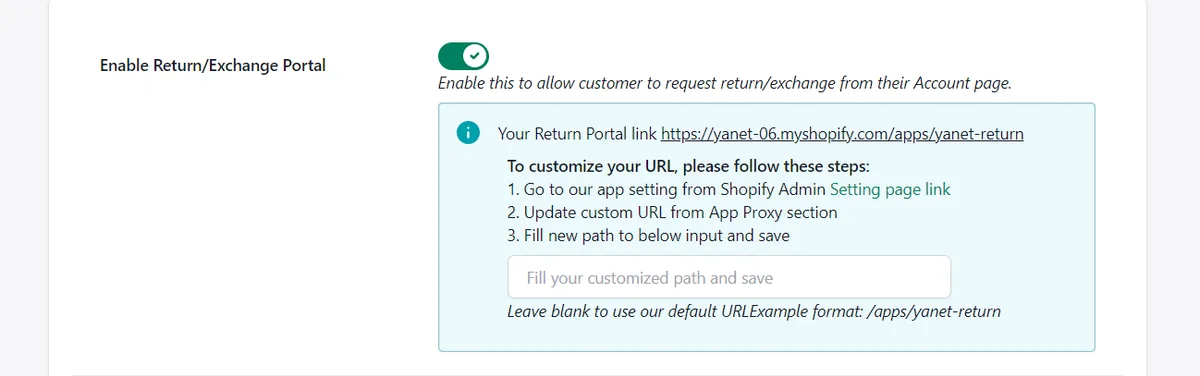
For styling, you can upload one or more banners, choosing a single image or an auto banner slider. You can also change the font and button color and show a Return & Exchange policy link. Keep the presentation consistent with your storefront and make the policy easy to recognize.

Beyond presentation, Yanet supports email notifications at each step and 16 languages. Refund options include the original payment method, store credit, discount codes, and gift cards, with some options on paid plans. Match those choices to your written policy rather than enabling options without a clear operating reason.
The Free plan includes six requests per month and exchanges to the same product or variant; exchanges to a different product or variant require a paid plan. Assess these limits alongside expected request volume when budgeting beyond the shopify website builder itself.
Conclusion
The shopify website builder is a strong candidate when selling products is your priority and you want hosting, storefront tools, and checkout in one platform. Its trade-offs are recurring costs, platform boundaries, and potentially greater expense for unusual customization. Compare the whole operating setup, not just the design editor.
Once your store is live, give the post-purchase experience the same attention as the storefront. Try Yanet Returns & Exchanges to add a branded self-service portal, and configure its policies around how your team will actually handle returns and exchanges.
FAQ
Is Shopify a good website builder for beginners?
Shopify can be a good choice for beginners whose main goal is selling products. Hosting and software updates are handled, and common storefront edits do not require code. You still need to prepare product information, configure payments, and establish store policies. Beginners building primarily a blog or portfolio should compare less commerce-focused options too.
Can I use the Shopify website builder without coding?
Yes, you can use the shopify website builder for common storefront edits without coding. Themes, sections, and blocks provide the main editing structure. However, no-code editing does not mean unlimited customization: deeper changes may require Liquid knowledge or developer assistance. Test your essential layouts and requirements before choosing a theme or paying for custom work.
How much does the Shopify website builder cost?
The total cost includes a monthly plan plus payment processing, any applicable transaction fees, a domain, and optional paid themes or apps. Your budget depends on which additions you actually need. Check Shopify’s pricing page for current platform amounts and conditions, then build a separate list of ongoing app expenses and any development work.
Can I switch from another website builder to Shopify later?
You can migrate products and content to Shopify, but the details vary by your existing platform and the material you need to move. Plan the migration rather than assuming everything will transfer unchanged. Review product information, page content, design requirements, and daily workflows, then allow time to check the new store carefully before making the switch.