

Shopify transaction fees are easier to understand when you separate the cost of processing a payment from any additional charge for using another gateway. This guide explains those charges, compares Shopify Payments with other providers, and shows how to check what remains payable after a refund.
Start with your actual payment setup, not a headline rate. Your plan, country and payment methods affect the calculation, so understanding shopify transaction fees means checking both Shopify’s charges and your provider’s terms. You will also learn how to compare plans, review statements and offer return options without assuming every fee disappears when money goes back to a customer.
What Shopify Transaction Fees Actually Are
Merchants often use one label for several different costs. For bookkeeping and pricing decisions, separate shopify transaction fees into three layers:
- Subscription: the recurring cost of your Shopify plan. Allocate it across orders when measuring overall operating costs, but keep it separate from payment charges.
- Payment processing: the charge for accepting a payment. For card transactions, these are your credit card processing fees.
- Additional transaction fee: a separate charge that may apply when you use a third-party payment gateway instead of Shopify Payments.

The distinction matters because changing one layer does not necessarily eliminate another. Removing an additional gateway-related charge does not make card processing free. Likewise, a lower subscription bill does not automatically mean a lower total cost at your sales volume.
Use our Shopify pricing guide to organize the subscription side of your comparison. Then collect the processing and additional transaction charges separately, rather than treating every deduction from revenue as the same fee.
Before comparing providers, choose one consistent reporting period. A full month is a useful starting point: record the plan cost, payment volume, completed orders and payment-related deductions for that same period. Mixing last month’s sales with this month’s fees makes a comparison difficult to trust.
Shopify Payments Fees vs a Third-Party Payment Gateway
The biggest decision behind your payment costs is which provider handles the card. Shopify Payments and a third-party payment gateway can both let customers pay, but they create different cost structures. The sections below separate them so you can compare like with like.
How Shopify Payments Fees Work
Shopify Payments handles payment processing, with rates that vary by plan, country and payment method. For this comparison, the additional transaction fee is the charge tied to using another gateway; it is separate from shopify payments fees for processing payments.
Availability depends on your country or region, so check availability in Shopify admin before planning a switch. To compare shopify transaction fees accurately, confirm current rates on Shopify’s official pricing page rather than relying on an old screenshot or another merchant’s account.
What You Pay With a Third-Party Payment Gateway
A third-party payment gateway has its own processing charges, and an additional Shopify transaction fee may also apply. That Shopify charge can vary by plan, so the provider’s advertised processing rate is only part of your comparison.
Merchants may still choose another provider for local payment methods, an existing contract or because Shopify Payments is unavailable where they operate. The practical question is whether the complete arrangement fits your customers and costs, not whether one advertised rate looks lowest.
Use this qualitative comparison when reviewing shopify transaction fees:
- Who processes the card: Shopify Payments on that route; your selected payment provider on the alternative route.
- Additional Shopify transaction fee: the gateway-related layer is tied to using another gateway, rather than Shopify Payments.
- Where rates are found: Shopify’s current pricing and account information; for another provider, its terms plus Shopify’s applicable charges.
- Availability: check Shopify admin for Shopify Payments; confirm another provider’s eligibility separately.
- Best fit: compare availability, payment needs, contractual terms and total cost.
Other Charges That Look Like Transaction Fees
International transactions may involve currency conversion charges or international card surcharges. Chargebacks can also carry fees, with terms depending on your payment setup. Keep these separate from ordinary processing so an increase in international sales does not look like an unexplained rate change.
The same caution applies to any statement line you do not recognize. Match it to a specific order, payment method or dispute before deciding which layer it belongs to. Guessing leads to wrong conclusions about your credit card processing fees and your gateway arrangement alike.
How to Calculate Your Real Cost per Order
A useful worksheet turns shopify transaction fees into a decision you can measure. Use payout and transaction statements to identify charges, rather than estimating everything from the difference between sales and bank deposits.
- Record payment volume and completed order count for the reporting period.
- Separate domestic transactions from international transactions.
- List processing charges and additional gateway-related charges separately.
- Add any conversion costs, international surcharges and chargeback fees shown.
- Track refund-related deductions separately to avoid counting a fee twice.
- Divide payment-related costs by the matching order count.
Hypothetical illustration, not Shopify rates: imagine 100 domestic orders generate $5,000 in payments. Processing costs total $120, and an additional gateway-related charge totals $50. Payment-related costs are $170, or $1.70 per order. These invented figures demonstrate arithmetic only.
Calculate international orders separately before combining totals. Otherwise, a change in your customer mix could distort your assessment of shopify transaction fees. Add the monthly subscription separately if you also want an allocated platform cost per order.
Do not confuse cost with cash flow. A payout shows money moving to your bank; your worksheet should explain which orders, refunds and charges produced that amount. Investigate differences using the underlying transaction entries.
For high-volume merchants, our guide to Shopify Plus costs provides another comparison starting point. Evaluate any plan change using your own order history, because shopify transaction fees alone do not represent the full subscription decision.
5 Easy Ways to Avoid Extra Shopify Transaction Fees
You cannot remove every payment cost, but you can avoid paying more than your setup requires. These five habits focus on the parts of shopify transaction fees that merchants control: provider choice, plan choice, gateway clutter, avoidable refunds and monitoring.
1. Use Shopify Payments Where It Is Available
Check availability in Shopify admin, then compare the applicable shopify payments fees with your current arrangement. Using Shopify Payments avoids the additional transaction-fee layer tied to another gateway, but payment processing still has a cost.
Before switching, check whether the payment methods your customers need are supported by your proposed setup. Reducing shopify transaction fees should be part of a workable payment decision, not the only consideration.
2. Compare Your Plan Against the Fee Savings
Moving to a higher Shopify plan generally means lower card rates and lower third-party transaction fees. Compare the extra subscription cost against the savings using actual payment volume and order history, rather than assuming an upgrade always pays for itself.
Hypothetical illustration, not Shopify pricing: if a plan change adds $40 to monthly subscription costs and saves $55 in payment-related fees, the net monthly saving is $15. Repeat the calculation for a quieter month before committing based on one busy period.
3. Audit Every Payment Gateway You Have Enabled
List your enabled gateways and identify which transactions use each one. Review provider terms, applicable Shopify charges and any contractual obligations. This makes shopify transaction fees easier to trace and helps you question arrangements you no longer need.
Do not remove an option simply because it is used infrequently. First ask whether it serves customers who otherwise could not pay, and compare that purpose with its actual cost.
4. Cut Avoidable Refunds and Chargebacks
Clear product descriptions, accurate sizing information, a visible return policy and careful packing can address avoidable misunderstandings. They cannot guarantee fewer disputes, but they give customers better information and your team a consistent process.
A Shopify return portal can provide a clear place to submit return requests. Keep refund rights visible: managing shopify transaction fees is not a reason to obstruct a valid refund or hide available remedies.
5. Review Your Statements Every Month
Compare current charges with your worksheet and investigate changes. Check whether payment methods, international orders, refunds or disputes explain the difference before assuming your rate increased.
Keep credit card processing fees separate from additional charges and operational return costs. A monthly review makes shopify transaction fees easier to budget for and gives you reliable evidence when considering a plan or provider change.
Are Shopify Transaction Fees Refunded When You Refund an Order?
A customer refund and the treatment of your fees are separate issues. Payment processors often do not return the original processing fee, but the exact outcome depends on the provider and applicable terms. Do not assume refunding the purchase reverses every charge.
When investigating shopify transaction fees after a refund, check Shopify’s guide to refunding and cancelling orders, your payment provider’s terms and the relevant payout or transaction statements. Use those records to confirm what happened to each charge.
People searching for shopify refund fees may be asking two different questions: whether issuing a refund creates a separate charge, and whether an original fee remains unrecovered. Verify both questions for your setup instead of treating them as interchangeable.
Hypothetical illustration, not Shopify rates or refund rules: suppose you return $80 to a customer, an original $2 processing fee is not recovered, return shipping costs $6 and handling costs $3. The refund-related cash outflow and costs total $91. The $80 reverses sale proceeds; the other $11 represents separate costs in this illustration.

A pending or authorized payment is not collected money. Depending on the gateway and payment status, cancellation may involve a void rather than a refund. Check the status before choosing an action; our guide explains how to cancel an order on Shopify.
Reviewing shopify transaction fees also requires checking whether the payment was collected in the first place. Do not apply assumptions about a captured, refunded payment to an authorization that was never collected.
What to Check on a Refunded Transaction
When a refund appears in your reports, work through the same short checklist every time. It keeps your records consistent and makes unusual cases easier to spot:
- Confirm the original payment was collected rather than only authorized.
- Note the refunded amount and whether it was full or partial.
- Look for any processing charge connected to the original payment.
- Check whether your provider’s terms mention how fees are handled on refunds.
- Record return shipping and handling separately from payment charges.
Customer refund timing is a separate question from fee treatment. Explain the expected process without promising an unverified arrival date, and consult our guide to how long Shopify refunds take when preparing customer communications.
How to Keep Refund Costs Down With Exchanges and Store Credit
When your policy allows and the customer chooses it, an exchange or store credit can keep the sale with your store instead of sending the payment back. This is a policy decision, not a method for recovering shopify transaction fees or overriding customer rights.
Set expectations before a return request arrives. Explain available options, any conditions and how customers can request their preferred resolution. Make the distinction between a payment refund, store credit and a discount code understandable rather than presenting them as identical.
Our guide to Shopify store credit can help you consider that option within your return policy. Keep the customer’s choice and applicable refund rights central to the process.
Budget these alternatives separately from shopify refund fees. An exchange still needs an operational decision about the returned item and replacement, while store credit creates a different customer outcome from returning money to the original payment method.
Managing Return Options With Yanet Returns & Exchanges
Yanet Returns & Exchanges provides a customer-facing Return Portal for submitting requests and a merchant dashboard for reviewing and managing them. It also includes email notifications, multiple languages, multiple shipping carriers, and rules and reasons setup.
Its refund solutions include store credit and discount codes on the Free plan, with gift codes on Professional. Exchanges for the same product/variant are available on Free; exchanges for a different product/variant are available on Professional. These options support your policy, but do not reduce, refund or recover shopify transaction fees.
In Settings > Refund methods, enable or disable the methods you want to offer. Exact refund behaviour depends on your Shopify configuration and the selected option.
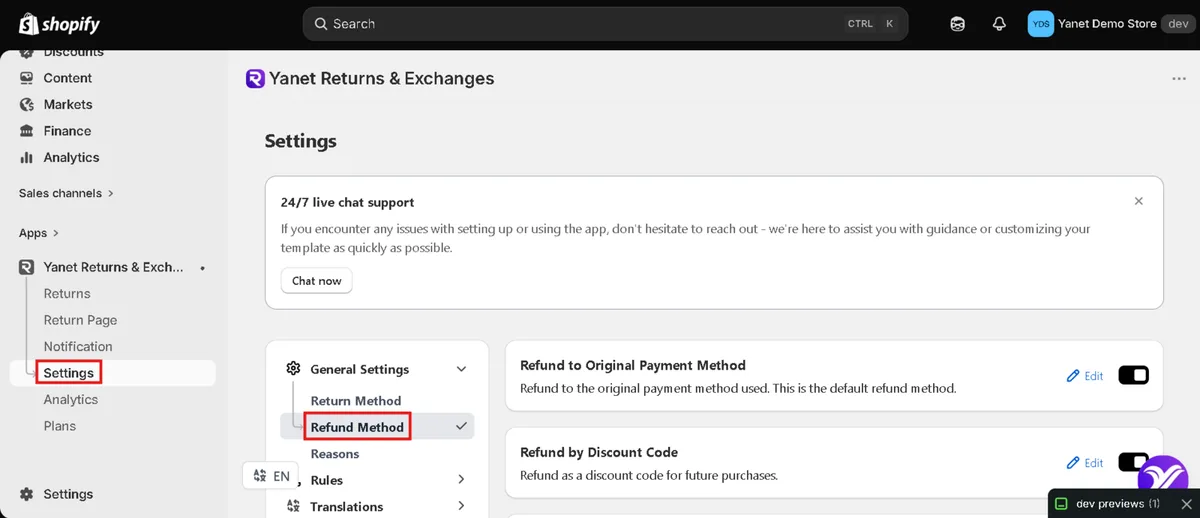
For discount codes, you can set a code prefix and a percentage of the refund amount as the code’s value. For example, with an original refund of $100 and a value of 150, the customer receives a $150 discount code for their next order.
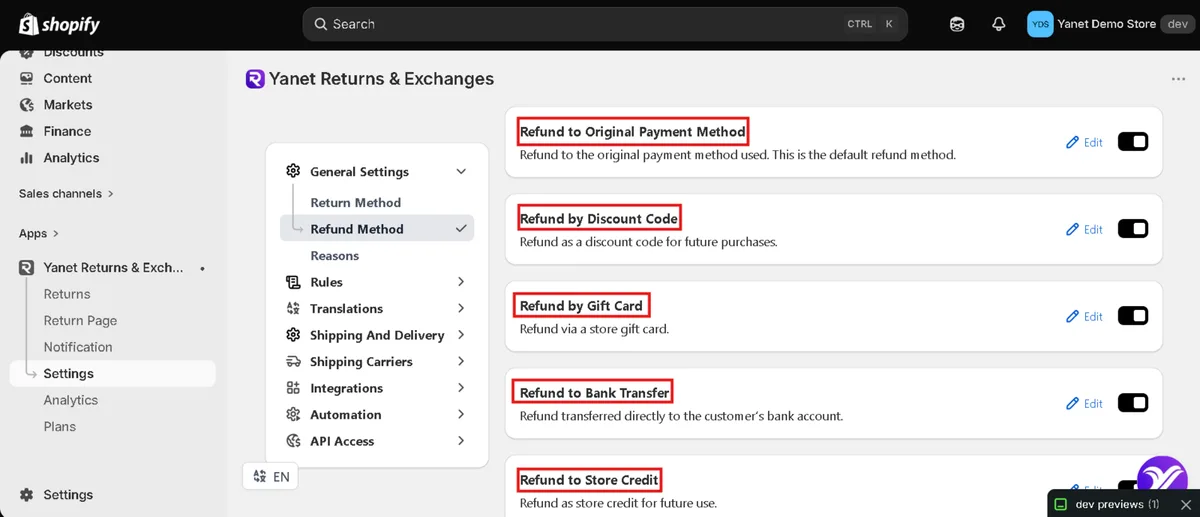
Review Yanet Returns & Exchanges against your request volume and required return options:
- Free: 6 requests per month.
- Professional: $9.99/month, with 80 free requests and $0.20 per additional request; a 14-day free trial is available. It also includes a packing slip, conditional Return/Exchange Fees and Rewards, and priority support.
- Ultimate: $29.99/month, with unlimited requests and Automation Approval; a 14-day free trial is available.
Recurring and usage charges are billed every 30 days. Compare app costs and return-handling needs separately from shopify transaction fees, so your budget reflects both payment costs and the tools used to manage requests.
Conclusion
Understanding shopify transaction fees starts with separating subscriptions, payment processing and additional gateway-related charges. Confirm current rates, compare plans using real orders and check provider terms before assuming a refund returns every fee.
Review shopify transaction fees monthly, and keep return-policy decisions separate from payment-fee assumptions. Exchanges and store credit can keep a sale with your store when your policy allows and the customer chooses them; they do not recover provider charges.
To organize those choices through a customer portal and merchant dashboard, Try Yanet Returns & Exchanges on the Free plan. Choose the options that fit your policy, explain them clearly and preserve customers’ refund rights.
FAQ
What are Shopify transaction fees?
The term is often used broadly, but payment processing and an additional Shopify transaction fee are different charges. Processing covers accepting a payment. An additional transaction fee may apply when another gateway is used instead of Shopify Payments. Your subscription is a separate cost, and applicable rates vary by plan, country and payment method.
Do Shopify transaction fees apply if I use Shopify Payments?
Shopify Payments still involves processing charges. The additional transaction-fee layer discussed here is tied to using another gateway, rather than the Shopify Payments route. Check your current account rates and payment setup, and remember that international transactions or chargebacks may involve other charges under the applicable terms.
Does Shopify refund transaction fees when I refund an order?
Do not assume every fee is reversed. Payment processors often retain original processing fees, but exact treatment depends on your provider, payment setup and applicable terms. Check Shopify’s refund guide, your provider’s refund terms and the transaction or payout statement to establish which charges were returned or remained payable.
How can I lower my Shopify transaction fees?
Check whether Shopify Payments is available, compare your complete payment costs and calculate whether a higher plan’s savings outweigh its subscription increase. Review enabled gateways and monthly statements. For returns, offer clear, policy-compliant choices, but do not assume an exchange or store credit recovers any Shopify or payment-provider fee.