
The shopify starter plan is Shopify’s entry-level option for selling through social media, messaging apps and shareable product or checkout links, rather than running a full online store. It suits sellers whose conversations and audience already live elsewhere, but it is not a shortcut to a theme-based website.
This guide explains what you can do, where the limits matter, who should use it and when to consider another plan. For a broader cost breakdown beyond Starter, see our guide to Shopify pricing and plans. Always confirm current charges and terms before committing.
What Is the Shopify Starter Plan?
Think of the shopify starter plan as a way to connect a product recommendation with a purchase. You share a product or checkout link where customers already interact with you, while managing products, orders and customers in the Shopify admin.
People also search for “shopify starter” when looking for a simpler entry point into selling. The important distinction is not just setup effort: this plan centers on link-based selling, not building a website with themes, navigation and content pages.
That makes it an option for testing demand before investing time in storefront design. For example, a creator could introduce a product through social posts and direct interested followers to a purchasing link. The test is whether people want the product—not whether a new website can attract visitors.

Shopify Starter Plan Features: What You Can Do
The core appeal of the shopify starter plan is a focused selling workflow. Here is how its documented capabilities translate into everyday tasks.
Sell through social media and messaging apps
Use social posts and customer conversations to introduce products, explain their value and direct people toward checkout. This approach works best when you already know where potential buyers spend time.
Prepare short answers about sizing, materials, delivery expectations and returns. Since customers are not browsing a full store, the information around your link needs to answer common questions before they buy.
Shareable product and checkout links
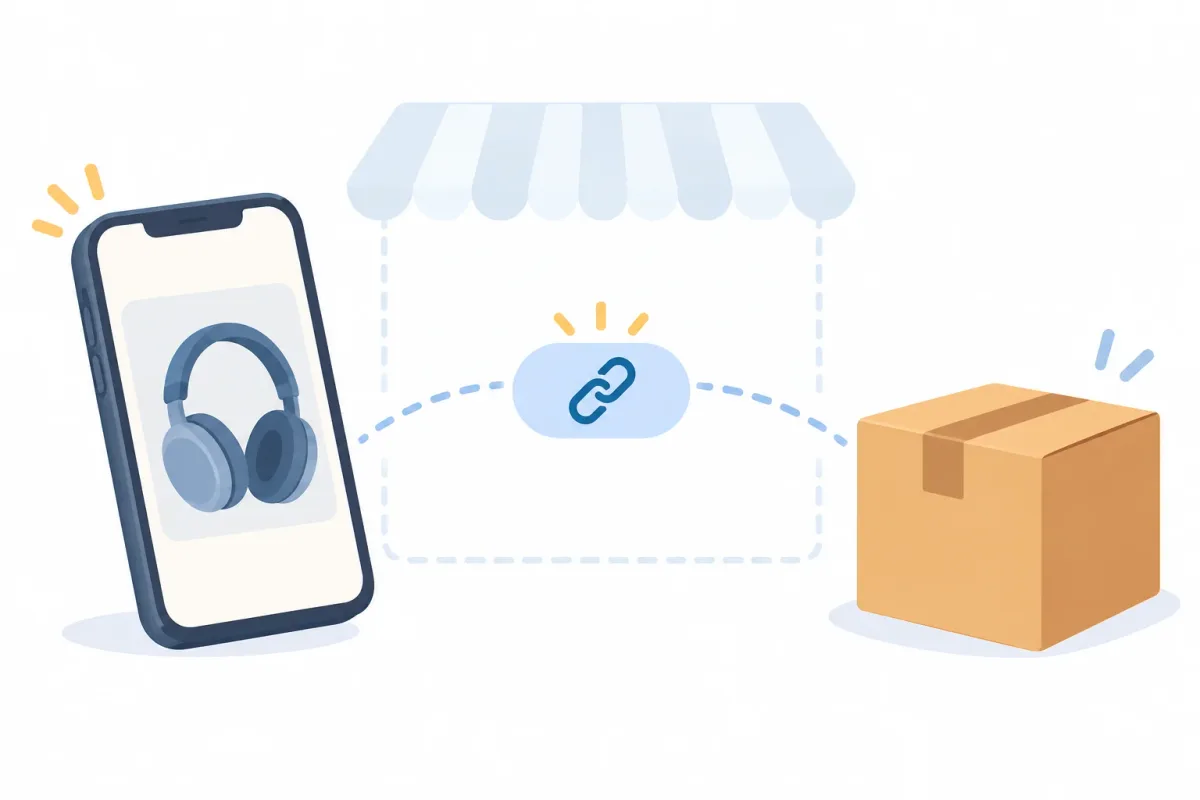
Shareable links connect your promotional content with a purchasing step. Place them where your audience can find them, and give each link enough context: what the product is, who it suits and what customers should check before ordering.
Before publishing, test the customer journey yourself. Open the link from the channel you intend to use and check that the destination matches the product you described.
Manage products and orders in the Shopify admin
You still manage products, orders and customers in the Shopify admin. Selling through conversations does not mean your operational records should remain scattered across direct messages.
Keep product information consistent with your posts, and use order records when answering customer questions. Avoid treating a social message as proof that an order was placed.
Hosted checkout and payments
Checkout is hosted by Shopify, rather than being a payment form you build yourself. However, payment availability, applicable rates and country-specific conditions require a current check.
Before accepting orders, compare the payment details relevant to your business location and customers. Do not assume that an arrangement described by another merchant applies to you.
Practical tips for selling with links
Treat every link as a mini product page. A buyer who taps it from a message has no navigation to fall back on, so the post, caption or reply that carries the link must say what is being sold, who it is for and what happens after payment.
Keep a short reply template for the questions you hear most often: delivery expectations, product care, sizing and how to ask for a return. Consistent answers make a small operation feel organized, even when every sale starts as a conversation.
Finally, review your links regularly. Remove or replace any that point to products you no longer sell, so customers never land on an offer you cannot fulfil.
Shopify Starter Plan Limits: What You Cannot Do
The main limitation of the shopify starter plan is its website model. Other operational requirements need individual verification rather than assumptions based on the plan’s name.
No theme store and no online store website
Starter does not include a theme-based online storefront or website. That means no Theme Store themes, no storefront editor, and no built-in store pages or blog functioning as your website.
You cannot use it to design a conventional storefront homepage or collection pages that you control as a site. Brand presentation depends more heavily on your social profiles, product information and customer communications.
This also changes your discovery strategy. Without your own storefront pages and blog, you cannot build that website-based SEO approach through Starter. You need another way for people to discover your products and reach your links.
Fewer growth tools than higher plans
Entry-level plans typically offer a narrower range of growth and operational options. For reporting depth, staff access and shipping options, compare your actual requirements against Shopify’s current plan comparison rather than assuming what is included.
Use Shopify’s official pricing page for live prices, plan details and the current comparison. Check availability for your country before making a decision.
Write requirements as tasks: “My assistant needs to handle orders,” or “I need reporting that answers this question.” Those statements are easier to verify than a general request for more features.
App and workflow limits
Some apps depend on a storefront, theme code or store-navigation steps. Check each app’s compatibility before installing it, especially if its setup instructions assume a theme-based website.
Describe your intended workflow to the app’s support team. Ask how customers access it, which setup steps apply, and whether anything depends on a storefront you do not have.
Shopify Starter vs Basic: How to Compare Them
Compare the shopify starter plan with Basic by starting with the customer journey you need. Is a product link enough, or must shoppers browse a branded website before deciding?
The table below is a decision framework, not a substitute for the live comparison. Verify Basic’s current inclusions, along with operational features, billing terms and availability, before choosing.
| Comparison point | Starter | Basic |
|---|---|---|
| Main selling channel | Social media, messaging and shareable links. | Typically considered for website-led selling; verify current channels. |
| Website and themes | No theme-based online storefront or website. | Check current storefront and theme inclusions in the live comparison. |
| Best for | Sellers who can bring customers directly to product links. | Potential fit when a full storefront is central; verify required features. |
| Upgrade trigger | Your sales process needs a website or capabilities you must verify. | Consider when its confirmed features meet those requirements. |
For Shopify Starter merchants, the useful question is not “Which plan sounds more professional?” It is “Which confirmed capabilities solve a current problem?” Avoid paying for an imagined future workflow, but do not choose a plan that blocks your launch.
Who Should Use the Shopify Starter Plan
The shopify starter plan is worth considering when you can reach buyers without relying on a standalone storefront. These situations fit that link-first approach:
- Creators and social sellers: Your audience already follows your content, and product conversations happen there.
- Product-idea testers: You want to learn whether people will buy before developing a website.
- Sellers with a small existing audience: Customers already know you through a community or direct contact.
- Side-hustle merchants: You want a focused selling process, provided the current plan meets your operational needs.
- Pre-launch validators: You are testing interest through direct promotion rather than website traffic.
- Event or pop-up sellers using links: You can share purchasing links with interested visitors; verify any separate in-person payment requirements.
The common factor is access to potential customers. A simpler selling setup does not create an audience, explain your product or replace clear customer service.
Who Should Skip the Shopify Starter Plan
Skip the shopify starter plan if a branded website is essential from launch. A business that needs a designed homepage, browsable site structure, built-in content pages or a website-based blog needs a different starting point.
A content-led SEO strategy is another reason to reconsider. If your acquisition plan depends on publishing searchable buying guides and directing visitors through a storefront, link-based selling does not provide that website foundation.
Requirements involving multiple staff, many integrations, wholesale processes or complex catalogs also deserve careful comparison. Do not assume Starter supports or excludes a particular workflow: document it and verify the relevant access, app and catalog requirements.
If these needs are central, consider a full-store plan or any trial currently offered after checking its terms. Choosing a smaller plan only helps when it supports the work you actually need to do.
When to Upgrade From the Shopify Starter Plan
Reassess the shopify starter plan when limitations begin affecting customer confidence or daily work. A change should solve an identifiable problem, not simply mark the passage of time.
- Customers keep asking for a website where they can browse your products.
- You want a theme-based storefront with a more deliberate brand presentation.
- Your acquisition strategy now depends on SEO or website content.
- Paid advertising needs landing pages you control as part of a site.
- Growing repeat orders make your current customer journey worth reviewing.
- You need team access or reporting capabilities that require a current plan comparison.
If the missing piece is a storefront, our guide to the Shopify website builder can help you think through what you want customers to see and do.
Next, list requirements in priority order. Separate launch-blocking needs from improvements that would merely be convenient, then compare each requirement against Shopify’s current plan documentation.
Before switching, review app compatibility, billing impacts and any setup work. Review what carries over—including catalog information and other records in the admin—rather than assuming every detail will remain unchanged.
Finally, plan a customer-facing check after any change. Test product access, checkout and support instructions, and update shared links or messages where needed. Keep using Shopify Starter until you have verified the alternative meets the need prompting the switch.
How to Handle Returns on the Shopify Starter Plan
The shopify starter plan does not remove the need for returns handling. Link-based customers can still request refunds or exchanges, and those conversations can become difficult to track across social inboxes.
Start with a clear policy and a consistent intake process. Tell customers how to request help, what information to provide and how you will communicate a decision. Avoid promising outcomes before reviewing the order and your policy.
Yanet Returns & Exchanges provides a customer-facing Return Portal for submitting return and exchange requests, plus a merchant dashboard where you can review, approve or reject requests.
Check compatibility before relying on it. Because Starter has no theme-based online store, confirm with Yanet support how customers will reach the Return Page—for example, by sharing its URL. Do not assume theme or store-navigation instructions apply, or treat this guide as confirmation of official Starter compatibility.
Define rules before directing customers to the portal
Yanet supports return and exchange rules based on order date, fulfillment date, product tags and collections. You can also define return and exchange reasons, helping customers explain what went wrong.
Refund options include store credit and discount codes, with gift code refunds on paid plans. Same-product/variant exchanges are available on Free; different-product/variant exchanges are available on Professional and above. Choose options that match the policy you communicate.
The app also offers email notifications, supports 16 languages and lists EasyPost, FedEx and Shippo as shipping carriers. Check the requirements relevant to your intended workflow instead of assuming every carrier arrangement applies to your business.
Set up and test customer access
- Open the app and go to Setting > Setup the Portal.
- Enable the Return/Exchange Portal.
- Upload banners and adjust the font and button color as needed.
- Show a Return & Exchange policy link.
- Confirm the customer access method with support, then test the instructions you will share.
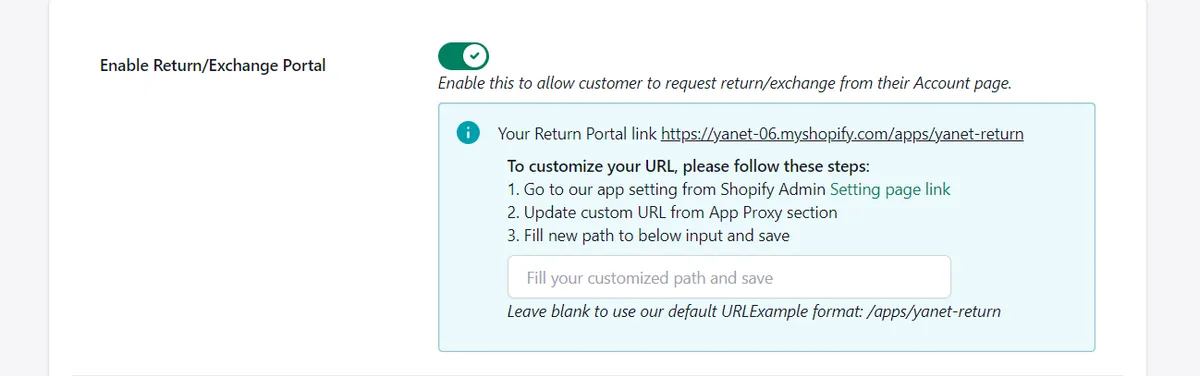
A deeper walkthrough explains how to set up a self-service Shopify return portal. For a link-based business, read its theme-related steps alongside the compatibility guidance above.
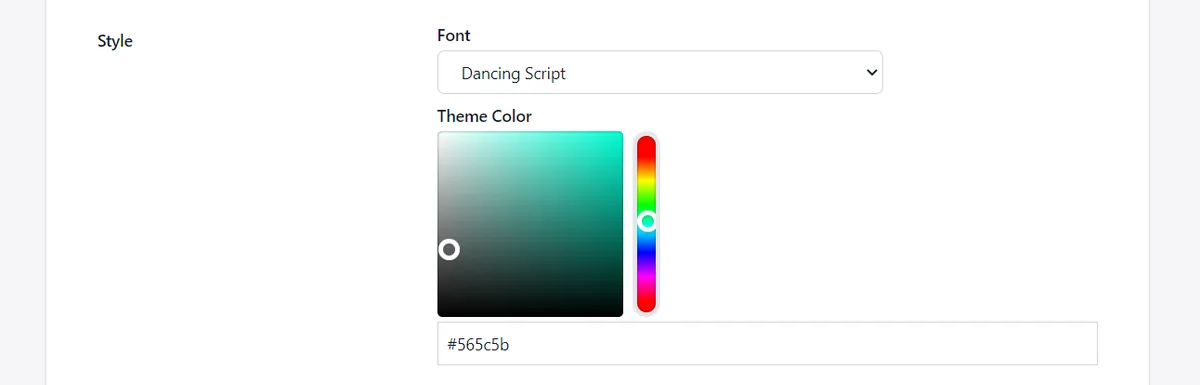
Keep the customer instructions short and consistent. Use the confirmed access method in your replies, explain what happens after submission, and avoid directing customers to store navigation that does not exist.
Choose an app plan around request volume
Yanet’s Free plan is $0 with 6 requests per month. Professional is $9.99/month with 80 included requests, then $0.20 per extra request, and a 14-day free trial.
Ultimate is $29.99/month with unlimited requests, automation approval and a 14-day free trial. These are Yanet app plans, not Shopify subscription prices. Check compatibility and the workflow first; a suitable request allowance cannot fix an unverified setup.
Common Mistakes With the Shopify Starter Plan
Most problems with the shopify starter plan come from expecting it to behave like a full store. Avoiding a few predictable mistakes keeps the experience smooth for you and your customers.
- Sharing a link without context. A bare link gives buyers no reassurance. Add the product details, delivery expectations and return information around it.
- Skipping the return policy. Social buyers still expect to know what happens if an item does not fit or arrives damaged. Write the policy before the first sale.
- Running the business from direct messages alone. Keep orders, customer details and decisions in your Shopify admin so nothing depends on scrolling through an inbox.
- Installing apps without checking compatibility. If a tool expects a theme or store navigation, confirm how it works for a link-based setup first.
- Waiting too long to review your plan. If customers repeatedly ask for a website, treat that as a signal to compare plans rather than working around the limit.
- Upgrading before you need to. A larger plan only helps when you will use what it adds. Start from a verified requirement.
A 7-Question Checklist Before Choosing the Shopify Starter Plan
Before choosing the shopify starter plan, answer these questions in writing. An unresolved operational requirement is a reason to investigate, not something to leave until your first customer needs help.
- Where do customers find you? Identify the social channel, community or conversation that will lead people to your purchasing links.
- Do you need a website? Decide whether a theme-based storefront is essential now or merely a future preference.
- How will customers find you on Google? Explain your discovery approach without assuming Starter provides website pages or a blog.
- Who helps you run the shop? Compare required staff access and responsibilities against current plan details.
- Which apps do you need, and are they compatible? Confirm requirements directly, especially where setup depends on themes.
- How will you handle returns? Define the policy, request channel, review process and customer updates.
- What will you do when you outgrow it? Set a practical review trigger and verify switching details before making changes.
Conclusion
The shopify starter plan suits link-first selling, not merchants who need a theme-based website. Choose it around how customers find you, verify uncertain capabilities and revisit your decision when a real workflow requires more.
Once you start selling, make returns part of your operating plan. Try Yanet Returns & Exchanges free after confirming compatibility and customer access with Yanet support. A clear request process matters even when your sales begin in a direct message.
FAQ
What is the Shopify Starter plan?
It is Shopify’s entry-level plan aimed at selling through social media, messaging apps and shareable product or checkout links. Products, orders and customers are managed in the Shopify admin, and checkout is hosted by Shopify.
Does the Shopify Starter plan include a website or themes?
No. It does not include a theme-based online storefront, Theme Store themes or a storefront editor. It also does not provide built-in store pages or a blog as a website.
Can I upgrade from Shopify Starter later?
Merchants can generally change plans from the Shopify admin, but you should verify the current process, billing details and what carries over in Shopify’s plan documentation. Review app requirements and any storefront setup work separately.
Is the Shopify Starter plan good for beginners?
It can suit beginners who already have a way to reach customers and want to sell through links rather than build a website. It is less suitable when a branded storefront or website-based content strategy is essential from the beginning. Verify current plan details against your own requirements before committing.