

shopify refund time includes both your store’s work before issuing a refund and the time a payment provider takes to return the money. This guide explains what changes by payment method and how to communicate each stage clearly, so customers know what happens next instead of opening another support ticket.
What Shopify Refund Time Really Means
There are two clocks behind every refund. Your clock covers receiving the request, approving it, receiving and inspecting returned items when required, and issuing the refund. The second clock starts after issuance, when the bank, card issuer or payment provider processes the return of funds.

Customers experience those stages as one wait. They may count from the day they requested a return, not the day you issued their money. That makes shopify refund time confusing unless your messages identify which stage the order has reached.
A refund issued in Shopify admin can show as refunded on your side before the customer sees the money. Check Shopify’s guide to refunding and canceling orders for current behavior for your payment setup, rather than treating an old support macro as permanent guidance.
When explaining Shopify refund processing time, distinguish “we are reviewing your return” from “we have issued your refund.” Approval is not payment, and a refunded order status is not proof that the customer’s bank has posted the funds.
How Long Do Shopify Refunds Take by Payment Method
The useful answer to “how long do Shopify refunds take” starts with the payment method. Do not publish one universal shopify refund time for card payments, wallets, manual payments and store credit: they follow different routes.
Credit and debit cards
Card refunds travel back through the card network and the customer’s bank or card issuer. Your team controls when it issues the refund, but not when the receiving institution makes it visible in the customer’s account.
Merchants commonly tell card customers to allow several business days. Roughly 5–10 business days is a commonly quoted planning window for shopify refund time, but confirm it against current Shopify and gateway documentation. Present it as guidance, never a guaranteed arrival date.
PayPal and digital wallets
Wallet refunds go back through the payment provider to the customer’s wallet or applicable funding source. The destination and processing behavior depend on the original payment and provider setup. Ask customers to check the relevant wallet activity as well as their bank account.
A wallet refund should not inherit your card-specific shopify refund time wording automatically. Explain which provider is handling the return and use its current guidance, without promising a fixed number of days.
Manual payment methods such as bank transfer or cash on delivery
For manual payments, the merchant needs to send the money back outside Shopify. Recording a refund does not itself complete an external bank transfer or return cash. Assign someone to arrange repayment and confirm when that separate action has actually happened.
Store credit, gift codes and discount codes
These options do not go through a card network, so there is no bank-processing step. They are also different from returning cash to the original payment method. Explain what the customer will receive, how to access it and how it can be used.
If you offer Shopify store credit, describe it separately from your card refund policy. Test availability and customer access in your configuration before making any timing promise.
Removing the bank step changes shopify refund time, but it does not justify calling every alternative “instant.” Your team may still need to approve the request, complete processing and send the customer the relevant information.
Why Customers Keep Asking “Where Is My Refund?”
Most “where is my refund” tickets begin with an information gap. A customer sends an item back, hears nothing and assumes something has gone wrong. Even a reasonable shopify refund time feels longer when the customer cannot tell whether anyone has received the return.
- Silence after return shipping: the customer does not know whether the parcel has arrived or is awaiting inspection.
- No confirmation email: they cannot distinguish an approved request from an issued refund.
- Approval delays: the request remains unresolved without an explanation of the next step.
- A pending statement entry: account activity does not look the way the customer expected.
- A partial refund: the amount received differs from the amount they anticipated.
- Multiple refund destinations: the customer checks only one place when the refund involves more than one method.
- Weekends and holidays: they count calendar days against guidance expressed in business days.
The fix is not simply a longer estimate. Explain the current stage, the amount involved and the next action. A useful shopify refund time update answers “What has happened?” before it answers “How much longer?”
What Slows Down Shopify Refund Processing Time on Your Side
Before blaming the bank, review the part of shopify refund time your store controls. A refund cannot begin its payment-provider journey while an approved return sits in an inbox or an inspected item waits for someone to issue the money.
Requests and approvals have no clear owner
Assign a primary owner and a backup for refund decisions. Review outstanding requests regularly, including cases waiting for more information. If a request cannot move forward, tell the customer what is missing rather than leaving it silently pending.
Received items wait for inspection
Separate “parcel received” from “item checked” in your internal process. Make sure warehouse staff know how to report each event to the person handling the refund. Otherwise, support may keep telling customers the store is waiting for an item already on a shelf.
Amounts are copied between tools
Repeatedly re-entering order details creates opportunities for mismatched quantities or amounts. Before issuing customer refunds, verify the returned items, agreed amount and selected method against the order. Use one consistent review checklist rather than relying on memory.
The policy leaves decisions unclear
State whether a return requires approval, receipt or inspection before refund issuance. Clear rules help staff apply the same process and explain shopify refund time consistently. Keep exceptions documented so a second support agent does not restart the decision from scratch.
How to Tell Customers About Shopify Refund Time
Put timing information where customers make decisions: your return policy, return portal text, request confirmation, refund-issued email and support replies. These messages should agree. A clear policy does little good if the confirmation email implies that approval means the money is already coming back.
When customers ask “how long do Shopify refunds take,” answer with a stage and a payment-method expectation. Explain what your team controls and what the bank or provider controls. Avoid presenting an estimate as a countdown that starts when the customer first contacts you.
Show a simple four-stage timeline
- Request received: explain that the request is awaiting review and identify any information still needed.
- Approved: explain the return instructions and whether receipt or inspection is required before refund issuance.
- Item received and checked: confirm that the physical-return steps are complete and explain any unresolved issue.
- Refund issued: state the amount, method and issuance date, then give the relevant provider-dependent guidance.
This timeline makes shopify refund time easier to understand without promising a date you cannot control. If your process does not require a physical return, adjust the stages rather than sending irrelevant shipping or inspection messages.
Use a clear refund-issued message
For a card refund, a message could read:
“We have issued your $48 refund today for order #1042 to the card used for payment. It can take several business days to appear, depending on your bank or card issuer. If it has not appeared after the timeframe in our refund guidance, reply to this email so our support team can investigate.”
Use the actual order number, amount, refund method and contact route in every message. If the refund is partial or divided across methods, explain each part separately. Never make the customer calculate the difference without context.
Review shopify refund time wording whenever you change payment options or return procedures. Keep support macros aligned with your current policy and the documentation for the payment setup you actually use.
Show Refund Progress Automatically With Yanet Returns & Exchanges
Yanet Returns & Exchanges provides a customer-facing Return Portal and a merchant dashboard for reviewing and managing requests. The portal gives customers a defined place to begin, helping reduce basic “how do I start?” emails.
The app structures the merchant-controlled part of shopify refund time. It does not accelerate bank transfers, provide a live bank arrival estimate or make money move faster than Shopify. Its role is to organize the return workflow and keep customers informed about progress.
Follow the four processing phases
- Approve or decline: review the request detail page and choose the appropriate action. Only approved requests move to the next phase.
- Mark as Received: click this when the returned item arrives.
- Mark as Checked: confirm inspection, with the option to restock the item to a chosen warehouse.
- Refund: confirm the amount and send the money back through the customer’s selected refund method, completing the request.
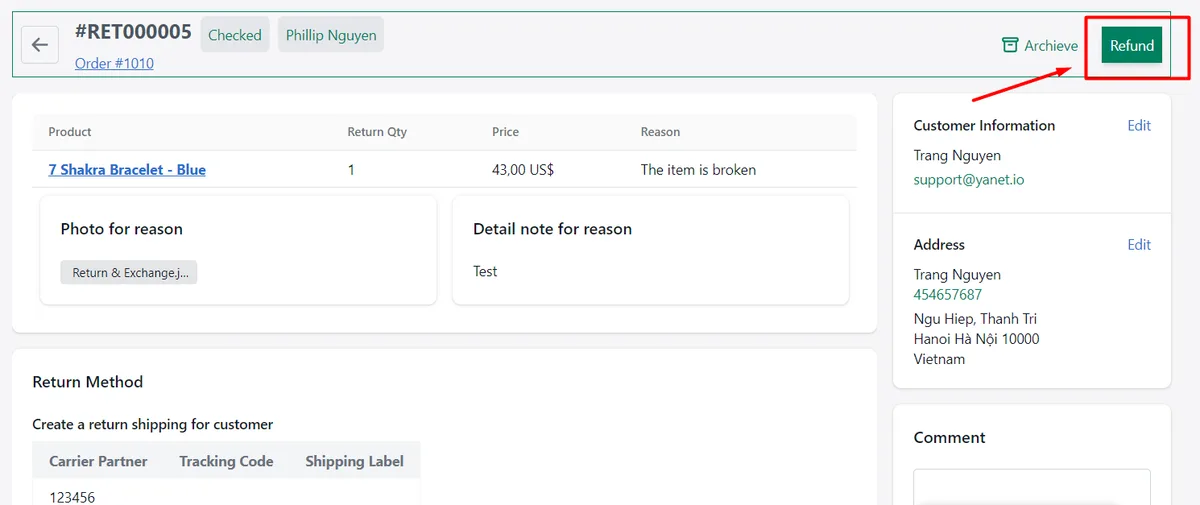
If email notification is enabled in the Email Notification settings, the customer automatically receives an update after each phase. These updates explain progress within shopify refund time; they should not imply that the customer’s bank has already posted a payment.
For a broader overview of the workflow, see the Yanet Returns & Exchanges app breakdown. Keep your customer-facing descriptions aligned with how your team actually processes requests.
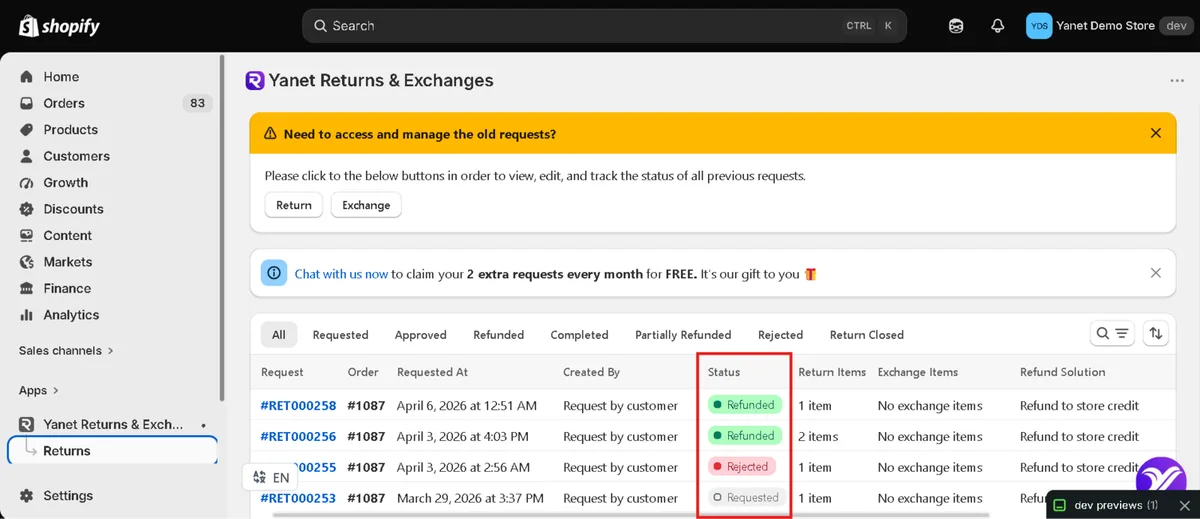
Dashboard statuses include Requested, Approved, Refunded, Completed, Partially Refunded, Rejected and Return Closed. Train staff to check the request details and explain the relevant status rather than treating every closed or completed case as the same outcome.
Configure notifications and verify the sender
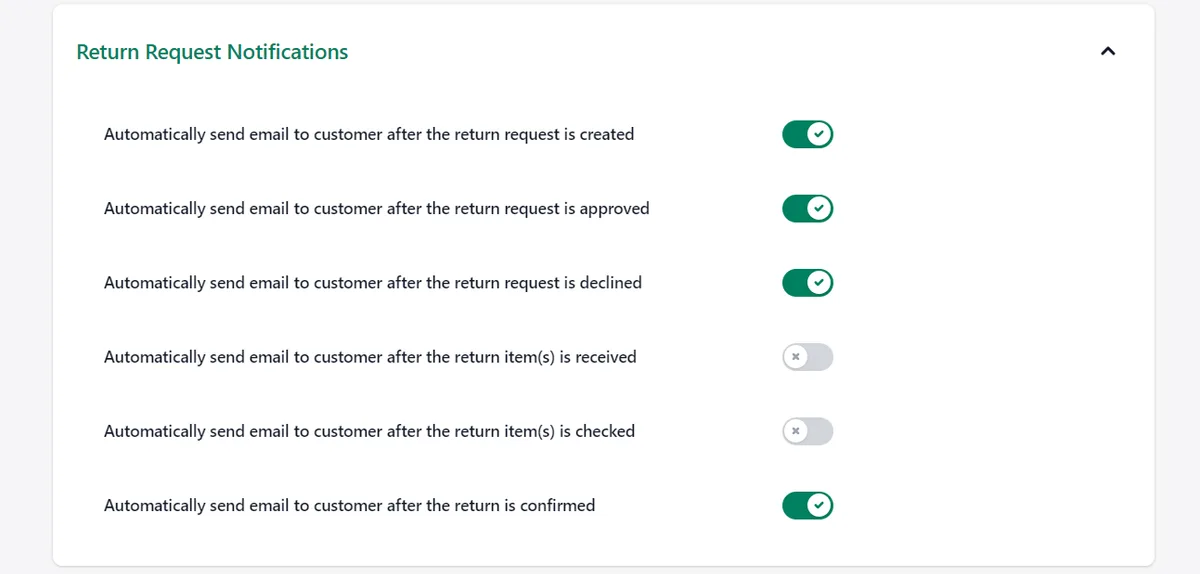
Go to Settings > Email Notification and set Sender Information, including the name and email used for app emails. Adding or changing the sender email triggers a verification email from Amazon Simple Email Service. Complete that verification to activate sending.
Under Request Notification, enable or disable emails for the relevant events. Return and exchange templates can be customized with email variables, a logo and translations. Notifications cover requests, approval, rejection, delivery or shipping status and other status changes.
Check refund methods and test before launch
Go to Settings > Refund methods to enable or disable the options customers can choose. Store credit and discount code refunds are available on Free; gift code refunds require Professional or Ultimate. Exact behavior depends on your Shopify configuration and selected option.
Test the full shopify refund time communication flow before launch: submit a request, process the phases, review emails and confirm how the selected refund option behaves. Check that no template promises immediate bank receipt.
The Free plan is $0 and includes six requests per month, a customizable portal, rules and reasons, email notifications and multiple shipping carriers. Professional is $9.99/month with 80 included requests, then $0.20 per extra request. Ultimate is $29.99/month with unlimited requests, Automation Approval and analytics. Both paid plans offer a 14-day free trial; prices are in USD.
A Support Checklist for “Where Is My Refund?” Tickets
Use the same sequence for every inquiry. A consistent review keeps shopify refund time explanations grounded in the actual order instead of a generic estimate.
- Confirm refund status in Shopify admin. Check whether the refund was issued, rather than only requested or approved.
- Confirm the method. Identify whether the customer should check a card, wallet, external repayment or non-card option.
- Check the issuance date. Do not calculate the provider’s processing window from the return-request date.
- Compare with current guidance. Use the typical window appropriate to the payment setup, accounting for business days where relevant.
- Send a specific update. Include the order, amount, method, issuance date and next step.
- Escalate when appropriate. If issued correctly, escalate a missing-funds inquiry after the relevant typical window passes; investigate an obvious processing error immediately.
- Record the reason. Note whether the confusion came from missing emails, partial amounts, unclear wording or an actual delay.
Use those ticket reasons to improve your Shopify refund processing time messages. If customers repeatedly misunderstand the same stage, rewrite that notification rather than repeatedly sending the same explanation manually.
Common Mistakes When Explaining Refund Timing
The biggest mistake is turning a typical shopify refund time into a promise. “Your bank will show it on Friday” creates an expectation your team cannot control, even when the refund was issued correctly.
- Calling refunds instant: distinguish issuing the refund from the customer receiving it.
- Mixing credit with cash refunds: explain the selected option and its destination.
- Ignoring partial refunds: state exactly what was refunded and what remains unresolved.
- Leaving out business days: make the basis of any quoted window clear.
- Hiding the policy: make timing guidance easy to find before customers need support.
- Repeating vague reassurance: replace “please wait” with the current stage and a concrete next step.
A trustworthy shopify refund time message is specific about completed actions and cautious about external timing. That combination gives customers useful information without making promises your store cannot keep.
Conclusion
shopify refund time combines your store’s processing steps with the payment provider’s return-of-funds process. Reduce avoidable delays on your side, explain differences between payment methods and send clear updates at each meaningful stage.
To organize requests and keep customers informed, install Yanet Returns & Exchanges from the Shopify App Store. Test your workflow and notifications before launch, and keep bank-arrival estimates separate from the actions your team can control.
FAQ
How long do Shopify refunds take?
It depends on when the merchant issues the refund and how the bank or payment provider processes it. For cards, several business days is commonly quoted, with roughly 5–10 business days used as a planning window rather than a guarantee. Confirm current guidance in Shopify’s refund documentation and your gateway documentation for your payment setup.
Why has my customer not received their refund yet?
First check whether the refund was actually issued or the return was only approved. Then confirm the amount, method and issuance date. The provider may still be processing it, or the customer may be checking the wrong destination. Partial refunds and business-day expectations can also cause confusion. Explain the verified status before suggesting an escalation.
Can I speed up a Shopify refund?
You can reduce delays in your own approval, return receipt, inspection and refund-issuance steps. Assign clear owners and keep requests from sitting unnoticed. Once the refund has been issued, however, the receiving bank, card issuer or payment provider controls its processing. Yanet can structure your workflow and notifications, but it cannot accelerate that external transfer.
Does store credit arrive faster than a card refund?
Store credit does not pass through a card network, so there is no bank-processing step. That does not automatically mean it is instantly available. Your approval process, Shopify configuration and selected refund option still matter. Test the customer experience in your setup and explain how customers can find and use their credit before promising any timing.