

shopify product review apps help you collect customer feedback and put it where shoppers make buying decisions. Written reviews, star ratings, and customer photos can answer questions that polished product descriptions leave open, including how an item fits, looks, or performs in everyday use.
Yanet does not sell a review app. This guide compares six review apps neutrally, covering collection, visual content, pricing, and distribution. It also explains how shopify product review apps connect to returns: reviews help set expectations before purchase, while Yanet Returns & Exchanges supports the returns that still happen.
What Shopify Product Review Apps Actually Do
Most shopify product review apps handle four jobs: collecting feedback, displaying it, distributing it beyond your storefront, and keeping it organized. The important difference is which jobs each plan includes.
- Collect: Request reviews through email, SMS, forms, or QR codes, depending on the app. Automation helps make requests consistent rather than a manual task.
- Display: Show star ratings, review widgets, carousels, and photo or video content. Check whether your preferred display is available on the plan you can afford.
- Distribute: Some plans support Google Shopping, Meta, TikTok Shop, or the Shop app. Rich snippets are another feature to check separately.
- Manage: Look for replies, moderation options, imports, and migration support. Confirm how each works before moving existing feedback.
Compare shopify product review apps against your actual workflow. A store needing straightforward product-page feedback has different requirements from one distributing reviews across several sales channels.

How to Choose a Shopify Reviews App
Review collection and automation
Map the journey from delivery to submission. Check request channels, reminders, submission forms, and whether customers can answer useful product-specific questions. A shopify reviews app should make feedback easy without sending requests before buyers have tried the item.
List your essential channels first. Do not choose shopify product review apps primarily for SMS or QR codes if your team will only use email.
Photo and video reviews
Separate photo collection from video collection when comparing plans. Some apps offer visual reviews free; others reserve media requests or video for paid tiers. Decide whether customers need to show fit, texture, scale, or the product in action.
Also check incentives. If you offer a discount for submitting a photo, reward participation rather than a positive rating, and make the terms clear.
Pricing model and order limits
Calculate costs using a normal month and a busy month. Check included orders, additional-order charges, and feature upgrades. A free shopify product reviews app may suit your launch but become restrictive as order volume grows.
Syndication, SEO and integrations
Compare shopify product review apps against the channels you already use. Distinguish rich snippets from Google Shopping syndication, and verify the required plan. Integrations matter most when they remove a real handoff, such as passing low-rated feedback to support.
Best Shopify Review Apps Compared
The Product reviews category of the Shopify App Store lists 499 apps at the time of writing. These six shopify product review apps cover different needs. Ratings and prices below come from their Shopify App Store listings at the time of writing and can change.
| App | Rating on Shopify App Store | Free plan | Paid plans | Photo/video reviews | Standout feature |
|---|---|---|---|---|---|
| Judge.me | 5.0 | Unlimited product, store, and visual reviews | Awesome: $15/month | Both on free plan | Broad free feature set |
| Loox | 4.9 | Up to 500 orders | Convert: $49.99/month; Unlimited: $299.99/month | Photos free; video on Convert | Visual reviews and 17+ widgets |
| Junip | 4.8 | Unlimited orders and request emails | Core: $29; Growth: $79; Premium: $299/month | Media requests on Core | Unlimited orders across plans |
| CWILL / TrustWILL | 4.9 | Unlimited collection; displays six reviews per product | Essential: $11.99; Pro: $29.99/month | Photo incentives; video on Pro | QR and WhatsApp collection |
| Klaviyo: Product Reviews | 4.8 | Up to 50 orders/month | $25/month for up to 250 orders | Text, photo, and video collection | Review data in Klaviyo CRM |
| Vitals | 4.9 | No free plan listed | Starter: $29.99; Growth: $79; Pro: $179/month | Photo and video | Reviews alongside 40+ tools |
Judge.me Product Reviews App
Judge.me offers unlimited product, store, photo, and video reviews on its free plan, plus widgets, carousels, rich snippets, and imports. Collection channels include email, SMS, push, QR codes, and forms. It supports 15 languages and is Built for Shopify.
Among shopify product review apps, it is a practical starting point for a tight budget. The limitation is feature access: Google Shopping, Meta, TikTok Shop sync, automatic reminders, and AI tools require the $15 Awesome plan. That plan also includes 130+ integrations.
Loox Product Reviews App
Loox focuses on visual feedback. Its free plan includes photo-review discounts, request emails and reminders, 17+ widgets, rich snippets, social posts from reviews, and Shop app syndication. Widgets and emails are translatable into 38 languages.
It suits brands prioritizing customer imagery, but video requires Convert. That $49.99 plan includes 300 orders, then charges $50 per additional 300 orders. Compare that structure carefully with the free plan’s stated 500-order allowance. Unlimited costs $299.99 monthly.
Junip Product Reviews App & AI
Junip combines mobile-first submissions with unlimited orders on every plan. Free includes unlimited request emails, product-page widgets, and rich snippets. Core adds media requests, incentives, replies, and product grouping for $29 monthly.
For merchants comparing shopify product review apps with predictable order-volume pricing, Junip deserves consideration. However, Google Shopping, TikTok Shop, Shop app, Meta Shops, and marketing integrations sit on Growth at $79 monthly. Unlimited orders do not mean every feature is included.
CWILL (Trustoo) Product Reviews / TrustWILL
CWILL supports collection through QR codes, WhatsApp, automatic emails, Amazon, and other platforms, with discounts for adding a photo. It supports 20 languages and works with AliExpress and DSers, making it relevant to merchants using those tools.
The free plan collects unlimited product and store reviews but displays only six per product. Essential removes that display limit for $11.99 monthly and adds replies and one-language auto-translation. Video collection, multi-language translation, and Google Shopping require Pro at $29.99 monthly.
Klaviyo: Product Reviews
Klaviyo collects text, photo, and video reviews through automated email and SMS flows. It supports custom questions, unique coupons, imports, and Google Shopping sync. Reviews live in Klaviyo CRM, allowing segmentation by star rating and routing low ratings to support.
It fits stores already using Klaviyo and comparing shopify product review apps for connected customer workflows. Watch volume: free covers 50 monthly orders, while $25 covers up to 250. You upgrade as you grow, and external charges may be billed by Klaviyo.
Vitals: Reviews, Bundles & 40+
Vitals combines photo and video reviews with bundles, upsells, trust badges, wishlists, pop-ups, and other tools. It imports reviews from AliExpress, CSV, or email. This suits merchants wanting several storefront functions together rather than a reviews-only installation.
Unlike several shopify product review apps here, Vitals lists no free plan, although Starter has a seven-day trial. Starter costs $29.99 for up to 200 monthly orders; Growth covers 201–1,000 at $79, and Pro covers 1,001–5,000 at $179.
Photo and Video Reviews: Which Apps Do It Best
Visual reviews can provide stronger practical proof because shoppers can inspect the product outside studio photography. A customer image may clarify scale or fit; a video may show movement or use. Neither guarantees accuracy, so written context still matters.
For free visual collection, Judge.me stands out among these shopify product review apps because its free plan explicitly includes unlimited photos and videos. Loox offers photo incentives free, but video sits on Convert. Junip adds media requests on Core.

CWILL offers photo incentives and reserves video collection for Pro. Klaviyo collects both formats through its review flows. Vitals includes photo and video reviews alongside its broader toolkit.
When testing shopify product review apps, submit a review from your phone and inspect the resulting display. Check whether shoppers can understand the image, identify the relevant product, and read the accompanying explanation without unnecessary effort.
How Shopify Product Review Apps Affect Conversion Rate
Reviews can reduce uncertainty at the product page. Detailed feedback may answer whether a fabric feels heavy, a product matches its description, or an item suits a particular use. That makes shopify product review apps useful decision support, not simply decorative trust badges.
Star ratings distributed to Google Shopping or supported advertising channels may provide context before a click. Check channel support and plan requirements rather than assuming every widget includes syndication. Fresh, specific feedback can also be more useful than a large collection of vague, old comments.
Handle negative feedback constructively. Publish an honest response, explain the next step, and correct unclear product information when a complaint exposes a gap. Removing useful criticism can leave the original customer confusion unresolved.
To evaluate shopify product review apps, compare product conversion rates before and after installation over reasonably comparable periods. Record promotions, price changes, traffic sources, and stock availability so you do not attribute every movement to reviews.
Use these Shopify analytics reports and metrics to structure your comparison, then track review submissions and recurring customer questions alongside sales outcomes.
Can Shopify Review Apps Reduce Returns?
Honest reviews can help shoppers avoid buying the wrong item. Customer photos and size feedback may reveal details missing from a size chart or description. However, shopify product review apps cannot prevent every return, and reviews are not a replacement for a workable returns process.
Set up a self-service returns page through a Shopify return portal so customers know where to start when an order does not work out.
Yanet is a companion to your review app, not a review collection tool. Its customer-facing, brandable portal supports return and exchange policies that can differ by product, plus ready-to-pick reasons. Customers receive email notifications at each status.
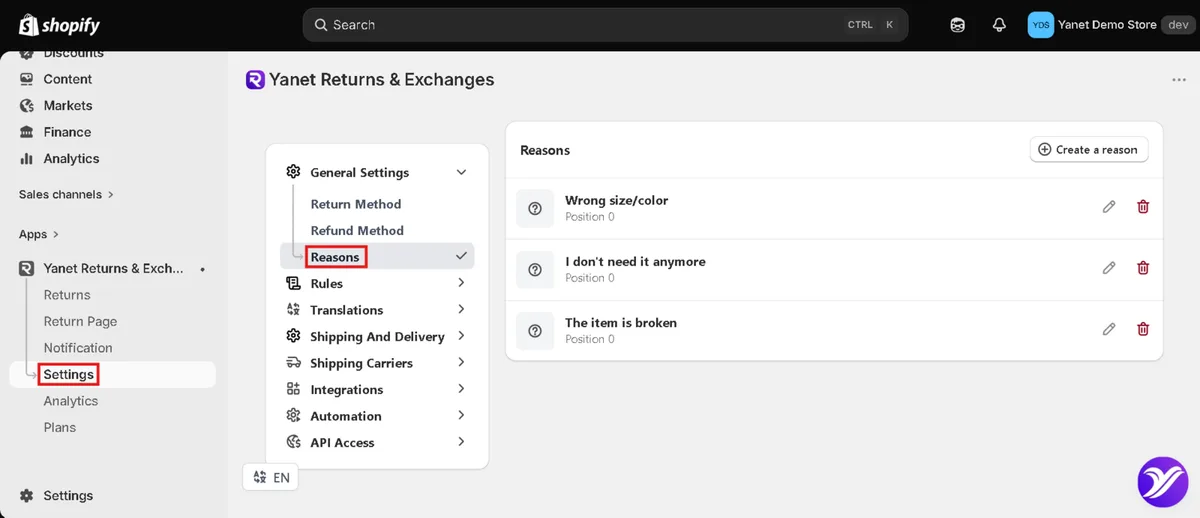
Yanet Returns & Exchanges offers a free plan, with paid plans starting at $9.99/month. All plans support refunds to store credit or discount code and exchanges for the same product or variant. Paid plans add exchanges for different products or variants.
You can request video evidence for selected return reasons. On the Ultimate plan, analytics highlight common return reasons and products with high return activity. Frequent size-related returns, for example, are a reason to review your sizing information rather than assume customers are choosing carelessly.
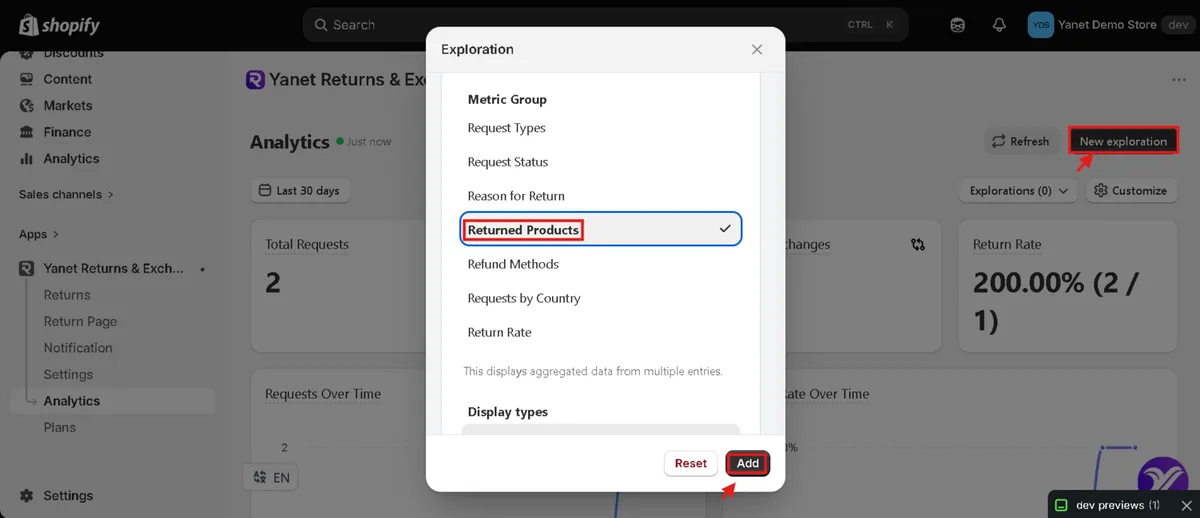
Use shopify product review apps and return reasons together to spot where product pages mislead shoppers. Reviews show what customers describe publicly; return reasons add another source of feedback. Update the page, then monitor whether the same confusion continues.
Common Mistakes When Choosing Shopify Product Review Apps
Most problems come from assumptions made before a plan is tested. Avoid these when you compare shopify review apps:
- Choosing on star rating alone: Every app in this guide is rated between 4.8 and 5.0, so the real differences sit in plans, limits, and features.
- Ignoring order-based limits: Loox, Klaviyo, and Vitals tie pricing or allowances to order volume, while Junip does not.
- Assuming a feature is free: Video, Google Shopping, and translation often sit behind paid plans.
- Skipping a mobile test: Many customers will leave a review from a phone, so test the submission form there.
- Treating reviews as a fix for weak product pages: Reviews support clear descriptions and sizing information; they do not replace them.
Which Shopify Product Review App Should You Pick?
Shortlist shopify product review apps by your main constraint, then test the relevant plan:
- Tiny budget or starting free: Judge.me includes unlimited product and visual reviews.
- Visual-first brand: Consider Loox for its photo focus and widgets; budget for Convert if video matters.
- Already using Klaviyo: Its reviews app connects feedback with CRM segmentation and support routing.
- One tool for many conversion widgets: Vitals combines reviews with 40+ tools.
- Unlimited orders and predictable pricing: Junip does not tie its plans to order counts; choose by required features.
- Multilingual store: Compare Loox’s 38-language widget and email translation, Judge.me’s 15 languages, and CWILL’s 20 languages, checking translation-plan restrictions.
How to Get More Reviews After You Install an App
Installing a shopify product reviews app is only the first step. Build a repeatable collection routine that respects the customer’s time and produces useful detail.
- Request feedback after delivery: Allow enough time to try the item. Adjust timing to the product rather than sending every request immediately after purchase.
- Keep mobile submissions simple: Test the form yourself. Ask for the details shoppers need, without turning a quick review into a long survey.
- Use supported photo incentives: Loox and CWILL list discounts for photo reviews. Explain the offer clearly and never make the reward depend on positive feedback.
- Try package QR codes where supported: Judge.me and CWILL list QR collection. Tell customers what the code opens and why their feedback helps.
- Reply to negative reviews: Where your plan supports replies, acknowledge the specific issue and explain how customers can get help. Use repeated complaints to improve product information.
- Import genuine existing reviews: Check migration support and verify product matching before publishing. Review the imported results rather than assuming every field transferred correctly.
- Check product and collection placement: Show detailed feedback on product pages and, where supported, ratings on collection pages. Confirm compatibility instead of assuming every app offers both.
- Keep requests consistent: Maintain a steady flow rather than collecting reviews once and stopping. Revisit timing when delivery patterns or product ranges change.
For import-related planning, our guide to Shopify dropshipping apps provides broader context for dropshipping stores considering imported reviews.
Whichever shopify reviews app you choose, review the workflow regularly. Good collection habits matter more than enabling every available feature.
Conclusion
The right shopify product review apps match your budget, order volume, collection needs, and sales channels. Compare plan restrictions carefully, test the customer experience, and use feedback to improve product information—not just display stars.
For the returns that still happen, try Yanet Returns & Exchanges, with a free plan available. Pair clear reviews with a straightforward returns process so customers can make informed purchases and get help when an item is not right.
FAQ
What are the best Shopify product review apps?
The best choice depends on your priorities. Judge.me offers broad free features, Loox emphasizes visual feedback, Junip offers unlimited orders, and Klaviyo suits existing Klaviyo users. CWILL offers several collection channels, while Vitals combines reviews with a wider toolkit.
Is there a free Shopify reviews app?
Yes. Judge.me, Loox, Junip, CWILL, and Klaviyo list free plans, but their limits differ. Compare order allowances, displayed-review limits, media collection, and distribution features before choosing.
Do photo and video reviews really matter?
They can help shoppers judge appearance, scale, fit, and use outside product photography. Their value depends on relevance and clarity, so encourage useful written context alongside the image or video.
Can I switch review apps without losing my reviews?
Several listings mention import or migration support. Judge.me imports from Yotpo, Loox, Amazon, and Etsy; Loox and Junip advertise migration from other review apps; Klaviyo can import previous reviews. Verify supported fields and product matching before removing your existing app.