
shopify pricing includes more than the monthly subscription: payment fees, apps, shipping and returns all affect what your store costs to run. This guide breaks down the plans, billing choices and less obvious expenses so you can build a realistic budget before choosing a tier.
Shopify updates its prices, and plan names and offers can change. Confirm live figures on Shopify’s official pricing page, then use the framework below to compare your total costs. A useful shopify pricing comparison includes what happens after the sale, especially when a customer requests a refund or exchange.
How Shopify Pricing Works: The Four Layers of Cost
Think of your bill as four separate layers. Keeping them separate makes shopify pricing easier to forecast and helps you identify which expenses grow with sales, which stay relatively stable, and which depend on operational decisions.
- Subscription plan: Your recurring platform charge, determined by your plan and billing cycle.
- Payment costs: Card processing charges and, where applicable, additional transaction fees for using a third-party gateway.
- Store tools: Apps, a domain, email services and any paid theme you choose.
- Operations: Shipping, tax-related obligations, returns, customer support and staff time.
Build your budget around a normal trading month, not just launch day. Include recurring subscriptions alongside variable costs such as labels, payment processing and return requests. Keep one-time setup purchases separate so they do not distort your ongoing monthly estimate.

The goal is not simply to find the lowest shopify pricing tier. It is to choose a workable setup and understand which costs will increase when order volume, staffing or returns grow.
Shopify Pricing Plans: What Each Tier Is For
Compare shopify pricing plans by the work your store needs to do. Moving up generally means more staff access, deeper reporting, lower card rates and lower third-party transaction fees, with more advanced shipping and checkout capabilities where available. Confirm each feature against the current plan comparison.
Three questions narrow the field quickly. How many people need access to the admin? How much of your revenue comes through cards and third-party gateways? And how much reporting and shipping flexibility does your team actually use today?
Starter
Starter suits testing an idea or selling through a simpler setup before committing to a fuller store operation. Its entry price can make it attractive when your priority is validating demand rather than managing a growing team.
Check whether its selling experience matches how you intend to reach customers. A lower subscription is not a saving if you immediately need capabilities outside the plan.
For a closer look at what this entry option includes and where it stops, read our guide to the Shopify Starter plan.
Basic
Basic is a practical starting point for a merchant ready to run a full online store with relatively straightforward operations. Consider it when you need a store foundation but do not yet require the staffing or reporting depth associated with higher tiers.
When reviewing shopify pricing, check staff access, shipping requirements and payment costs alongside the subscription. Those details matter more than choosing a plan solely because it is positioned for new businesses.
Grow
Grow suits businesses with steadier sales and more operational demands. It is worth comparing when additional staff access, reporting or lower payment rates could justify a higher fixed subscription.
Use your actual order history to evaluate the move. Compare the additional subscription cost with the payment-fee difference and the practical value of any capabilities your team will use.
Advanced
Advanced is aimed at more complex operations that need greater reporting depth, team access or shipping capabilities. Lower card rates and third-party transaction fees can also become more relevant as sales increase.
Do not upgrade for unused features. Check which capabilities solve a current problem, and whether your team has the processes to benefit from them.
Shopify Plus
Shopify Plus is the high-volume and enterprise option, with custom pricing and support. It belongs in the conversation when checkout requirements, organizational complexity or enterprise needs go beyond the standard tiers.
Request a proposal based on your business rather than assuming a public entry figure represents your full commitment. Across all shopify pricing plans, names, inclusions and prices can change, so verify the current comparison before subscribing.
Shopify Plans and Pricing: Monthly vs Yearly Billing and the Free Trial
Shopify generally offers discounts for paying yearly rather than monthly. Monthly billing gives you more flexibility while you test the business; yearly billing can reduce the subscription cost when you are confident about continuing.
When comparing shopify plans and pricing, distinguish an advertised monthly equivalent from the amount collected at checkout. An annual commitment affects cash flow differently from a monthly subscription, even when its effective monthly cost is lower.
A free trial is usually available, but confirm its current length and any introductory or first-month offer on the official pricing page. Do not build your launch budget around an offer you remember seeing previously.
Before starting, prepare product information, photography, shipping policies and your launch checklist. During the trial, prioritize testing the buying journey and identifying essential tools rather than installing every potentially useful app.
Set a reminder before the trial ends. Review your readiness, selected billing cycle and any separate app subscriptions. This keeps shopify pricing decisions tied to your launch schedule rather than an overlooked renewal date.
For a step-by-step plan for those first days, see our guide to the Shopify free trial.
Transaction Fees and Payment Processing Costs
Payment processing and additional transaction fees are different charges. Processing covers taking a payment; an additional transaction fee may apply when you use a third-party payment gateway instead of Shopify Payments. Both can vary by plan.
This distinction matters when calculating shopify pricing because choosing another gateway can introduce a cost beyond that provider’s own processing charge. Compare the complete payment setup, not just the rate advertised by one party.
International transactions can introduce further costs. Currency conversion and international card surcharges may apply, while chargebacks can carry fees. The relevant terms depend on your payment setup and the transactions you accept.
Check the payment details in your Shopify admin and the current official pricing page. Review your processor’s terms too, especially for refunds, disputes and cross-border payments.
For a useful shopify pricing forecast, separate domestic and international sales in your worksheet. Use your expected payment mix, then replace assumptions with actual statement data once orders arrive. When considering an upgrade, compare the extra subscription with the fee savings your real sales volume would produce.
Apps, Themes and Other Recurring Costs
A free theme can keep setup costs down, while a paid theme adds a one-time purchase. Apps may bill monthly, by usage or through a combination of both. Domain renewals and email services belong in the budget too.
To keep setup costs down, see our shortlist of free Shopify themes for launching your store.
Keep these additions separate from the platform subscription when reviewing shopify pricing. Otherwise, a growing tools bill can look like an increase in the underlying plan cost.
Typical budget lines:
- Domain registration and renewal.
- Email services and customer communication tools.
- Apps, including usage-based charges.
- Shipping labels and label or barcode software.
- Tax-related software, administration and applicable taxes.
- Theme purchases and any separately commissioned setup work.
Audit apps quarterly. For each one, record its owner, purpose, billing method and whether you still use it. Prefer a suitable free tier while testing, but check usage limits before relying on it during a busy period.
Also budget for the work software does not eliminate. Understanding how long Shopify refunds take helps you prepare customer messages and avoid spending support time repeatedly answering the same question.
Watch for overlap between tools before adding another subscription. A disciplined shopify pricing worksheet lists each app once, separates fixed and variable charges, and includes a reminder to reassess it when usage changes.
The Hidden Cost Most Shopify Pricing Guides Skip: Returns and Exchanges
A return creates several costs at once: shipping, the refunded sale, inspection, restocking and customer communication. For shopify pricing purposes, distinguish the cash refunded from the inventory outcome: an item returned in sellable condition is different from stock you cannot resell.

Your Shopify return label policy determines another part of the cost. Decide when you pay return shipping, when the customer pays, and how you communicate that responsibility before a purchase.
Payment processors often do not return the original processing fee when you refund a payment. Check your processor’s terms rather than assuming a refund reverses every charge. Add inspection and support time to your estimate, even when the owner does that work.
A simple way to estimate the cost of one return is to add return shipping, any unreturned processing fee, handling and inspection time, and support time. Multiply that by the number of requests you expect each month, then compare the result with the price of tools that reduce the work.
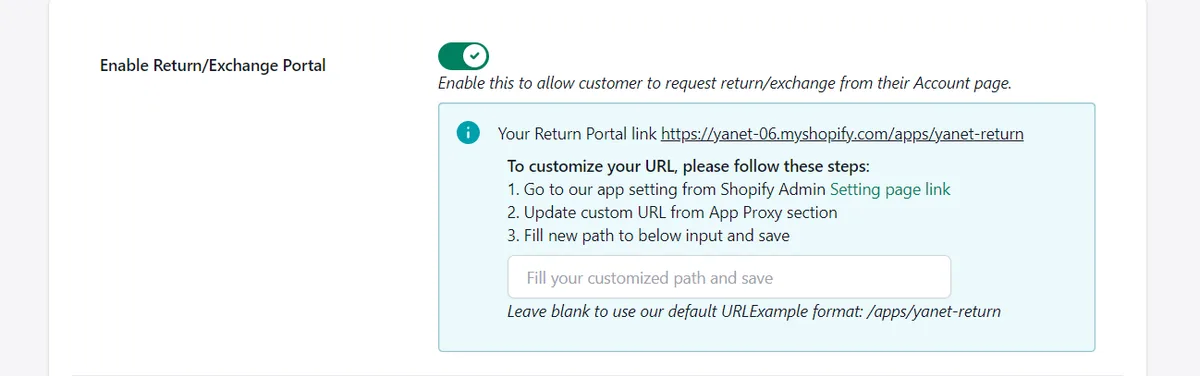
A self-service Shopify return portal can reduce back-and-forth by giving customers a structured way to submit requests. Clear return rules and reasons also help your team assess requests consistently instead of rebuilding the process in every email.
Exchanges can preserve a sale when the original item was unsuitable but the customer still wants to buy. Store credit provides another option when appropriate under your policy and applicable requirements. Neither should be used to obscure a customer’s refund rights.
Consider where Shopify store credit for returns and exchanges fits your process. Make the available outcomes clear, and let customers understand the difference between receiving credit, exchanging an item and getting money back.
A realistic shopify pricing budget therefore includes both return expenses and the tools used to manage them. Track request volume, outcomes and handling time so you can choose software based on actual needs.
What a Returns App Adds to Your Shopify Pricing (Yanet Example)
Yanet provides a concrete example of the app layer in shopify pricing. Its tiers combine a subscription, request allowances and different return-management capabilities, so compare both your expected volume and the features your policy requires.
You can review and try Yanet Returns & Exchanges through the Shopify App Store. The following comparison uses the verified plan details; it does not assume any particular savings for your store.
Billing is in USD. Recurring and usage charges are billed every 30 days, so keep that billing cycle visible in your budget rather than treating it as identical to a calendar month.
| Plan | Price | Requests | Key features |
|---|---|---|---|
| Free | $0 | 6 requests per month | Customizable return portal; rules and refund/exchange reasons; same-product/variant exchanges; refunds to discount code and store credit; multiple languages, email notifications and multiple shipping carriers. |
| Professional | $9.99/month | 80 included per month, then $0.20 per extra request | All Free features; different-product/variant exchanges; packing slip; refund by gift code; conditional fees and rewards; priority support; 14-day free trial. |
| Ultimate | $29.99/month | Unlimited requests | All Professional features; automation approval; dedicated priority support; 14-day free trial. API/Webhook is listed as coming soon. |
The Free plan lets you start with a customizable return portal page, configure rules and refund/exchange reasons, and support exchanges to the same product/variant. Its request allowance makes it an option to evaluate when return volume is low.
Professional adds exchanges to a different product/variant, a packing slip and refunds by gift code. It also includes return/exchange fees and rewards by conditions, plus priority support. These differences matter when your return policy needs more than the Free plan provides.
Ultimate adds automation approval and dedicated priority support, alongside unlimited requests. API/Webhook is marked “coming soon,” so do not budget or design a live workflow around it as an available feature.

The app works with Shopify Admin and customer accounts, supports 16 languages, and works with EasyPost, FedEx and Shippo. Check these details against your operational requirements rather than choosing on request allowance alone.
The shopify pricing calculation becomes especially useful at higher request volumes. At 180 requests in a month, Professional costs $29.99: 80 included requests plus 100 extra requests × $0.20 equals $20 in usage charges, added to the $9.99 subscription.
That matches Ultimate’s $29.99 subscription. Above roughly 180 monthly requests, Ultimate costs less than Professional on the stated pricing. You may also prefer it earlier if you need automation approval; below that volume, compare feature needs as well as the bill.
How to Choose the Right Shopify Plan for Your Stage
Start with your current operation, then consider the next realistic growth step. Comparing shopify prices and plans against a distant best-case scenario can lead to paying for capabilities long before you use them.
- Testing an idea: Compare Starter with the requirements of your intended selling setup. Keep optional subscriptions limited while you validate demand.
- First steady sales: Evaluate Basic against your store requirements, then budget separately for payments, essential apps, shipping and returns.
- Scaling with a team: Compare Grow and Advanced for staff access, reporting, payment rates and shipping needs. Use actual sales and workload data.
- Enterprise: Discuss Shopify Plus when high volume, checkout requirements or organizational complexity justify a custom proposal.
Before changing tiers, calculate the difference between your current setup and the proposed one. Include subscription changes, payment costs and any tools you would still need. Better shopify pricing decisions come from the whole calculation, not the subscription in isolation.
Budget checklist:
- What sales volume and order mix are you budgeting for?
- Who needs staff access, and what work will they do?
- Which payment gateway will you use?
- Which apps are essential, and which charge by usage?
- What is your expected return rate and monthly request volume?
- Who handles inspections, exchanges and customer questions?
Revisit shopify plans and pricing when your circumstances change: a larger team, a new market or sustained sales growth. Review app tiers when their usage changes too. Keeping these decisions separate makes shopify prices and plans easier to evaluate without overlooking operational expenses.
Conclusion
Your true shopify pricing budget combines the subscription, payment charges, store tools and operating costs. Confirm current Shopify terms, compare tiers against real needs, and include return shipping, refund-related fees and staff time before deciding what you can afford.
For returns, start with a process that matches your policy and request volume. Try Yanet Returns & Exchanges free, then reassess its request allowance and features as your store grows. A clear budget should show both what you pay today and which changes would make another plan worthwhile.
FAQ
How much does Shopify cost per month?
The cost depends on your plan, billing cycle and additional services. The entry plan has the lowest subscription price, while higher tiers cost more and offer different capabilities. Confirm exact figures on Shopify’s official pricing page, then add payment processing, apps and operating expenses to estimate your total.
Does Shopify charge transaction fees?
Payment processing charges apply according to your payment setup. An additional transaction fee may apply when you use a third-party payment gateway instead of Shopify Payments. Rates vary by plan, and currency conversion, international cards or chargebacks can introduce other charges. Check your Shopify admin and processor’s terms.
What hidden costs should I budget for on Shopify?
Budget for apps, usage charges, domains, email, paid themes, shipping labels, tax-related administration and staff time. Returns can add shipping, inspection, restocking and support costs. Also check whether your processor retains the original processing fee when you refund a payment.
Is there a free way to handle returns on Shopify?
Yanet Returns & Exchanges has a Free plan with 6 requests per month. It includes a customizable return portal, rules and refund/exchange reasons, exchanges to the same product/variant, and refunds to discount code and store credit. It also includes multiple languages, email notifications and multiple shipping carriers.