
A shopify free trial is most useful when you treat it as a short store-building project, not a chance to explore every setting. Before you start, gather your product information, decide what a launch-ready store needs, and reserve time to test the buying process. This guide explains the trial’s limits, what happens afterward, and which tasks deserve your attention before you commit to a plan.
How the Shopify Free Trial Works
The shopify free trial gives you time to build a store and evaluate whether Shopify fits your business. Your goal is not to finish every possible improvement. It is to answer practical questions: Can you present your products clearly, configure your operations, and manage an order from checkout through a possible return?
How long the trial lasts
At the time of writing, Shopify advertises a three-day free trial on its App Store pages. The length, introductory offers, and terms can change, so confirm the current offer on Shopify’s official pricing page before registering. Do not build your schedule around an offer you saw in an older article.
Plan your shopify free trial around a few focused work sessions. Prepare your materials beforehand, then spend the trial configuring and testing rather than searching for product photos or debating your brand name.
What you can do during the trial
Use the shopify free trial to work on your catalog, store design, policies, payment configuration, and shipping setup. You can also install apps while building your store and assess whether they solve a real operational problem. Check the requirements shown in your admin before assuming a particular checkout or payment function is ready to use.
What the trial does not include
Do not treat the shopify free trial as a promise that every related service is free. Apps, domains, themes, and payment services can have separate costs or terms. Before accepting a charge or starting another subscription, read its billing details and record when any separate trial ends.
What You Need Before You Start Your Shopify Trial
Preparation matters because a short trial leaves little room for collecting missing information. A merchant migrating from another platform should identify which products and business details need transferring. A first-time seller should begin with a manageable launch catalog rather than trying to prepare every future product.
- Product list: Names, descriptions, prices, variants, and available quantities.
- Photos: Clear product images organised by item and variant.
- Brand basics: Store name, logo if available, contact email, and a simple visual direction.
- Policies: Draft shipping, returns, refund, privacy, and terms pages.
- Fulfilment information: Supplier details, dispatch arrangements, delivery destinations, and shipping costs.
- Payment information: Business and banking details relevant to your intended payment provider.
If suppliers will fulfil orders for you, settle the basic workflow before opening your store. Our Shopify dropshipping guide is a starting point for understanding that business model before committing your trial time.
Create one folder for these materials and one document for unresolved questions. That keeps your shopify free trial focused: build with the information you have, and investigate only the gaps that could prevent a safe launch.
What Happens When the Shopify Free Trial Ends
To continue with a paid Shopify subscription after your shopify free trial, you need to choose a plan. The plan names are Starter, Basic, Grow, Advanced, and Shopify Plus. Plus has custom pricing and is aimed at high-volume or enterprise businesses. Compare the current scope of each plan rather than choosing by name alone.
Check Shopify’s official pricing page for live prices, current offers, billing options, and terms. This is also where you should verify details that may have changed since you first researched Shopify.
Monthly billing and yearly billing create different commitments. Shopify generally offers discounts for yearly billing compared with monthly billing, but a lower equivalent monthly cost does not automatically make an annual commitment right for an untested business. Compare the amount payable, the billing schedule, and your confidence in launching.
For a breakdown of subscription choices and related expenses, read our Shopify pricing guide. Build your budget around the ongoing operating cost, not just an introductory offer.
Your shopify trial budget should separate these costs:
- Shopify subscription: Your selected plan and billing cycle.
- Payment processing: Fees vary by plan and payment arrangements.
- Third-party gateway fees: Additional transaction fees may apply when using a third-party gateway instead of Shopify Payments.
- Apps: Recurring subscriptions and any usage-based charges.
- Domain and theme: Any separate purchases you choose to make.
If you are not ready to subscribe, check the current account instructions and terms before the deadline. Do not assume a particular pause arrangement, extension, or continued checkout availability.
Shopify Free Trial Checklist: 8 Things to Do Before It Ends
Use this shopify free trial checklist in order. Store details and product information come first because later tasks depend on them. Leave design refinements until the essential buying and fulfilment journey works.
1. Set up store basics
Review your store name, currency, business country, intended markets, and contact email. Make sure these reflect where your business operates and whom you plan to serve. Distinguish the address customers should use for support from any private administrative contact information.
Practical tip: Keep a short “store facts” document with your approved business details. During the shopify free trial, use it to check consistency across settings, policy pages, and customer-facing messages.
2. Add products with titles, photos, variants, and inventory
Start with a small, representative set of products. Include an item with variants if your catalog uses sizes, colours, or other options. Write titles customers can understand, use relevant photos, and review quantities carefully. Product descriptions should answer purchase questions rather than simply repeat the title.
Practical tip: Ask someone unfamiliar with the product to review one listing. If they cannot identify what is included, which option to choose, or what the item looks like, improve it before adding more products.
3. Choose and customise a theme
Choose a theme that presents your products clearly, then set up navigation, your homepage, and product pages. Use our Shopify website builder guide for more context while planning your storefront.
Practical tip: Give design a fixed time limit during your shopify free trial. Review your store on a phone as well as a computer, and prioritise readable text, clear product images, and obvious navigation over decorative changes.
4. Set up payments
Review the payment options available to your business and follow the setup requirements shown in your admin. Check provider requirements, applicable processing costs, and any outstanding information requests. Do not assume that saving a settings page means every payment requirement has been completed.
Practical tip: Record unresolved payment questions in one place. Separate tasks you can complete immediately from anything requiring documents, provider confirmation, or further guidance.
5. Configure shipping rates and taxes
Decide where you will ship, how orders will be dispatched, and what customers should expect to pay. During the shopify free trial, compare your proposed shipping charges with your actual fulfilment arrangements. Check Shopify’s documentation for configuration guidance and consult your accountant about tax obligations.
Practical tip: Write down a few representative delivery scenarios before testing. Include your main destination and a destination you do not intend to serve, so you can check whether the store behaves as expected.
6. Write policy pages
Prepare shipping, refund and returns, privacy, and terms pages. Make sure the promises match what your business can deliver. Your returns policy should explain the process customers must follow, not simply state that returns are accepted.
Practical tip: Compare policy wording with your supplier and fulfilment arrangements. Resolve contradictions before launch, particularly around dispatch expectations, return eligibility, and who pays return costs. Obtain professional advice where needed.
7. Place a test order and review the full journey
Use the testing options available for your payment setup and follow Shopify’s current instructions. Walk through product selection, checkout, confirmation emails, order handling, and fulfilment. A shopify free trial should help you uncover operational gaps, not just produce a storefront that looks finished.
Practical tip: Keep a simple test log with the step, expected result, actual result, and required fix. Include a mobile checkout review and check the email address customers would use to request help.
8. Pick only essential apps and test them
Install apps against a written requirement, such as managing return requests. During your shopify trial, check each app’s pricing, included usage, setup requirements, and separate trial dates. An app belongs in your launch setup only if you understand what it does and why you need it.
Practical tip: Maintain an app list with the purpose, owner, cost, and decision date. Reassess anything you installed out of curiosity before committing to ongoing charges.
Set Up Returns During Your Shopify Trial (Most Merchants Skip This)
Decide how returns will work before your first order arrives. Your shopify free trial is a useful time to define eligibility, request handling, customer updates, and available resolutions. Otherwise, the first unhappy customer becomes a live test of an unfinished process.
Shopify admin lets you issue refunds, but that action does not by itself give shoppers a self-service request page. A self-service Shopify return portal gives customers a defined place to begin the request process rather than relying only on an email conversation.
First, map a simple scenario: a customer requests a different size. Decide what information you need, who reviews the request, and which outcome your policy allows. Keep this workflow understandable before adding more rules.
One app you can evaluate is Yanet Returns & Exchanges. It provides flow-based return and exchange management, an embedded public return portal, and email notifications at each step. Merchants can create different policies and rules for different products.
To set up the portal during your shopify free trial, open the app and go to Settings > Setup the Portal. Enable the Return/Exchange Portal and optionally customise its URL. Then review the customer-facing process alongside your written returns policy.
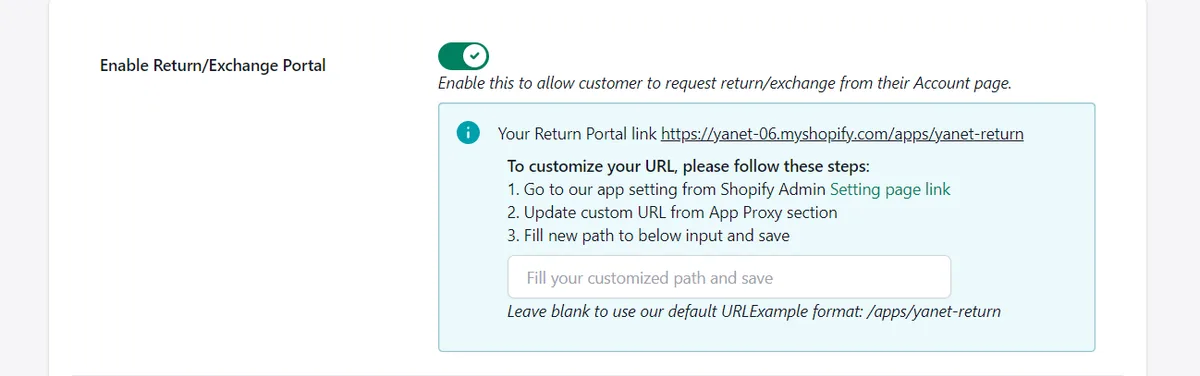
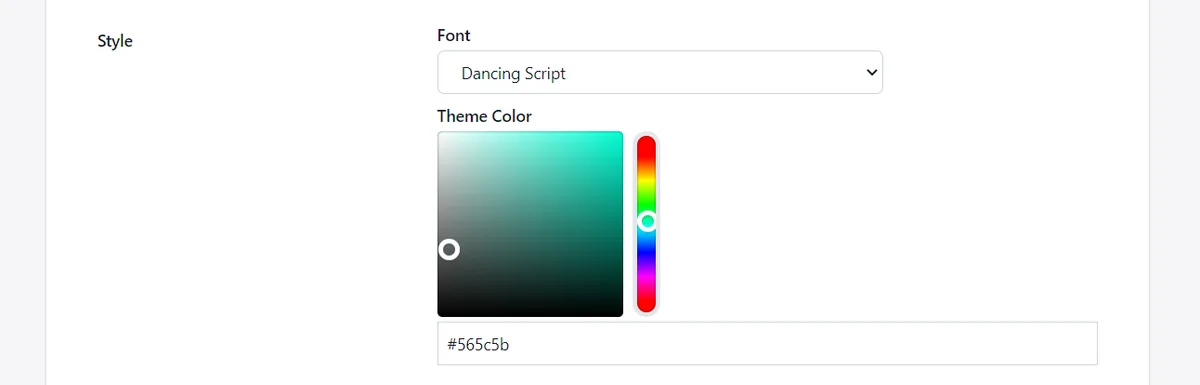
Next, upload a banner image or configure an auto banner slider. Under Portal style, adjust the font and button colour. You can also customise portal text and enable the Return & Exchange policy link so customers can review your policy on the portal.
Choose a plan based on expected request volume and required outcomes. Yanet’s plans are billed in USD, with recurring and usage charges billed every 30 days.
| Plan | Price and requests | Selected included features |
|---|---|---|
| Free | $0; 6 requests per month | Customisable portal, rules and reasons, same-product/variant exchanges, store credit and discount-code refunds, multiple languages, email notifications, multiple shipping carriers. |
| Professional | $9.99/month; 80 requests, then $0.20 per extra request | All Free features, different-product/variant exchanges, packing slip, gift-code refunds, conditional fees and rewards, priority support. Includes a 14-day free trial. |
| Ultimate | $29.99/month; unlimited requests | All Professional features, automation approval, and dedicated priority support. Includes a 14-day free trial. |
Test a request and review the portal wording and email notifications. The shopify free trial and Yanet’s paid-plan trials are separate: track their terms and dates independently. Start with the features your policy actually needs.
Common Mistakes That Waste a Shopify Trial
A shopify free trial can disappear into small decisions unless you protect time for the essentials. Watch for these common mistakes:
- Starting before preparing: Collecting photos and supplier information after registration leaves less time to build and test.
- Installing too many apps: Each addition brings another setup process, pricing decision, and workflow to review.
- Ignoring policies: Attractive product pages cannot explain an unclear returns or shipping process.
- Not testing orders: Looking at a storefront is not the same as completing the customer journey and handling the order.
- Forgetting the deadline or billing cycle: Record the shopify trial end date and review any separate app subscription dates.
- Choosing by the first-month price: Compare ongoing costs and the commitment required, not just the opening offer.
How to Decide Before Your Shopify Free Trial Ends
Before the shopify free trial ends, judge your store against launch requirements rather than visual perfection. Minor design improvements can wait. Unclear shipping charges, incomplete payment setup, and an untested order process deserve attention before you accept customer orders.
Use this mini-checklist to make your decision:
- Ready to launch? Products, policies, contact information, and the order workflow have been reviewed.
- Which plan? The current plan details meet your actual selling and operational needs.
- Monthly or yearly? You understand the payment commitment and have compared it with your available budget.
- Which apps remain? Every retained app has a clear purpose and a known ongoing cost.
- What remains unresolved? Each launch-blocking issue has a specific next action.
Set a calendar reminder before the deadline, leaving enough time to review your options without rushing. Keep a separate reminder for any app trial that ends on a different date. Save your cost worksheet and test log so the decision rests on evidence rather than how polished the homepage feels.
Conclusion
A productive shopify free trial starts before registration: prepare your materials, build the essentials, and test the complete order journey. Confirm current plan prices and terms, budget for separate costs, and choose a billing cycle that suits your confidence and cash flow.
Include returns in that preparation rather than waiting for your first request. Try Yanet Returns & Exchanges free to evaluate a customer return portal and a structured request workflow while you build your store.
FAQ
How long is the Shopify free trial?
At the time of writing, Shopify advertises a three-day free trial on its App Store pages. Trial length, introductory offers, and terms can change. Confirm the offer on Shopify’s official pricing page and check the details shown during registration before planning your store-building schedule.
Do I need a credit card for a Shopify trial?
Check the current sign-up screen and Shopify’s official pricing page rather than assuming a credit card is or is not required. Registration requirements and offer details can change. Before continuing, review what information is requested, any billing authorisation, and the terms that apply after the trial.
What happens to my store when the Shopify free trial ends?
You need to choose a plan to continue with a paid Shopify subscription. Review the instructions in your account and the current terms for what applies if you do not subscribe. Do not assume your checkout will remain available or that a particular pause or extension option applies.
Can I install apps during a Shopify trial?
Yes, you can install apps on your store while you build it. Each app has its own pricing and trial terms, so review these separately from Shopify’s trial. Yanet Returns & Exchanges has a Free plan costing $0, while its Professional and Ultimate plans each include a 14-day free trial.