

The shopify basic plan gives a new store the essentials for selling online, but its staff limit, payment fees and reporting depth deserve a closer look before you commit. The right choice depends less on how ambitious your business is and more on who operates it, how customers pay and what information you need to make decisions.
This guide focuses on Basic: its features, costs, restrictions and upgrade triggers. For a broader comparison covering Advanced and Plus as well, use our Shopify pricing guide. Here, the goal is to decide whether Basic fits your current workflow without paying for capacity you do not need.
What the Shopify Basic Plan Includes
The shopify basic plan includes a full online store, unlimited products and a theme editor. You can start with a free theme or choose a paid one, then use the editor to shape your storefront around your products and brand.
Online store and checkout
A useful way to evaluate the shopify basic plan is to build your essential pages and test the buying journey before spending heavily on design. Start with clear product information, straightforward navigation and a theme that presents your catalog well. These free Shopify templates can help you shortlist a starting point.
Basic includes Shopify Payments and Shop Pay checkout, subject to availability. Payment-provider choice matters because checkout convenience and payment costs are separate considerations. Check which providers you can use in your country before estimating your ongoing expenses.
Marketing tools
The shopify basic plan includes discount codes, automatic discounts, gift cards and abandoned cart recovery emails. Shopify Email is free for up to 10,000 emails per month. These tools give a new merchant practical ways to run promotions and follow up with potential customers.
Start with a simple offer rather than several overlapping promotions. For example, choose either a discount code for a specific campaign or an automatic discount for an eligible purchase, then check that the offer behaves as intended.
Apps and sales channels
Basic includes sales channels and full Shopify App Store access. That means you can add tools around a specific operational gap rather than upgrading your Shopify subscription immediately. However, assess app costs separately: access to the marketplace does not mean every app is free.
Shopify Basic Plan Price and Billing
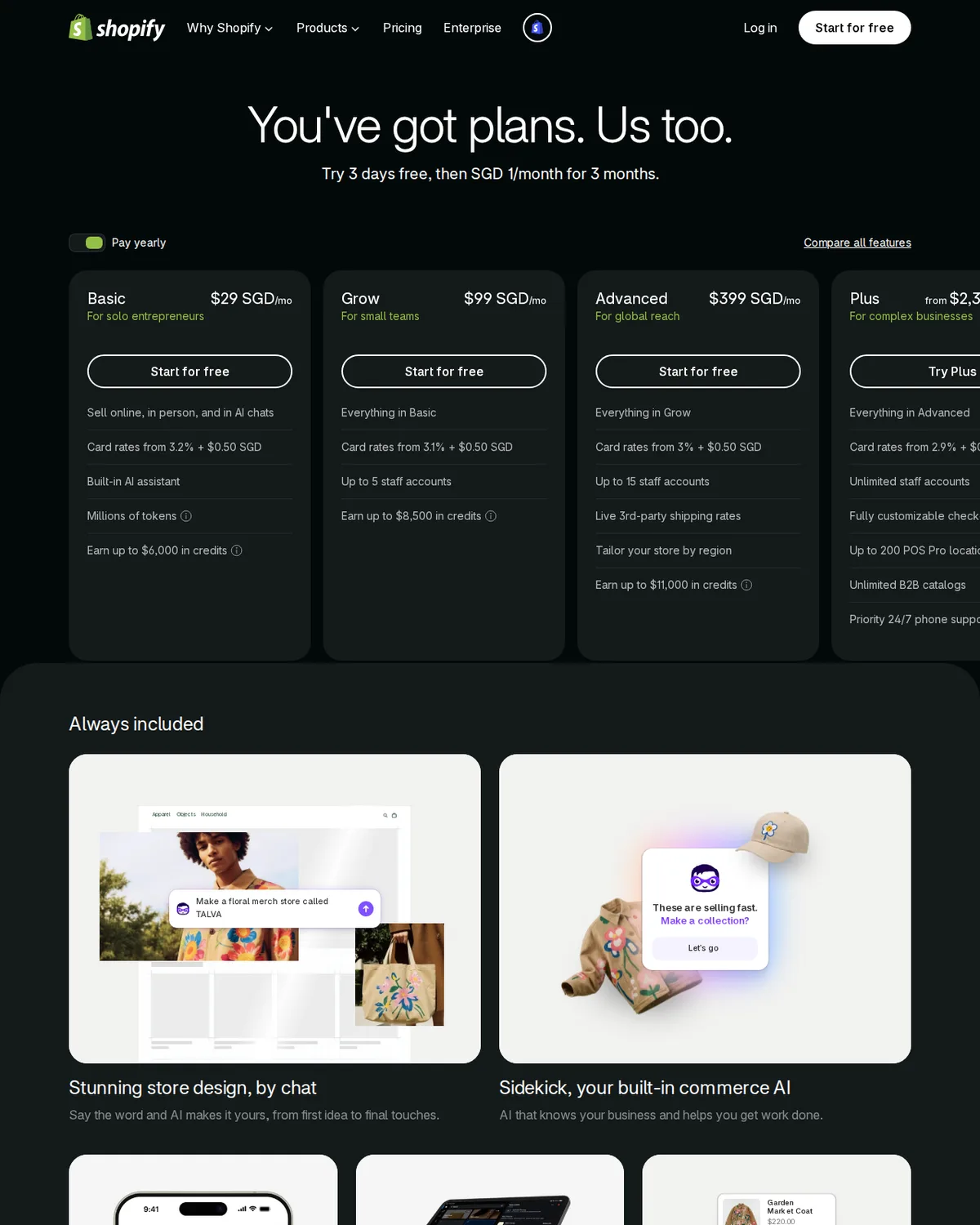
US pricing for the shopify basic plan is $39 per month with monthly billing, or $29 per month billed yearly. The yearly rate is about 25% lower, but the cash-flow commitment is different: you pay for the year rather than keeping a monthly subscription expense.
At those rates, yearly billing means $348 for the year, compared with $468 across twelve monthly payments. A new merchant may reasonably prefer monthly billing while testing demand, even though the annual option costs less overall.
Shopify’s current pricing page showed a three-day free trial followed by a $1-per-month introductory offer for three months. Treat that as an offer to verify, not a permanent entitlement. Vify’s Shopify free trial guide explains what to check before starting.
Prices differ by country and currency, so do not assume the US subscription price applies to your store. Build your budget using your local subscription price, payment charges and any apps you intend to keep.
When comparing billing options for the shopify basic plan, ask whether the annual saving outweighs the value of retaining cash today. Plan names, prices and fees change, so readers should confirm current details on Shopify’s pricing page before subscribing or switching.
Transaction Fees and Card Rates on Basic Shopify
Two separate charges can affect payments on the shopify basic plan: the payment provider’s processing rate and Shopify’s additional third-party transaction fee. Confusing them can make a low subscription price look cheaper than the store’s actual operating cost.
Card processing rates are the charges associated with processing a card payment. They depend on your country and plan. Third-party transaction fees are the additional Shopify charges that apply when you use an outside gateway instead of Shopify Payments.
The shopify basic plan charges an extra 2.0% when you use an external gateway. That additional fee is waived with Shopify Payments where available. Grow’s third-party transaction fee is 1.0%, which becomes relevant when comparing the cost of staying on Basic.
For a location-specific example, Shopify’s pricing page viewed from Singapore listed card rates starting at 3.2% + $0.50 SGD on Basic. It showed percentage rates from 3.1% on Grow, 3.0% on Advanced and 2.9% on Plus. These illustrate how rates can fall across tiers; they are not universal rates for every country.
Shopify Payments is not available everywhere, including India and Pakistan. Merchants there using external gateways pay Basic’s additional 2.0% fee alongside their provider’s charges.
- Confirm whether Shopify Payments is available where your business operates.
- Check the processing rates for your country and chosen provider.
- Calculate Shopify’s additional fee separately if you need an outside gateway.
Staff Accounts, Reports and Other Limits of the Shopify Basic Plan
Two staff accounts
The shopify basic plan allows two staff accounts, including the owner. For a solo founder, that leaves room for one other person. For a two-person business, it means both available places are already occupied.
You cannot buy add-on seats on Basic. Grow supports up to five staff accounts, while Advanced supports up to fifteen. If a third person needs an account, the decision is about access requirements rather than whether your sales have reached a particular milestone.
Reporting depth
The shopify basic plan includes finance reports, product analytics and Live View. These can help you monitor the store, but Basic does not include professional reporting tools such as a custom report builder or cohort analysis; those require Grow or higher.
Before upgrading for reports, write down the questions you cannot answer today. “I need better reporting” is vague; “I need to compare customer groups over time” identifies a concrete requirement.
Google Analytics 4 can be a workaround for some analytical needs. It is not the same as having Shopify’s professional reports, so evaluate whether it answers your actual questions rather than assuming it replaces every missing report.
Other limits to check
Review the whole workflow, not just the subscription checklist. Basic Shopify may provide the storefront you need while leaving operational work to apps or manual processes. Check app subscriptions, supported payment providers and the number of people who need access before choosing annual billing.
Keep a short list of recurring workarounds. If the same missing capability creates extra work every week, it deserves a place in your next plan review.
Shopify Basic vs Starter vs Grow
The useful comparison is whether you need a full storefront, more staff access or deeper reports. The shopify basic plan sits between link-based selling on Starter and the additional team capacity and reporting available on Grow.
| Feature | Starter | Basic | Grow |
|---|---|---|---|
| Monthly subscription | About $5 | $39 monthly, or $29/month billed yearly | $105 monthly |
| Selling setup | Link-based selling; no online store theme | Full online store | Full online store |
| Staff accounts | Check current plan details | 2, including owner | Up to 5 |
| Third-party transaction fee | Check current plan details | 2.0% | 1.0% |
| Reporting distinction | Check current plan details | Finance reports, product analytics, Live View | Professional reports |
If your main decision is whether you need a standalone storefront at all, read the Shopify Starter plan guide for the detailed Starter-versus-Basic comparison.
For Advanced and Plus, use the broader pricing guide linked above. Keeping those decisions separate makes it easier to compare the capabilities you need now, rather than treating the most expensive tier as the destination for every store.
Is the Shopify Basic Plan Enough for Your Store?
The shopify basic plan is usually sufficient when a small team needs a full store and can work within its reporting and payment constraints. Match it to your operating model rather than choosing solely by revenue.
- Solo founder or first store: Basic covers the core storefront, checkout and promotional tools while you establish demand.
- Dropshipper testing products: Unlimited products and App Store access support testing, but budget separately for any apps your workflow requires.
- Two-person team: The account allowance fits, but there is no spare seat for another person.
- Growing team: A third person needing an account is a direct reason to consider Grow.
- Mostly third-party gateway payments: Compare fee savings carefully, because the extra 2.0% can outweigh subscription savings.
A useful rule of thumb is that the shopify basic plan is often enough for stores below about $5,000–$10,000 in monthly sales. This is a planning guideline, not a Shopify rule, and it should not override a clear requirement for staff access or professional reporting.
A store below that range might still need Grow because of its team structure. Another store above it might remain comfortable on Basic because it uses Shopify Payments and has simple reporting needs.
If you start small and reassess later, consult Shopify’s billing help before changing plans so you understand the billing implications.
When to Upgrade From Basic Shopify
Upgrade from the shopify basic plan when a measurable saving or a specific operational need justifies it. “We are growing” is a reason to review the plan, not automatically a reason to change it.

At monthly billing, Grow costs $66 more than the shopify basic plan: $105 minus $39. Its third-party transaction fee is one percentage point lower. Dividing $66 by 0.01 gives a break-even point of roughly $6,600 per month in third-party gateway sales.
At $50,000 per month through an outside gateway, Basic’s 2.0% additional fee is $1,000. Grow’s 1.0% would be $500, a $500 fee difference before accounting for the higher subscription. Your gateway’s own processing charges remain a separate cost.
This calculation isolates the third-party fee saving. It does not apply in the same way if you use Shopify Payments, and yearly billing changes the subscription comparison. Confirm your local figures on Shopify’s official pricing page.
- You need a third staff account.
- You need professional reports, custom reporting or cohort analysis.
- Your external-gateway fee savings exceed the subscription increase.
- Repeated workarounds cost more time than the higher plan would save.
Revisit these signals before renewing the shopify basic plan, especially if your staffing or payment mix has changed. Use actual recent sales through your external gateway, not total revenue indiscriminately.
If your requirements eventually extend well beyond this comparison, review Shopify Plus costs as a separate decision rather than treating Plus as the automatic next step.
Handling Returns on the Shopify Basic Plan
As sales grow, returns can become one of the first operational tasks to consume your two-person team’s time. The shopify basic plan gives you full App Store access, so improving that workflow does not have to start with changing your Shopify subscription.

Yanet Returns & Exchanges provides a customer-facing Return Portal for submitting return and exchange requests. Merchants can review, approve or reject those requests in a dashboard, rather than collecting the initial request details through separate conversations.
For a store on the shopify basic plan, the practical goal is a clearer process. Yanet supports rules based on order date, fulfillment date, product tags and collections, plus custom return and exchange reasons. Email notifications and support for 16 languages help you structure customer communication.
Refund options include store credit and discount codes, with gift code refunds on paid plans. Same-product/variant exchanges are available on Free; different-product/variant exchanges require Professional or above. Supported carriers include EasyPost, FedEx and Shippo.
Choose the app plan separately
These are Yanet’s app prices, not Shopify subscription prices. Choose according to request volume and the exchange or automation features you need.
- Free: $0, with 6 requests per month.
- Professional: $9.99 per month, with 80 included requests, then $0.20 per extra request. Includes a 14-day free trial.
- Ultimate: $29.99 per month, with unlimited requests and automation approval. Includes a 14-day free trial.
Set up the customer-facing portal
Before enabling the portal, decide which products qualify and which reasons customers should be able to select. Our guide explains how to set up a self-service return portal with a clear customer journey.
- Open Settings > Setup the Portal.
- Enable the portal and customize its URL.
- Upload banners and adjust the font and button color.
- Show a policy link so customers can review your conditions.
- Configure eligibility rules and custom reasons around your return policy.
For example, use your policy’s eligibility window to choose an order-date or fulfillment-date rule. Then review the request reasons you collect: specific reasons give your team more useful context than a broad “other” option alone.
Conclusion
The shopify basic plan provides a full storefront, unlimited products and useful marketing tools. Its main decision points are two staff accounts, a 2.0% additional fee for external gateways and the absence of professional reports.
Keep the shopify basic plan while it fits your team and payment economics; upgrade when account access, reporting or measurable fee savings justify the difference. For returns, start by improving the process: try the free plan of Yanet’s returns and exchanges app to give customers a dedicated place to submit requests.
FAQ
How much is the Shopify basic plan?
US pricing is $39 per month billed monthly, or $29 per month billed yearly. Prices vary by country and currency, and introductory offers can change. Confirm the current local price before subscribing.
How many staff accounts does the Shopify Basic plan include?
Basic includes two staff accounts, counting the owner. There are no add-on seats on Basic. Grow supports up to five staff accounts if your team needs more access.
Does the Shopify basic plan have transaction fees?
Basic charges an additional 2.0% transaction fee when you use an external payment gateway. That additional fee is waived when using Shopify Payments where available. Card processing charges are separate and depend on your location and payment arrangement.
Can I upgrade from Shopify Basic later?
Yes, Shopify lets you change your plan through the billing settings in your admin. Check Shopify’s billing help for the current process and billing implications before making the change.