

An order tracker shopify customers can use themselves gives them somewhere to check shipment progress before emailing your team. The challenge is choosing the right approach: Shopify’s standard updates, carrier links, manual support, or a dedicated app. This guide compares those options and walks through a Yanet setup. It also separates tracking questions from requests to cancel an order on Shopify, which need a different workflow.
Why Your Store Needs an Order Tracker Shopify Customers Can Use Themselves
A “where is my order?” email rarely ends with reading one tracking number. Your team checks the order, identifies the carrier, interprets its latest update, and explains what happens next. Repeat that throughout the day, and routine status questions interrupt work that needs human judgment.
A useful order tracker shopify setup gives customers proof of progress. “Info received” means a label exists but pickup is still pending; “In transit” means the shipment is moving. Explaining these stages is more helpful than showing an unexplained tracking code.
Tracking also belongs in your post-purchase experience. Customers should know where to look, what the latest update means, and when to contact support. A tracker cannot resolve every delay, but it can make the next action clearer.
Keep the boundary clear: tracking explains shipment progress; returns handle what happens when a customer wants to send something back. Delivery confirmation does not replace a return policy, and a tracking exception should not automatically become a refund decision.
What to Look for in a Shopify Order Tracking App
Before comparing an order tracker shopify merchants might install, list your actual support problems. Missing updates, confusing carrier names, and hard-to-find tracking links require different fixes. Use this checklist when evaluating each order tracking app.
- Automatic carrier detection: Check whether the app identifies carriers and lets staff correct an incorrect match.
- Branded tracking page: Look for a page on your store that customers can find and use easily.
- Proactive status emails: Check which shipment events trigger messages and whether you can edit their content.
- Estimated delivery date: Understand where the estimate comes from and what happens when one source is unavailable.
- Exceptions and failed deliveries: Look for clear statuses and a practical way for staff to review problems.
- Multiple languages: Check supported languages and how untranslated customer-facing text behaves.
- Dropship support: If relevant, check whether supplier-related origin details can be hidden.
- Analytics: Look for shipment status summaries and transit information that help you spot recurring problems.
- Privacy: Review the Data Processing Agreement, record-deletion options, and staff access controls.
- Quota fit: Compare shipment allowances with your store’s needs, including busier periods.
The best order tracker shopify choice is not necessarily the option with the longest feature list. Prioritize the capabilities your team will configure, maintain, and use when a shipment goes wrong.
4 Ways to Offer an Order Tracker Shopify Customers Can Access
1. Shopify shipping emails and the order status page
Shopify generally sends shipping updates with tracking information when you add it to a fulfillment, and customers can open an order status page. Start by reviewing that existing experience before adding another tool. Consult the Shopify Help Center for guidance relevant to your store.
This basic order tracker shopify approach may be enough when customers can find their updates and your team receives few tracking questions. Test the customer journey rather than assuming the information is easy to locate.
2. Send raw carrier tracking links manually
You can copy a carrier link into an email or support reply. It is a straightforward way to answer an individual question, but customers leave your store to interpret the carrier’s information. Your team also has to find and send the correct link each time.
3. Answer every tracking ticket manually
Manual replies let staff explain unusual circumstances and provide context. However, they make your team the lookup service for routine questions. Keep this approach for cases that need investigation rather than making it the default route for every customer.
4. Use a dedicated order tracking app
A dedicated order tracker shopify setup can combine a branded tracking page with shipment notifications and exception monitoring. Capabilities vary, so compare the actual lookup experience, supported messages, privacy controls, and shipment allowance rather than assuming every app works alike.
| Approach | Branded page on your store | Proactive status emails | Effort for your team |
|---|---|---|---|
| Shopify standard updates | Basic order status experience | Basic shipping updates | Low for routine updates |
| Manual carrier links | No | No, not through this method alone | High as requests increase |
| Manual support replies | No, not through replies alone | No, unless staff send them | High |
| Dedicated app, such as Yanet | Yes, with Yanet’s branded tracking page | Yes, for configured Yanet shipment events | Setup and ongoing monitoring |

Browse the Orders and shipping category of the Shopify App Store to compare options. Use the same checklist for each candidate, and test a real shipment before committing to a workflow.
Yanet Order Tracking: Features of a Full Order Tracker for Shopify
Yanet Order Tracking is one order tracker shopify merchants can consider for shipment tracking, customer notifications, and shipping protection in one place. It is one of several Yanet apps. Here is what its documented features cover.
Sync orders and automatic carrier detection
Yanet syncs Shopify orders and automatically detects carriers. Its Orders view shows the tracking number, carrier, last checkpoint, transit time, shipment status, and payment and fulfillment status. Staff can search by order name, customer email, or tracking number, filter by status, and export orders.
For an order tracker shopify team managing several carriers, correction tools matter. Carrier matching lets staff fix a wrongly detected carrier, while Settings → Carriers lets them add frequently used carriers to speed up matching.
Branded tracking page
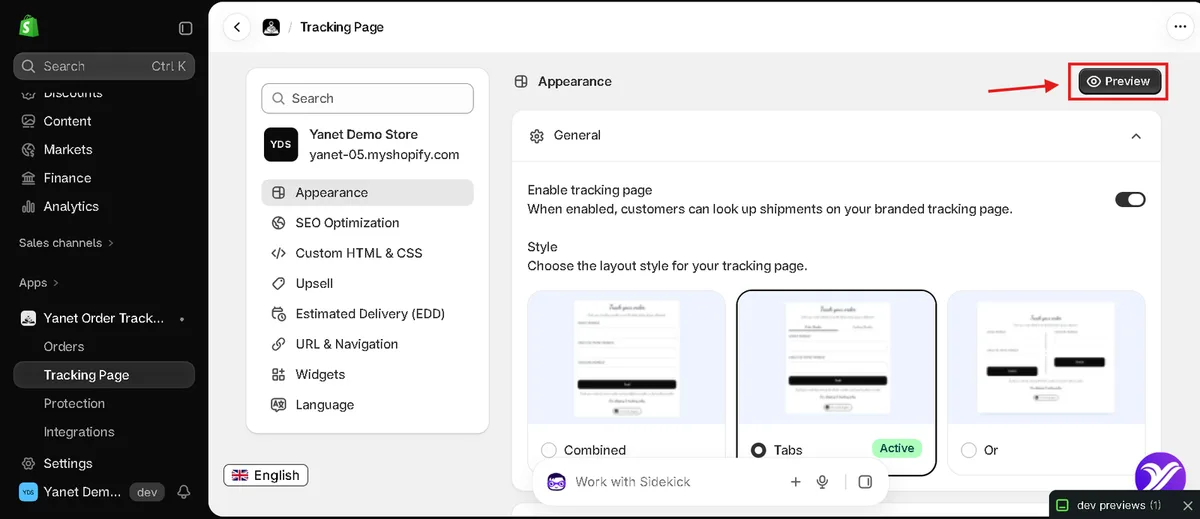
The tracking page offers Combined, Tabs, and Or layouts for customer lookup. You can preview the page, change its app proxy URL, and add it to your store menu. Optional features include product recommendations, SEO title and description settings, and custom HTML and CSS.
This makes the order tracker shopify experience part of your storefront rather than just a carrier link. Yanet also provides lookup forms, tracking buttons, and order status and customer account widgets.
Shipment notifications
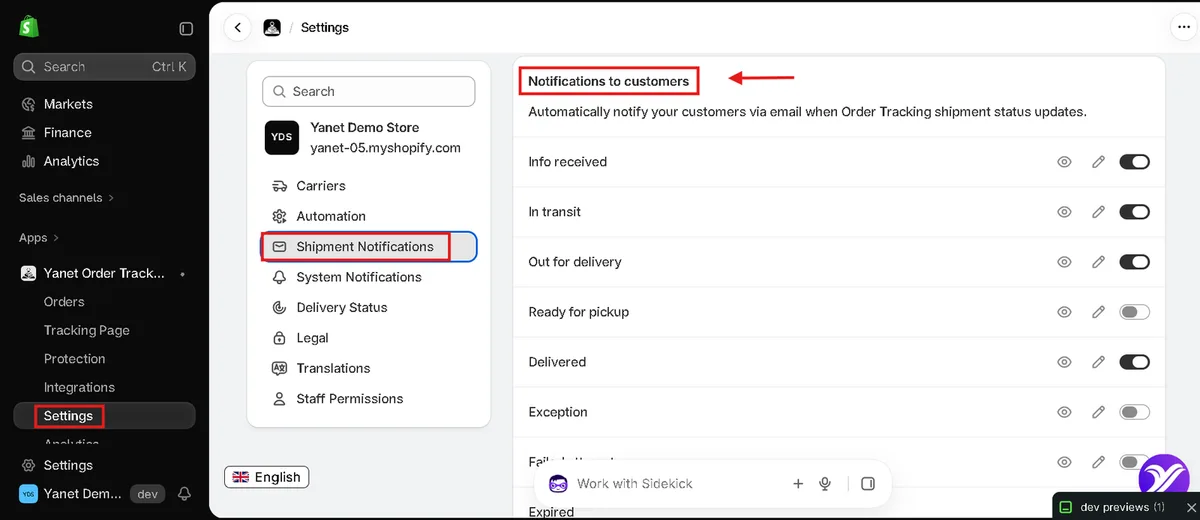
Yanet can email customers for Info received, In transit, Out for delivery, Ready for pickup, Delivered, Exception, Failed attempt, and Expired events. You can preview and edit messages, configure sender details and email branding, set notifications to yourself, and review email delivery status logs.
Estimated delivery date (EDD)
Yanet supports Shopify EDD from fulfillments when available, Carrier EDD, and Custom EDD. Custom estimates use your cutoff time, processing time, business days, excluded non-business days, and destination transit times. Drag sources into priority order; the first available source appears.
An order tracker shopify page should present EDD as an estimate, not a guaranteed arrival promise. An optional Purchase EDD block or embed can also display estimated delivery dates on product pages.
Shipping protection and claims
Customers can optionally add shipping protection at checkout. The selection starts empty, the fee appears as a removable line item, and you set the fee, offer text, and coverage types: loss in transit, delivery delay, and damage. Claims are managed inside Yanet without an external insurer.
Automation, analytics and integrations
Dropship mode masks the origin carrier as “Shipping Partner” and hides warehouse locations on the customer tracking page. If you run a dropshipping store on Shopify, review this setting before sharing your tracking page.
Yanet also supports shipment-status order tags, problem alerts, shipment analytics, webhooks, and API access. Shopify Flow is listed as an Enterprise plan feature. Analytics include shipment totals, status breakdowns, exception rate, average transit days, and a selectable reporting period.
For the post-delivery workflow, Yanet connects with Yanet Returns & Exchanges. That separate app provides a branded return portal, rule-based policies, refund, exchange, and store-credit options, plus return-status emails.
How to Set Up an Order Tracker Shopify Stores Can Launch Today
Build your order tracker shopify workflow around one reliable lookup route first. Then add notifications, delivery estimates, and translations. Follow these steps in Yanet, and test the complete journey before directing customers to it.
-
Install Yanet Order Tracking. Search for “Yanet Order Tracking” in the Shopify App Store, select Install, review permissions, and open the app from Apps in Shopify Admin.
-
Work through the Get Started checklist. Its five tasks cover accepting the DPA, enabling and customizing the tracking page, connecting carriers and reviewing notifications, translating customer-facing text, and reviewing Orders and exceptions. Use the remaining steps below to complete that setup.
-
Sync your orders. Open Orders and click “Sync orders.” Check that a test order has a tracking number, carrier, and shipment information. If your order tracker shopify test order does not appear, confirm that it has a tracking number and sync again.
-
Review carriers. Add frequently used carriers under Settings → Carriers. If an order has the wrong carrier, use Carrier matching to correct it before relying on its shipment updates.
-
Enable and preview the tracking page. Go to Tracking Page → Appearance and turn on “Enable tracking page.” Choose Combined for one lookup form, Tabs for switchable search tabs, or Or for side-by-side search options. Click Preview to check the customer-facing page.

Preview the tracking page as customers will see it. -
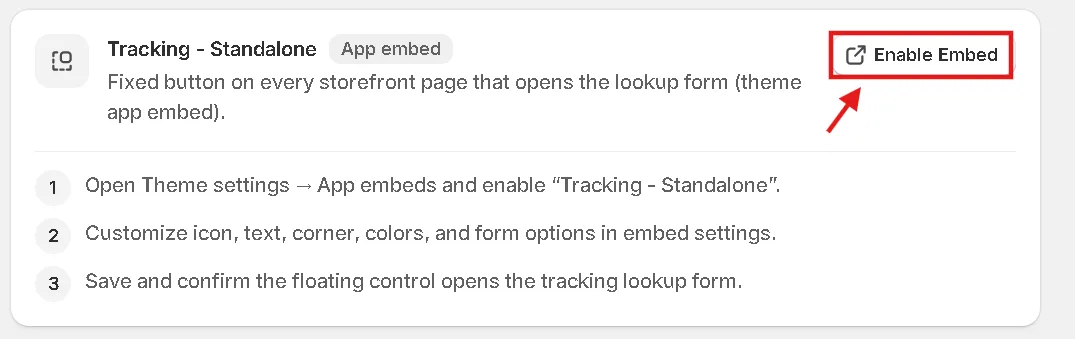
Add the lookup widget or button to your theme. Under Tracking Page → Widgets, choose the Embedded theme block for a lookup form, the Standalone app embed for a fixed lookup button, or the Button theme block linking to the page. Your order tracker shopify setup only needs one clear lookup location initially.

Enable the Standalone embed to show a lookup button on every page. -
Turn on customer shipment notifications. Open Settings → Shipment Notifications and configure the events customers should receive. Use the eye icon to preview each message and the pencil icon to edit it. Review sender details and branding, and decide which problem notifications should also reach your team.

Choose which shipment statuses trigger an email to customers. -
Configure estimated delivery dates. Review Shopify, Carrier, and Custom EDD sources and drag them into priority order. If using Custom EDD, check processing days, cutoff time, excluded dates, and destination transit times. Your order tracker shopify estimate is only useful if those inputs reflect your operation.
-
Review translations and privacy. Translate customer-facing text for your shoppers; untranslated text falls back to English. Review the tracking-page privacy policy link and optional automatic deletion of shipment records as part of your data-handling process.
-
Test with a real order number. Save the setup and try the lookup form with an order number or tracking number. Check the page, widget, carrier, status, and any available EDD. If the page is missing, confirm that “Enable tracking page” is on.
Finish the order tracker shopify test from a customer’s perspective: start on your storefront, find the tracking entry point, and complete a lookup. Ask a colleague unfamiliar with the setup to repeat it. Confusing wording is easier to fix before customers encounter it.
Tips to Cut “Where Is My Order” Tickets Even Further
Launching an order tracker shopify page is the beginning, not the entire process. Assign someone to review shipment problems and keep the information customers see consistent with your actual fulfillment workflow.
Review exceptions before customers chase you
Check Exception, Failed attempt, and Expired orders regularly. An exception can indicate a delay or damage; Expired means there have been no tracking updates for a long time. Investigate the checkpoint and carrier before deciding what to tell the customer.
If a status is not updating, verify the carrier using Carrier matching or Settings → Carriers. Use automatic shipment-status tags to organize follow-up work, and review analytics for recurring problems rather than treating every ticket as an isolated incident.
Keep messages and lookup routes useful
Review notifications and translations whenever your customer-facing instructions change. Your order tracker shopify emails should explain the status and what the customer should do next. Avoid telling someone to contact support immediately for a normal “Info received” update.
Add your tracking page to a header, footer, or store menu, and include its address in customer emails where appropriate. Keep the route recognizable. If you show EDD early through the optional product-page block, make sure its calculation still matches your processing schedule.
Check operating settings as your store changes
Monitor shipment quota usage under Subscriptions or on the home page. Yanet’s Starter plan includes 200 shipments per month. Check usage during busy periods instead of waiting until tracking questions reveal a problem.
If suppliers fulfill your orders, review Dropship mode in your order tracker shopify configuration. Confirm that the customer page hides warehouse locations and shows the masked origin carrier as intended, while retaining a clear explanation of shipment progress.
Give returns and refunds their own next steps
After delivery, the question may change from “Where is my parcel?” to “Where is my money?” Give support staff a consistent explanation of how long Shopify refunds take rather than treating refund timing as another shipment status.
Keep the handoff explicit: tracking is for shipment progress, a return request is for sending an item back, and a refund update concerns the customer’s payment. Separate instructions help customers choose the right route.
For return requests, direct customers to a self-service Shopify return portal. That gives them a relevant next step instead of leaving them on a delivered tracking result with no guidance.
Conclusion
A useful order tracker shopify setup gives customers clear shipment progress and reserves your team’s attention for problems that need help. Compare standard Shopify updates, manual carrier links, individual replies, and dedicated apps against your workload, privacy requirements, and shipment volume.
With Yanet Order Tracking, start by syncing orders, checking carriers, enabling a lookup page, and configuring notifications. Add realistic EDD settings and translations, then test a real order. Keep your order tracker shopify workflow maintained through regular exception reviews.
Try Yanet Order Tracking for shipment visibility. For the next stage of the customer journey, explore Yanet Returns & Exchanges to manage return requests separately from tracking questions.
FAQ
How do customers track an order on Shopify?
Customers can generally use tracking information in shipping updates or open their order status page. If your store uses a dedicated app such as Yanet, you can also direct them to a branded tracking page with an order lookup form.
Do I need an app to add order tracking to my Shopify store?
Not necessarily. Shopify’s standard shipping updates and order status page may cover your needs. Consider an order tracking app when you want capabilities such as a branded lookup experience, configurable shipment-event emails, exception monitoring, or additional delivery-estimate controls.
Can customers track orders without logging in?
Yanet’s tracking page provides a lookup form that customers can use with an order number or tracking number. Test your chosen lookup layout before publishing it so the instructions are clear.
Does Yanet Order Tracking support multiple languages?
Yanet’s tracking page supports English, German, French, Spanish, Dutch, Italian, Vietnamese, Japanese, Chinese, Portuguese, Polish, Romanian, Turkish, Finnish, Russian, Arabic, and Hindi. Text without a translation falls back to English.
How many shipments does the Starter plan include?
The Starter plan includes 200 shipments per month. You can check quota usage under Subscriptions and on the app’s home page.