

The dawn shopify theme is a practical starting point for merchants who want a free, flexible storefront without choosing a specialized design immediately. This review explains its features, how to customize it without code, and where its editor may stop meeting your needs.
You will also learn how to evaluate another theme, switch safely, and prepare your store for returns. The goal is to make the dawn shopify theme work for your business—not to change themes simply because another demo looks better.
What Is the Dawn Shopify Theme?
Dawn is Shopify’s well-known default free theme, built and maintained by Shopify. Available at no cost in the official Shopify Theme Store, it is also a common baseline or reference when comparing other themes.
The dawn shopify theme is built for Online Store 2.0, which supports sections across page templates and app blocks. These building blocks let you arrange content through the theme editor rather than coding every layout change. Shopify’s themes documentation explains the broader theme system.

A theme controls your storefront’s design and layout. A Shopify plan is separate: choosing the shopify dawn theme does not replace your subscription or remove other business costs. “Free” refers to the theme itself, not your plan, domain, apps, or every cost of running a store.
Before choosing a visual direction, review Shopify store examples for ideas about product presentation and page structure. Focus on what helps customers understand the products, rather than assuming every design you see can be reproduced with Dawn’s editor.
Dawn Shopify Theme Features: What You Get Out of the Box
Sections and blocks on every page
The dawn shopify theme uses sections and blocks to organize page content. In the theme editor, you can add and arrange supported sections, then add or reorder the blocks available inside them. Available choices depend on the template and section you are editing.
App blocks allow compatible app content to sit within supported areas of your theme. However, installing an app does not mean its content belongs everywhere. Place each block where it helps a customer complete a task.
Theme settings for brand styling
Theme settings provide controls for colors, typography, layout, buttons, and product cards. Check the editor in your current version of the theme for the exact controls. If you are evaluating dawn theme shopify styling options, inspect those settings before promising yourself a particular design.
Start with a restrained palette and readable typography. Apply changes consistently, then check product pages as well as the homepage. A button color that looks attractive beside a banner still needs to remain clear beside product information.
Clean, flexible, general-purpose design
The dawn shopify theme favors simple layouts rather than heavy visual effects. That makes it adaptable to many catalogs, particularly when strong photography and clear product information do most of the selling. Its general-purpose structure is a starting point, not a finished brand identity.
Free, maintained by Shopify, and a safe reference theme
Because Shopify maintains Dawn, it is a useful reference for understanding the standard theme-editing workflow. You can explore sections, blocks, and templates before deciding whether another design is necessary. Still, assess the current version against your requirements rather than assuming maintenance guarantees every feature you need.
How to Customize the Shopify Dawn Theme Without Code
Customize the dawn shopify theme around a customer’s journey: understand the store, find a product, evaluate it, and buy. Prepare your photos, product descriptions, and navigation labels first. Otherwise, you may spend time polishing a layout that does not suit your real content.
- Open Online Store > Themes. Identify the theme you want to edit.
- Duplicate the theme or use an unpublished copy. Keep the live storefront untouched while you experiment.
- Click Customize. This opens the theme editor for your chosen copy.
- Set brand basics. Add your logo and choose colors and fonts using the available settings.
- Build a focused homepage. Choose a few purposeful sections that introduce your products and guide shoppers onward.
- Check product and collection pages. Use real products with long titles and variants, not only your simplest examples.
- Simplify navigation. Use clear labels and remove unnecessary choices.
- Preview mobile. Inspect text, images, menus, and the route to purchase.
- Publish when ready. Review your changes before replacing the live theme.

For broader guidance on organizing your storefront, use the Shopify website builder guide. Keep your first editing session focused on structure; detailed styling is easier once the main pages work.
Use your own content first
The dawn shopify theme can look very different with your catalog than with demonstration content. Upload real photos with consistent proportions and use actual product names early. Check whether important details remain readable when titles wrap or images have different backgrounds.
For example, test a short product name beside your longest one on a collection page. When reviewing shopify dawn theme layouts, this reveals more than inspecting a grid filled with equally sized sample titles.
Keep the page light
Give every section a job. A homepage might introduce your main collection, explain a useful product benefit, and direct customers toward shopping. Avoid repeating the same message through several sections simply because the editor makes adding them easy.
Compress images appropriately and keep only apps you genuinely need. The dawn shopify theme is not protected from the effects of unnecessary additions. After installing an app, review the storefront again instead of assuming the experience is unchanged.
When code starts to matter
Some layouts go beyond what the editor can achieve. If you have exhausted the relevant controls, Liquid changes or developer help may be necessary. Write down the exact outcome first, including which page needs it and why the existing layout is insufficient.
Always make code changes on a copy. Before requesting custom work, confirm whether a simpler arrangement solves the same customer problem without creating something you must maintain.
Dawn Theme Shopify Pros and Cons
Use this dawn theme shopify comparison to separate useful strengths from trade-offs. The right choice depends on how closely the available structure matches your requirements, not how many settings you can change.
| Area | Where Dawn helps | Where to be careful |
|---|---|---|
| Cost | The theme is free. | Your plan, domain, apps, and custom work remain separate costs. |
| Customization | Sections, blocks, and settings support no-code changes. | The editor does not offer unlimited layout freedom. |
| Design | A simple foundation suits many catalogs. | A distinct identity requires thoughtful content and styling. |
| Maintenance | Shopify builds and maintains the theme. | Custom changes still need review and testing. |
| Apps and add-ons | App blocks support compatible app content. | Unnecessary additions can complicate the storefront. |
| Growth | Standard layouts can remain useful as a business grows. | New requirements may call for another structure. |
The dawn shopify theme is strongest when you value a straightforward foundation and can work within its structure. A limitation matters only when it prevents something your store genuinely needs.
Limits of the Dawn Shopify Theme
The dawn shopify theme deliberately starts with a simple design. That simplicity can reduce distractions, but it also means merchants must supply the differentiation through photography, copy, branding, and thoughtful page organization.
- Similar-looking stores: changing only colors may leave your storefront looking familiar rather than distinctive.
- Specialized requirements: highly custom product pages, advanced merchandising, or complex navigation may need an app, custom code, or another theme.
- Editor boundaries: available settings determine how far you can go without development.
- Content differences: your images, titles, and descriptions may not fit a demo’s proportions.
- App overhead: adding many apps can slow the storefront and introduce more elements to check.
These are evaluation points, not claims that a particular feature is absent. Always check the current version’s feature list before assuming a feature exists. Compare the live editor with your written requirements rather than relying on an older review.
A useful dawn theme shopify test is to build one representative product page before styling everything else. Include a difficult product, not just your easiest seller. If that page works clearly within the available controls, you have stronger grounds for continuing.
When to Stay With Dawn and When to Switch Themes
Stay with Dawn if
Stay with the dawn shopify theme if standard layouts meet your needs, your budget is limited, and you want a Shopify-maintained foundation. A small or growing catalog does not automatically require a different theme.
Before switching, identify the actual problem. Inconsistent images, confusing navigation labels, and weak product descriptions can follow you into any new design. Fixing those issues may make the shopify dawn theme sufficient without a rebuild.
Switch themes if
Consider switching when a written requirement cannot be met through the editor. Your brand may need a distinct layout, or a content-led store or very large catalog may benefit from a different structure. Describe the customer task the new design must improve.
Compare the dawn shopify theme with free Shopify themes such as Refresh, Colorblock, Craft, Studio, Sense, Taste, Spotlight, Ride, Origin, Crave, and Publisher. Check each current listing and test your content rather than choosing from demo appearance alone.
Use the same evaluation checklist for every candidate. For example, check how each handles your product titles, collection organization, and required page content. Consistent testing makes differences easier to judge.
Paid theme or developer?
Consider a paid theme or developer only when a clear requirement remains unresolved. Buying another design does not guarantee that it solves your particular problem. Ask whether the requirement is covered directly or would still need custom work.
Theme cost is only one layer beside your plan, apps, and domain. Review the Shopify pricing guide before committing to a larger storefront budget.
For a dawn shopify theme customization project, request a defined scope and a testing plan. Compare the ongoing responsibility of custom work with the effort of adopting another theme.
How to Switch From the Dawn Shopify Theme Safely
Replacing the dawn shopify theme is a storefront project, not simply a design toggle. Theme settings and section content may need to be re-entered in the new theme, so leave time to rebuild and inspect key pages.
- Keep Dawn in your theme library. Preserve it as a reference for your existing layout and settings.
- Add the new theme as an unpublished copy. Build without changing the live experience.
- Rebuild theme-specific content. Check settings, section text, images, and page arrangements.
- Test core journeys. Review navigation, product pages, mobile layouts, and the cart.
- Check app blocks. Review apps that rely on theme blocks and confirm their placement.
- Publish after review. Inspect the live storefront again and retain the old theme for reference.
Use the official Shopify Theme Store to inspect current listings before selecting a replacement. Verify the features you need instead of assuming every theme provides the same controls.
Keep a short migration checklist with each page and app placement marked as reviewed. Record what worked in the dawn shopify theme so useful details are not lost while rebuilding.
Make Your Dawn Shopify Theme Store Ready for Returns With Yanet
A clear storefront also needs a clear post-purchase process. For a dawn shopify theme store, Yanet provides a branded, customizable self-service return and exchange portal where customers can submit requests.
Yanet Returns & Exchanges supports per-product, rule-based return and exchange policies and automated email notifications at each step of a request. It supports 16 languages.
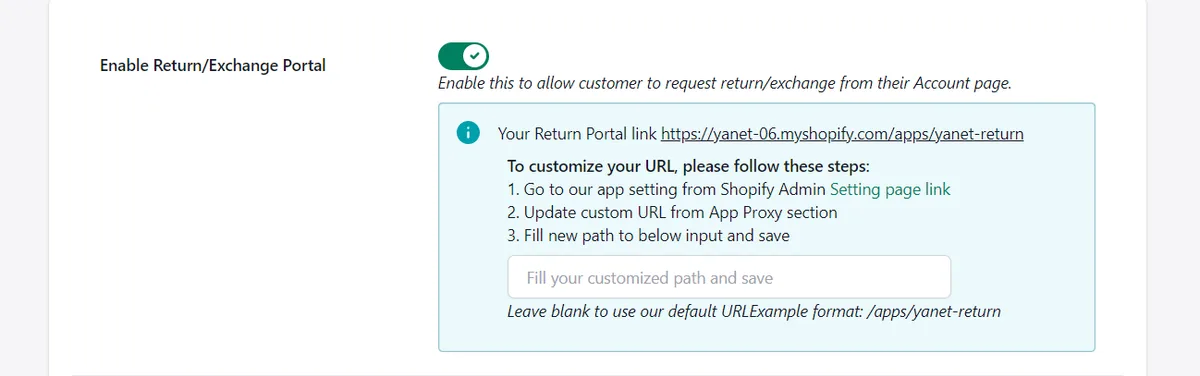
To set up the portal, open the app, go to Setting > Setup the Portal, and enable the Return/Exchange Portal. You can optionally upload banners, using a single image or an auto banner slider.
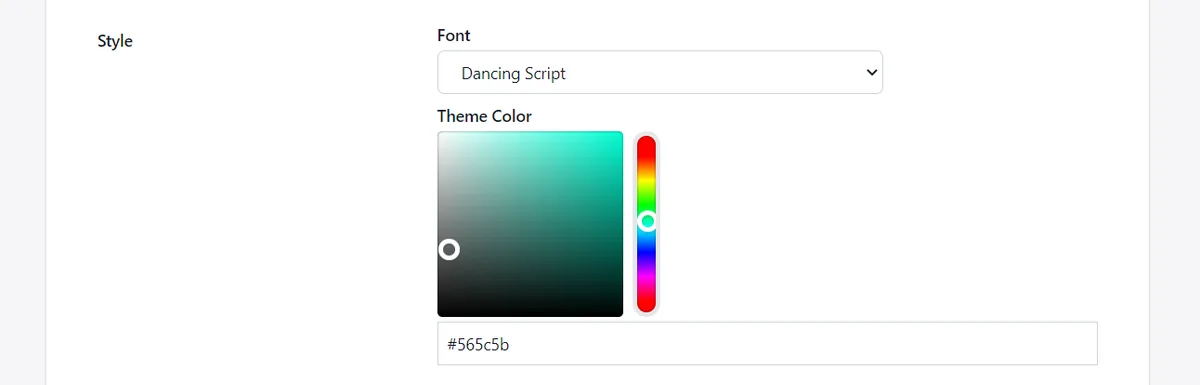
Under Portal style, change the text font and button color so the portal matches your Dawn theme.
When the Return & Exchange policy option is enabled, a policy link appears on the portal. Use the Shopify return portal guide to plan how the portal fits your customer-facing returns process.
Refund options can include the original payment method, store credit, discount codes, and gift cards; some options are available on paid plans. Shipping carrier integrations such as FedEx, Shippo, and EasyPost support return labels.
The free plan has a limited number of monthly requests and supports exchanges for the same product or variant. Paid plans add exchanges to a different product. Check those boundaries against your return policy before choosing a plan.
For your shopify dawn theme setup, keep the portal’s wording and visual choices consistent with the storefront. During a dawn theme shopify redesign, include the portal in your review so the post-purchase experience remains coherent.
Conclusion
The dawn shopify theme offers a free, Shopify-maintained foundation with sections, blocks, and styling controls. Start with real content, customize an unpublished copy, and test product pages and mobile layouts before publishing.
Stay with Dawn while its structure meets your needs. Switch only when a specific requirement justifies another layout or development work, and review the full storefront before making the change live.
To support customers after checkout, try Yanet Returns & Exchanges and configure a return portal that matches your store and policies.
FAQ
Is the Dawn Shopify theme free?
Yes. Dawn is available at no cost in the official Shopify Theme Store and is built and maintained by Shopify. That means the theme itself is free, not that running a Shopify business has no costs. Your Shopify plan, domain, apps, and any developer work are separate considerations. Evaluate your overall operating budget rather than treating the theme’s price as the total cost of your storefront.
Is the Dawn theme good for beginners?
Dawn can be a practical choice for beginners who want a straightforward foundation and no-code editing tools. Its sections, blocks, and theme settings let you explore page organization without starting with custom development. However, you still need clear product information, suitable images, and useful navigation. Begin with a few essential pages, test them using real content, and check the current editor before assuming a particular layout is available.
Can I customize the Shopify Dawn theme without coding?
Yes. You can use the theme editor to arrange supported sections and blocks and adjust available styling settings. Check your current theme version for the exact controls. Start with your logo, colors, typography, and page structure, then preview your actual products on desktop and mobile. If a required layout goes beyond the editor’s options, you may need Liquid changes or developer help. Always experiment on a copy.
Can I switch from Dawn to another theme later?
Yes. Add the replacement as an unpublished theme and build it before changing your live storefront. Theme settings and section content may need to be entered again, so do not assume the design transfers automatically. Check navigation, product pages, mobile layouts, the cart, and apps that use theme blocks. Publish after testing, then keep your previous Dawn theme in the library as a reference for the earlier setup.