

This Shopify review examines whether the platform fits your products, budget, and day-to-day workload in 2026. It covers setup, selling tools, costs, limitations, and the operational details that matter after customers place orders.
Unlike Shopify reviews built around a score, this evaluation uses public documentation and merchant-focused criteria, not hands-on testing. Prices and payment terms change, so confirm current details before committing.
Shopify Review 2026: What Shopify Is and How It Was Judged
Shopify is a hosted, all-in-one ecommerce platform combining hosting, checkout, store administration, themes, and apps. You build and operate the store without maintaining its underlying servers.
This Shopify review considers ease of setup, total cost, flexibility, scaling, the app ecosystem, and post-purchase operations such as returns. The question is not whether Shopify has the longest feature list. It is whether you can run your particular business without excessive expense or workarounds.

Shopify Pros and Cons at a Glance
Use this Shopify review summary as a starting point, then check the trade-offs against your actual workflow. Every list of Shopify pros and cons looks different once your own products and budget are added.
Seven advantages
- Hosted infrastructure without server maintenance.
- Themes that reduce coding requirements.
- A broad app ecosystem.
- Integrated checkout and payment options.
- Plans supporting different growth stages.
- Website, POS, and channel selling.
- Documentation and specialist support resources.
Five limitations
- Costs extend beyond the subscription.
- Third-party gateway transaction fees can apply.
- Apps introduce expense and dependencies.
- Advanced customization may require development.
- Moving platforms later requires planning.
7 Shopify Pros
1. Everything in one hosted platform
Shopify handles hosting and platform security, removing server maintenance from your launch checklist. You do not need to select hosting infrastructure or maintain the underlying ecommerce software yourself. For a small team, that means fewer technical responsibilities competing with product sourcing, customer service, and fulfillment.
The benefit in this Shopify review is reduced infrastructure work, not zero responsibility. Merchants still need sensible account permissions, secure credentials, accurate store settings, and careful app choices. Hosted software simplifies the technical foundation, but your team remains responsible for operating the business and protecting access to it.
2. Themes and design without code
Themes give merchants a starting structure instead of a blank development project. You can build a storefront around product information, images, navigation, and available theme settings without writing every page from scratch. This is useful when a clear, functional launch matters more than a completely original interface.
For this Shopify review, the advantage is faster progress toward a usable store. Choose a theme based on your catalog rather than its demonstration photography. Check how it presents long product titles, variants, collections, and mobile navigation before you decide.
3. A huge app ecosystem
Shopify’s app ecosystem lets merchants add capabilities rather than commission every specialized workflow. Common needs include customer reviews, email, shipping, and returns. This makes the platform adaptable when a business grows beyond its original setup or discovers an operational requirement that was not obvious before launch.
The useful distinction in this Shopify review is between flexibility and necessity. An available app is not automatically an app you need. Write down the problem first, then compare permissions, ongoing cost, support, and compatibility. Add tools gradually so you can tell whether each one genuinely removes work.
4. Built-in payments and checkout
Shopify brings checkout into the same platform as orders and store administration. Shopify Payments is available in supported locations, while payment availability and requirements depend on your business circumstances. Keeping these pieces together can simplify setup compared with assembling a storefront and payment workflow separately.
A practical Shopify review must still distinguish convenience from universal suitability. Confirm whether Shopify Payments supports your location and business category, then check the payment methods relevant to your customers. Walk through checkout with a representative order before launch.
5. Room to grow through plans up to Plus
Shopify offers plans including Starter, Basic, Grow, Advanced, and Plus. Plus is custom-priced and intended for high-volume or enterprise businesses. The broader advantage is a platform with options for different stages, rather than a setup you necessarily need to replace as soon as operations become more demanding.
That does not mean upgrading should be automatic. This Shopify review recommends choosing against current requirements and a realistic next stage. A growing catalog alone is not a useful upgrade strategy; a documented operational requirement gives you a much clearer basis for the decision.
6. Sell beyond your website
Shopify supports selling through an online store, POS, and additional channels. For merchants combining a website with in-person selling or other sales surfaces, this can make it easier to build operations around one commerce platform instead of treating each location as an entirely separate business.
The qualification in this Shopify review is that channel availability and requirements need checking before you commit. List where you actually intend to sell, then verify the relevant setup, hardware, payment, and regional requirements. Evaluate the real combination you need rather than the longest list of channels.
7. Learning resources and specialist help
Shopify’s help center, experts, and partner ecosystem provide routes to documentation and specialist assistance. That matters when your team encounters unfamiliar tasks such as organizing a catalog, adjusting a theme, or planning a migration. You are not limited to figuring out every operational question without reference material.
This Shopify review treats those resources as support for decision-making, not a promise that every issue has an immediate answer. Start with documentation, define the problem clearly, and seek specialist help when the work exceeds your skills. When hiring, specify deliverables so you can maintain the result afterward.
For another overview of the platform’s building blocks, read our sister site Vify’s guide to key Shopify features.
5 Shopify Cons to Weigh Before You Commit
1. Costs stack up beyond the subscription
The subscription is only one part of running a store. Apps, a domain, a paid theme, payment costs, and operational services can change the total considerably. A platform can look affordable at the plan level while becoming less comfortable once you assemble the actual setup your business needs.
A useful Shopify review therefore starts with a store budget, not just a plan comparison. Separate launch expenses from recurring commitments, and distinguish essential tools from optional improvements. Include slower sales periods in the exercise, because a setup that only works in your best month leaves little room for surprises.
2. Third-party gateways can mean additional fees
Using a third-party payment gateway instead of Shopify Payments can introduce additional transaction fees. Those charges are separate from the payment provider’s own processing costs. Applicable terms depend on your setup, so check current documentation rather than relying on a remembered percentage or an older comparison article.
This Shopify review recommends checking payment eligibility before selecting a plan. If you need a particular gateway, calculate the combined payment costs using representative order values. Comparing Shopify pros and cons without including your actual gateway can distort the budget, so record which charges come from Shopify and which come from the provider.
3. Filling gaps can create app dependency
An app ecosystem is valuable, but relying on several apps introduces recurring costs and additional configuration. Each tool may have its own settings, support process, and responsibilities. When multiple apps touch the same workflow, understanding which one controls a particular result can become an operational task in itself.
The caution in this Shopify review is to avoid building a complicated stack before proving you need it. Begin with the native workflow, identify a specific gap, and add a tool only when the improvement is clear. Document what each app does and who manages it.
4. Deeper customization can require development
Theme settings are useful, but they do not make every design or workflow possible without code. A highly specific storefront requirement may involve theme development or specialist assistance. The gap becomes more important when the desired experience differs substantially from the structure offered by your chosen theme.
For this Shopify review, the practical response is to separate requirements from preferences. Write down what customers must be able to do, then distinguish that from visual details you would simply like to have. Ask a developer to assess essential requirements before committing to a theme.
5. Moving away later takes effort
Leaving any established commerce platform involves more than copying a product list. Products, customer records, URLs, and app-dependent workflows need review. A replacement store also needs checking so that customers can still find products and your team can continue operating without unnecessary disruption.
This Shopify review treats migration effort as a planning issue rather than a reason to avoid launching. Keep product information organized, maintain records of important settings, and document how your apps support the business. The same discipline makes a future move more manageable if your requirements change.
How Much Shopify Really Costs
The honest answer to “how much does Shopify cost?” is that it depends on four layers. These are the plan subscription, payment processing and any transaction fees, store tools such as apps, a domain and a theme, and operations including shipping, returns, and support.
This Shopify review recommends building a monthly budget from those layers instead of comparing plan prices alone. Our Shopify pricing guide walks through every plan and the less obvious charges that sit around it.
Separate one-time purchases from recurring charges, then estimate costs for both quiet and busy months. Keep your assumptions visible: expected orders, average order value, essential apps, and the work involved in handling returns.
Plans, offers, and rates change, so verify current figures on Shopify’s official pricing page before you subscribe.
Payments deserve their own line in the budget. Check how your chosen gateway affects Shopify transaction fees before you finalize the numbers.
Shopify vs Other Platforms
This Shopify review favors Shopify when selling products is the main job and you value room to grow and an app ecosystem. If you are choosing between a website builder and a commerce platform, start with Wix vs Shopify.
A content-first site, a tiny hobby page, or a highly custom build may suit a different approach. Compare the work involved in running each option, not just how the storefront looks on launch day.
To shortlist alternatives around your essential workflows, use Vify’s overview of Shopify competitors, then price the complete setup for each.
Reviews on Shopify: Merchant Feedback and Customer Reviews
Reviews on Shopify fall into two groups, and it helps to keep them apart. The first is merchant feedback: Shopify reviews you read on third-party sites or in the Shopify App Store. The second is customer feedback about the products in your own store.
When reading merchant Shopify reviews, check how recent they are, what kind of business wrote them, and which plan or setup they describe. Shopify App Store feedback concerns individual apps, not the platform as a whole. Look for repeated, specific issues rather than letting one unusually positive or negative account decide the outcome.
Customer reviews on Shopify are collected on your product pages. Merchants usually gather them with Shopify product review apps, which build social proof but do not tell you whether the platform itself fits your business.
Apps You Will Probably Add: Returns, Reviews and More
Common app categories worth evaluating include product reviews, shipping and tracking, email, and returns and exchanges. This Shopify review recommends adding them in response to a demonstrated need, not installing every category before launch.
Returns are the category merchants most often underestimate. Every sale carries some chance of a refund or exchange, so the process needs to be ready before the first request arrives.
Returns and Exchanges: The Gap Many Merchants Notice
Shopify’s admin can issue refunds and process returns. Many merchants still want a branded self-service portal, configurable rules, exchange handling, and automation.
Yanet Returns & Exchanges manages return and exchange requests from one place. Customers submit requests in a Return Portal, and the merchant reviews them in a Returns dashboard.
Merchants can create policies, rules, and ready-to-pick reasons, offer different refund and exchange solutions, and manage return shipping across multiple carriers. The app also sends email notifications through the return process, supports multiple languages, and offers return analysis and data export. Automated approvals are available on eligible plans.
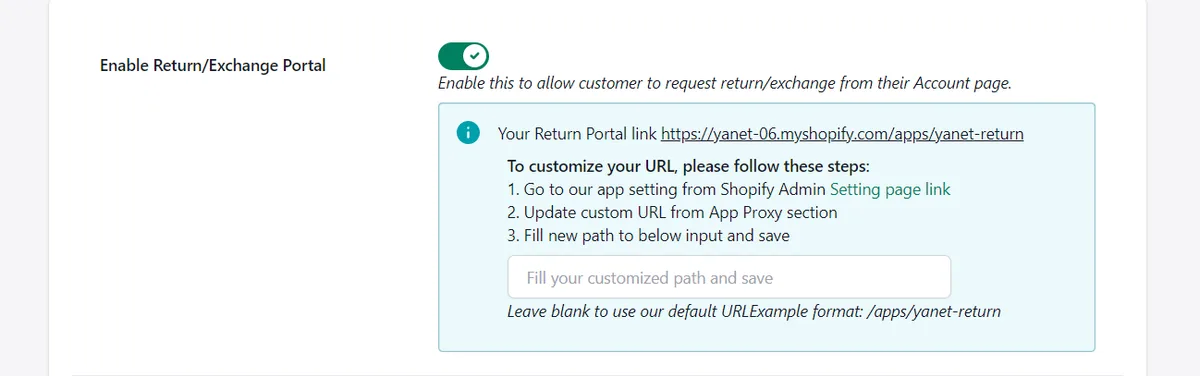
In Settings > Setup the Portal, you can enable the portal, customize its URL, upload a banner or an automatic banner slider, set the font and button color, and show your policy link. A customer-facing page like this is the core of any Shopify return portal.
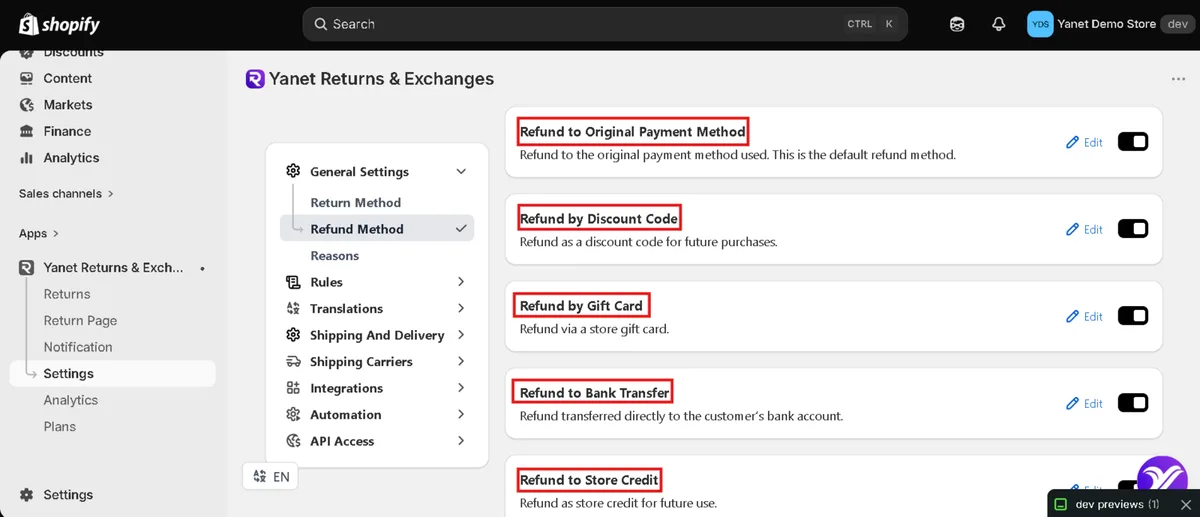
Refund methods are configured under Settings > Refund methods. One option is a refund by discount code, where you set the code prefix and the value percentage.
Exchanges follow a similar review flow. In the admin you check return items, reasons, and any restocking fee, then review the replacement items and the summary of return value, exchange value, shipping, and fees. If you plan to offer a Shopify exchange instead of a refund, this is where the price difference is handled.
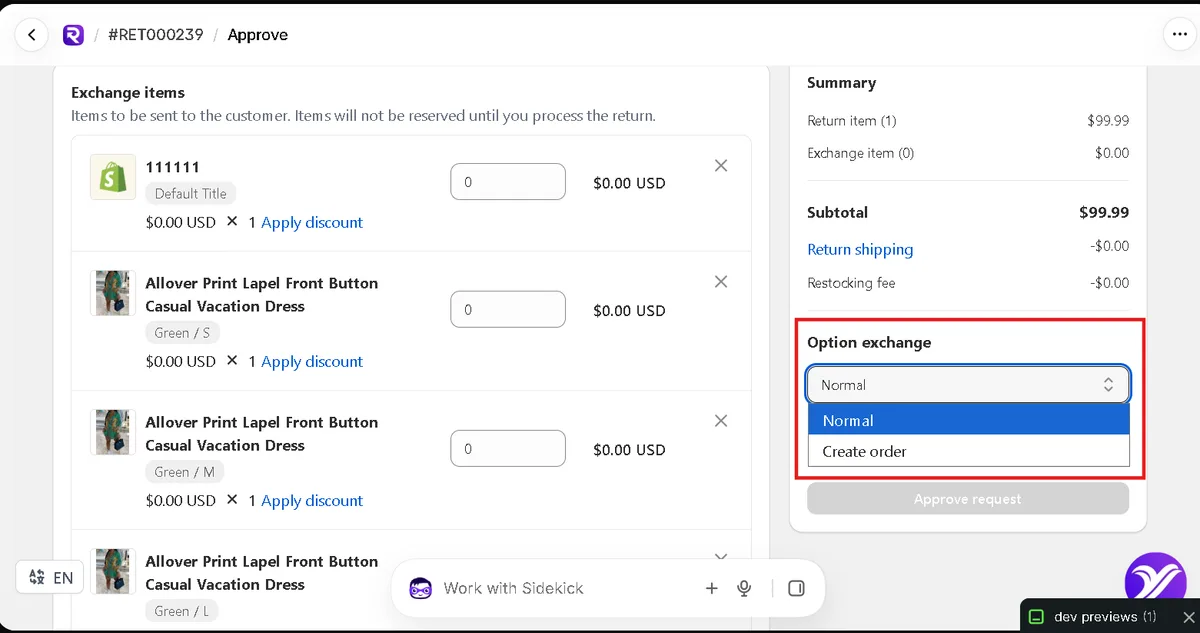
Two options are available: “Normal” adjusts the original order, while “Create order” creates a new order for the exchange items.
Who Shopify Is Really For (and Who Should Look Elsewhere)
The right answer depends less on the platform and more on what your business needs to do every day. Use the two lists below as a quick filter.
Shopify is a strong fit if…
- You sell physical or digital products.
- You want room to scale.
- You value an app ecosystem.
- You do not want to manage hosting.
Look elsewhere if…
- Your site is primarily content.
- Your budget is near zero.
- Your requirements are highly custom.
- You have no appetite for managing apps.
Turn this Shopify review into a practical check: add representative products, inspect mobile navigation, and map fulfillment and returns. Then use the Shopify free trial to test those steps before you commit to a plan.
If a step feels awkward during that test, write it down. A short list of friction points tells you which apps, plan features, or workarounds your store will really need.
Shopify Review Verdict: Is It Worth It in 2026?
Shopify is worth considering when commerce is central and convenience justifies recurring costs. It is less compelling when your needs are minimal or unusually specialized.
Use Shopify reviews to identify questions, then weigh the Shopify pros and cons against your requirements. Before you decide, ask yourself:
- Does the theme suit your catalog?
- Are suitable payments available in your location?
- Can you afford the complete setup?
- Do your essential workflows, including returns, work?
- Is ownership of daily tasks clear?
If most answers are yes, Shopify is a reasonable platform to build on. If several are no, revisit the cost and customization sections above before you commit.
Conclusion
This Shopify review finds a capable hosted platform with useful themes, selling tools, and room to grow. Its trade-offs are cumulative costs, app dependency, and customization limits, making it strongest for product-led businesses comfortable managing those commitments. Budget the full operation before choosing a plan. For the returns side, try Yanet Returns & Exchanges on the Shopify App Store to evaluate its portal and request-management workflow.
FAQ
Is Shopify worth it in 2026?
Shopify can be worth it if selling products is your main goal and you want hosted infrastructure, checkout, themes, and access to apps. The decision depends on your total operating budget and workflow requirements. A content-first website or very small hobby project may not need the same commerce-focused setup.
What are the main Shopify pros and cons?
The main advantages are hosted infrastructure, approachable storefront design, an app ecosystem, integrated selling tools, and options for growth. The main drawbacks are costs beyond the subscription, possible third-party gateway fees, app dependency, customization limits, and migration work. Their importance depends on your products, location, budget, and operational complexity.
Where can I find trustworthy reviews on Shopify?
Use recent merchant feedback alongside Shopify’s public documentation. Read third-party platform evaluations critically, and remember that Shopify App Store feedback evaluates individual apps. Look for businesses resembling yours, specific descriptions of problems, and relevant context. A single exceptional experience should prompt further investigation rather than settle the decision.
Do I need extra apps on Shopify?
Not necessarily for every task. Start by checking whether Shopify’s existing workflow meets your requirements, then add apps for identifiable gaps. Common categories include product reviews, email, shipping, and returns. Evaluate each tool’s recurring cost, permissions, setup work, and operational value before making it part of your store.