

shopify plus costs include the platform charge, a revenue-linked element at high sales volume, and the operating expenses surrounding the platform. Unlike standard plans with published tier prices, Plus requires a contract-level calculation: understand how the base and variable fees interact, then add development, apps, payments, and team costs.
What Shopify Plus Costs: The Short Answer
Shopify has publicly listed Plus as starting from roughly $2,300 USD per month on a three-year term, with a higher monthly price for shorter commitments. That is a starting point, not a complete operating budget. Your proposal, sales volume, payment setup, and implementation requirements determine the actual total.

The useful question is not simply whether you can afford Shopify Plus costs. It is whether the additional capabilities can generate enough contribution profit or remove enough operational expense to justify the difference from Advanced.
This guide is for merchants who already have an established operation and need to evaluate:
- Whether checkout or operational limitations are costing the business money.
- How multiple storefronts, wholesale, or regional expansion affect the budget.
- Whether the upgrade remains worthwhile after development and ongoing expenses.
- What evidence finance needs before approving a longer contract.
For entry-level options and a broader overview, see our Shopify pricing guide for every plan. Here, the comparison stays focused on Advanced versus Plus.
Shopify Plus Costs Breakdown: Platform Fee and Revenue-Based Fee
Separate the platform charge from the rest of your budget. Shopify Plus costs start with a contractual arrangement rather than a single price that describes every merchant’s situation.
Shopify has publicly listed a starting price of roughly $2,300 USD monthly on a three-year term. Shorter terms carry a higher monthly price. Shopify changes these terms, and quotes can be negotiated, so confirm current numbers on Shopify’s official Plus page before building a business case.
At sufficiently high monthly revenue, a variable platform fee based on a percentage of sales can exceed the base fee. Ask for that percentage and the relevant revenue calculation in your proposal. Do not assume you always pay the full base fee plus the full percentage charge: have Shopify explain precisely how the charges interact.
Request written answers to these questions:
- What sales count toward the variable fee calculation?
- How are refunds, discounts, taxes, shipping, and currencies treated?
- How does the calculation apply across storefronts?
- Are there minimums, caps, or other contractual conditions?
- What changes at renewal or if your business structure changes?
The contract term also changes the risk profile of Shopify Plus costs. A longer term can lower the monthly price, but it increases your commitment if priorities change or implementation takes longer than expected.
Compare the full committed spend, not just the monthly discount. Finance should also model a lower-sales scenario, where the expected operational benefits arrive later but the contractual obligation remains.
Shopify Plus Plan vs Advanced: Side-by-Side Comparison
Compare capabilities against specific business constraints, not a checklist of features you might eventually use. The Shopify Plus plan is easier to justify when a relevant capability has an owner, an implementation budget, and a measurable business outcome.
| Area | Advanced | Shopify Plus plan |
|---|---|---|
| Pricing model | Published tiered monthly price. | Contract-based quote with base and potentially revenue-linked pricing. |
| Checkout customization | More limited scope; verify current options. | Typically described as offering deeper checkout customization. |
| Automation | Verify current automation availability and limits. | Shopify Flow and Launchpad are typically associated with Plus; verify availability and scope. |
| Multiple storefronts | Assess separate-store costs and management. | Typically includes expansion-store options, subject to contractual conditions. |
| Wholesale and B2B | Assess available tools and any additional requirements. | Typically offers more extensive wholesale/B2B tools. |
| Support | Verify current support channels and scope. | Typically associated with dedicated merchant success support; confirm the arrangement. |
| Staff accounts | Check current account limits against team needs. | Typically offers greater staff-account capacity; confirm current limits. |
Plan boundaries change. Check Shopify’s current plan comparison and confirm important requirements in your proposal rather than relying on an older comparison table.
Do not attribute the entire value of an automation workflow to Plus without checking whether your existing plan already supports it. The same applies to staffing and wholesale requirements: identify the exact limitation before assigning an upgrade benefit.
A fair evaluation of Shopify Plus costs also distinguishes platform access from implementation. Deeper customization is not the same as a finished checkout project, and expansion-store options do not eliminate the work of operating another storefront.
Build a requirements sheet with three columns: current limitation, proposed solution, and expected financial effect. If a feature has no clear use case, leave it out of the financial justification. This keeps Shopify Plus costs tied to actual needs rather than hypothetical future complexity.
Shopify Plus Costs Beyond the Subscription
The platform invoice is only one part of Shopify Plus costs. Separate one-time implementation spending from recurring expenses so the first-year budget does not understate the upgrade’s cash requirements.
- Migration and replatforming: Budget for data preparation, redirects where relevant, testing, integrations, and launch coordination. An Advanced-to-Plus move may involve less migration work than changing platforms, but projects still need scoping.
- Developer and agency work: Include checkout and theme customization, quality assurance, maintenance, and updates. Request a delivery estimate and an ongoing support allowance.
- Apps: Many apps charge monthly or by usage. Higher order volume can increase bills even when the number of installed apps stays unchanged.
- Payment processing: Calculate charges using your actual payment mix and proposed terms, not an assumed enterprise discount.
- International and currency costs: Review conversion, settlement, and regional operating expenses against your intended setup.
- Expansion stores: Give each storefront its own budget for design, content, apps, testing, and operational ownership.
- Staff time: Include training, project management, reporting, and time spent maintaining new workflows.
- Returns and exchanges: Account for shipping, inspection, restocking, support, and the financial effect of refunds.
Audit each app’s billing unit: orders, requests, transactions, subscribers, or another measure. Our guide to subscription apps for Shopify and their pricing is relevant when recurring-revenue tools form part of your stack.
For each usage-based tool, calculate the bill at normal volume and during your busiest expected month. A low fixed subscription can become a larger expense when usage increases or when separate stores need separate subscriptions.
Keep a contingency line for uncertain project scope rather than hiding it inside optimistic estimates. Reviewing Shopify Plus costs this way also reveals whether an apparent platform problem is really an app, process, or staffing issue that could be fixed without upgrading.
How Revenue Changes Shopify Plus Costs: A Simple Break-Even Method
Revenue matters because it can affect the platform charge and the potential value of improvements. But revenue alone does not establish affordability: contribution margin determines how much additional sales activity can actually pay toward Shopify Plus costs.
- Add up your current Advanced costs. Include the subscription, apps, development retainers, relevant payment charges, and recurring manual work. Use the same reporting period throughout.
- Add the Plus quote. Build the proposed monthly budget using the quoted platform calculation at your expected sales level. Do not add it to the old subscription as though both continue indefinitely.
- Add extra development and app costs. Spread one-time implementation costs over a clearly stated evaluation period, while tracking the upfront cash requirement separately.
- Subtract evidenced savings. Use your statements and written quotes to calculate payment-rate differences. Include reduced workarounds only when work will genuinely disappear or capacity will be productively reassigned.
- Compare the difference with extra contribution profit. Test whether plausible checkout or conversion improvements cover the remaining monthly increase.
Hypothetical example: illustrative numbers, not Shopify’s rates. Suppose current comparable operating costs are $2,000 monthly. Your proposed Plus operating budget is $4,000 before an additional $500 monthly implementation allowance, and verified savings total $700 monthly.
The incremental monthly cost is $4,000 + $500 − $700 − $2,000 = $1,800. If the proposed improvements produce $2,000 in additional monthly contribution profit, the net benefit is $200. That narrow cushion deserves scrutiny rather than an automatic approval.

Validate the baseline with Shopify analytics reports and metrics, alongside payment statements and accounting records. Use consistent dates and definitions so revenue, refunds, and costs describe the same trading period.
Then rerun the calculation at lower, expected, and higher revenue. Shopify Plus costs may change as sales rise, while development spending or app charges may behave differently. Ask what happens if the project launches late, conversion stays flat, or seasonal demand falls short.
A useful decision document shows both monthly economics and cash payback. Even a project with a positive recurring benefit may take time to recover its upfront implementation spend.
Is the Shopify Plus Plan Worth It? Signs You Should Upgrade
The strongest upgrade case connects a current bottleneck to a deliverable solution. Shopify Plus costs are harder to justify when the argument depends on prestige, vague growth expectations, or capabilities nobody has time to implement.
Signs it is worth upgrading
- Checkout limitations are blocking a defined improvement. Your team has identified the constraint and confirmed that the proposed customization can address it.
- You operate across storefronts or regions. The organizational benefits outweigh the additional operating complexity.
- Wholesale requirements are substantial. You have documented the B2B workflows and confirmed they match the proposed tools.
- Automation needs are heavy. Repetitive work has measurable volume, clear rules, and a realistic implementation plan.
- Team access and support needs have expanded. Current arrangements create identifiable friction or risk.
- The sales-volume arithmetic works. Your quoted fees and expected contribution profit support the investment.
Before approval, assign an owner and delivery date to each expected benefit. Shopify Plus costs begin according to the contract, while operational benefits may not arrive until workflows and customizations are live.
Signs you should wait
Wait if sales are still unpredictable, Advanced has unused capacity, or the desired features have no near-term implementation plan. A growing store can outgrow processes without outgrowing its platform tier.
Also consider waiting if you lack developer resources or project ownership. Paying for additional scope without the capacity to use it leaves a gap between expenditure and results.
You can revisit Shopify Plus costs after fixing the highest-impact operational problems on your existing setup. Better baseline data and clearer requirements often make the eventual upgrade decision easier to defend.
Reducing Operating Costs Around Shopify Plus: Returns and Exchanges
Returns deserve a separate budget line when evaluating Shopify Plus costs. At higher order volume, shipping, refunded sales, inspection, restocking, and customer support create recurring financial pressure.
Separate these components to avoid double counting. A refunded sale reduces retained revenue; return shipping and handling are additional expenses. Exchange activity also requires operational attention, even when the customer keeps shopping with you.
Yanet Returns & Exchanges is one option for managing this workflow. Its plans provide a defined request allowance or unlimited requests, making the app subscription a line item you can model alongside other operating expenses.
All plans below are billed in USD. Select a tier using both request volume and the functions your team actually needs.
| Plan | Price and requests | Included features |
|---|---|---|
| Free | $0; 6 requests per month. | Customizable return portal page; rules and refund/exchange reasons setup; same-product/variant exchanges; refunds to discount code and store credit; multiple languages; email notifications; multiple shipping carriers. |
| Professional | $9.99/month; 80 included requests, then $0.20 per extra request. | All Free features; different-product/variant exchanges; packing slip; refund by gift code; conditional return/exchange fees and rewards; priority support; 14-day free trial. |
| Ultimate | $29.99/month; unlimited requests. | All Professional features; automation approval; dedicated priority support; 14-day free trial. |
At 180 requests monthly, Professional costs $9.99 + 100 × $0.20 = $29.99, matching Ultimate. Above roughly 180 monthly requests, Ultimate is cheaper on subscription cost. Below that level, the additional features may still affect your choice.
To plan the customer-facing process, use our Shopify return portal guide. Define request reasons and rules before launch so customers receive clearer instructions and staff can handle requests more consistently.
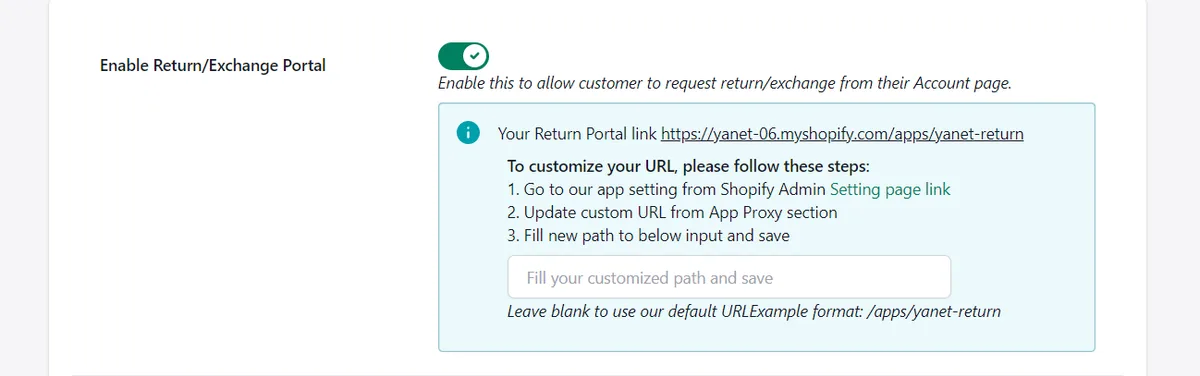
This is also where Shopify Plus costs should be separated from process quality. A platform upgrade does not, by itself, establish your return policy, inspection standards, or staff responsibilities.

Clear refund timelines can reduce avoidable support questions. Explain the relevant stages to customers using our guide to how long Shopify refunds take, rather than promising that every refund will arrive on the same schedule.
Track monthly requests, handling time, shipping expense, and resolution outcomes. These measures help you evaluate the workflow without assuming that an app subscription automatically produces savings.
For a realistic view of Shopify Plus costs, forecast returns activity alongside order growth. Review request volume before peak trading periods, and choose the Yanet tier that fits both volume and required functionality.
Conclusion
shopify plus costs combine contractual platform pricing with payment processing, implementation, apps, staffing, and ongoing operations. The starting monthly figure is only the beginning; your proposal must clarify the revenue-based calculation and commitment.
Upgrade from Advanced when specific capabilities can remove measurable constraints and the financial case survives conservative assumptions. Compare contribution profit rather than revenue alone, and give each expected benefit an implementation owner.
Keep returns in that operating budget. You can try Yanet Returns & Exchanges free with its six-request monthly Free plan, or use the 14-day free trial on Professional or Ultimate to assess the relevant workflow.
FAQ
How much does Shopify Plus cost per month?
Shopify has published a starting price of roughly $2,300 USD per month on a three-year term, with higher monthly pricing on shorter terms. At high sales volume, a revenue-based platform fee can apply under the contract’s calculation. Confirm current pricing and how the base and variable charges interact directly with Shopify.
What is the difference between Shopify Plus and the Advanced plan?
Advanced uses published tier pricing, while Plus uses contract-based pricing and is typically associated with deeper checkout customization, expansion-store options, and broader B2B capabilities. Staff access, automation, and support arrangements also require comparison. Verify current inclusions and limits against your requirements.
Is the Shopify Plus plan worth it for a growing store?
Growth alone is not enough to justify upgrading. Plus becomes more compelling when confirmed capabilities solve current constraints and the expected contribution profit or operational benefit exceeds the full incremental cost. If Advanced still meets your needs, waiting can be the better financial decision.
Does Shopify Plus charge transaction fees?
Payment processing costs and any third-party gateway fees depend on your payment setup and contractual terms. Do not assume the platform subscription includes all payment-related charges. Check the Plus proposal and Shopify’s current terms, then calculate the impact using your actual payment mix.